Sage-Partner-for-header
Maintaining data accuracy and accountability is critical in any ERP-driven business environment. In Sage X3 ERP, the Audit Trail feature plays a key role in tracking changes made to master data, helping organizations ensure transparency, compliance, and internal control. This blog explains how to configure the audit trail for the Product Master table (ITMMASTER) in Sage X3, enabling you to monitor product creation, modification, and deletion activities along with the responsible users, step by step.

How to do Audit Trail setup for Product Table in Sage X3 ERP

Audit_Trail_setup_for_Product_Table-Africa

How to do Audit Trail setup for Product Table in Sage X3 ERP

Maintaining data accuracy and accountability is critical in any ERP-driven business environment. In Sage X3 ERP, the Audit Trail feature plays a key role in tracking changes made to master data, helping organizations ensure transparency, compliance, and internal control. This blog explains how to configure the audit trail for the Product Master table (ITMMASTER) in Sage X3, enabling you to monitor product creation, modification, and deletion activities along with the responsible users, step by step.
We have setup the Audit trail for the Product master (ITMMASTER) table report that will indicate the creation, modification, and deletion according to the users.
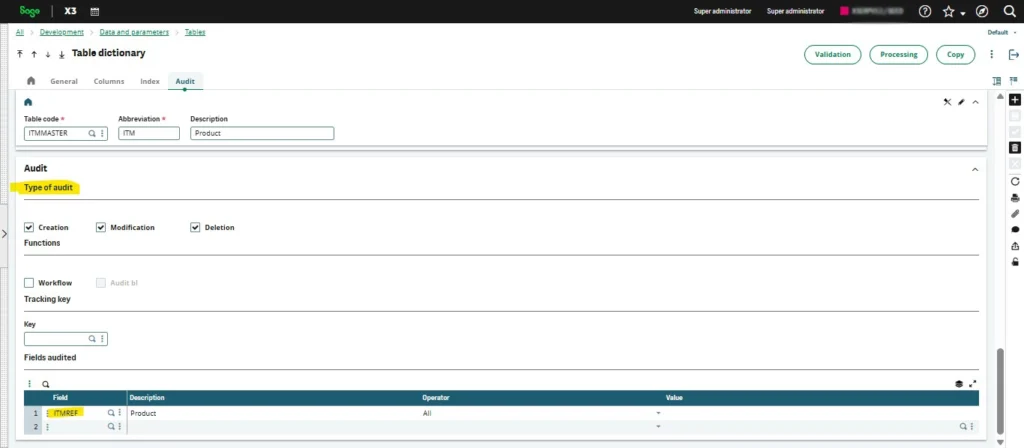
To activate audit tracking for the product table (typically ITMMASTER), navigate to

Development > Data and Parameters > Tables > Tables> ITMMASTER

Select the Type of audit you require, i.e.,
  • Creation: If we want the report of the product creation.
  • Modification: If there is any modification performed in the product.
  • Deletion: If the product is deleted from the system.
Then, after the type selection enter the field that has to be audited.
audit_trail_setup_for_product_table_image-1
Once it is completed, forced validate the ITMMASTER table.
audit_trail_setup_for_product_table_image-2
Then created and deleted the product.
audit_trail_setup_for_product_table_image-3

Go to Usage> Audit> Fields

audit_trail_setup_for_product_table_image-4

In that we can see the product creation and deletion status and also the user who have created and deleted the product.

audit_trail_setup_for_product_table_image-5

About Us

Greytrix Africa is a leading Sage business partner and ISV Partner offering Consulting, Implementation, and development services for Sage X3, Sage 300, Sage 300 People (HRMS), Sage CRM, and Sage Intacct, which covers East Africa, West Africa, SADC, and Middle East region. We offer professional services such as Implementation and Configuration, Business Process Analysis, Project Management, Integrations and Migrations, and Technical & Functional Support, along with enhancements within Sage X3, Sage 300 People (HRMS), Sage 300, Sage CRM, and Sage Intacct across various industry verticals like Process Manufacturing (Food & Beverages, Chemical), Discrete manufacturing (Automotive, Textile & Apparel), Non-Profit, Health-care Industry and Services Industry (Financial, Software & Engineering), Distribution (Transportation & Logistics), and Agriculture.


Our Partners

Get In Touch

Get In Touch

Thank you for contacting us.

Be ready to explore some leading business management solutions that will help shape the future of your business!

Our team will get in touch with you shortly.

Get In Touch

Thank you for downloading Sage X3 Brochure

The brochure is sent successfully on your registered  Email Id.

Download Free Sage X3 Brochure