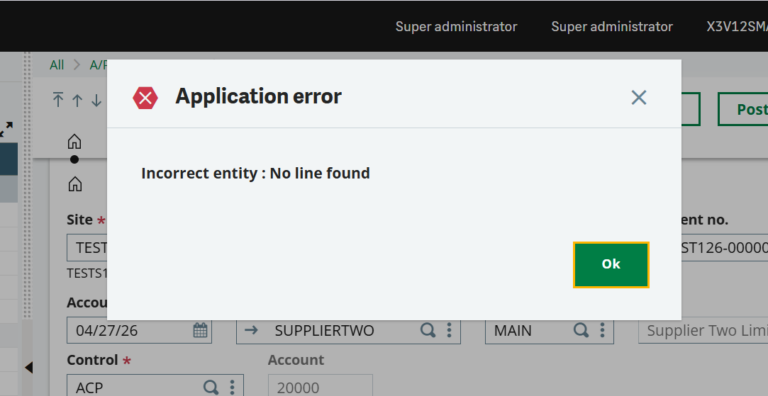
When posting a Supplier BP Invoice in Sage X3, users may sometimes encounter an error message reading ‘Incorrect Entity: No Line Found’. This Sage X3 Supplier BP Invoice error is a common Sage ERP invoice posting issue that typically occurs when the account’s analytical dimensions have not been updated for the current fiscal year.
How to Fix the ‘Incorrect Entity: No Line Found’ Error in Sage X3 ERP
Supplier BP Invoices are used in Sage X3 to record and manage vendor invoices that are not linked to a specific purchase order or receipt — for instance, to record costs like rent or utilities. The function is found in the AP/AR Accounting module.
When posting a Supplier BP Invoice, especially in a new fiscal year, users may come across the following error:
‘Incorrect Entity: No Line Found’
This article provides a step-by-step resolution to help users fix the ‘Incorrect Entity: No Line Found’ error in Sage X3 and post the invoice successfully.
Solution
To resolve this error, follow the steps below:
Step 1: Navigate to the Account in Question
Go to the account in question under Common Data > General accounting tables > General > Accounts. This will open the accounts in the respective Chart of Accounts.
Step 2: Navigate to the Account in the BP Invoice
Navigate to the account in the BP Invoice that was being posted, then go to the Analytical Section.
Step 3: Update the Analytical Dimensions
Under Dimensions, select the New Entity and Envelope created for the new fiscal year.
Step 4: Retry the BP Invoice
After that, create a new BP Invoice. It will now post successfully without the error.
About Us
Greytrix Africa is a leading Sage Platinum Partner, ISV Partner, and Sage business partner offering Consulting, Implementation, and Development services for Sage X3, Sage 300, Sage 300 People (HRMS), Sage CRM, and Sage Intacct, covering East Africa, West Africa, SADC, and the Middle East region. We offer professional services such as Implementation and Configuration, Business Process Analysis, Project Management, Integrations and Migrations, and Technical & Functional Support across various industry verticals including Process Manufacturing, Discrete Manufacturing, Non-Profit, Healthcare, Distribution, and Services Industry. For Sage ERP Support and expert assistance, our team is available to help you resolve issues and optimize your Sage environment.