Every year, many African manufacturers and distributors enter Q4 facing stock shortages, excess inventory, or delayed deliveries -not because demand was unpredictable, but because planning started too late.
How to Fix Extra Lines in the Stock Journal from Intersite Purchase Receipts in Sage X3
When performing an intersite transaction in Sage X3 using the longer method — where a Purchase Order is generated, resulting in a Sales Order from the selling site, followed by a Sales Delivery and then a Purchase Receipt to receive the goods into the purchasing site — the Accounting Interface is run to generate the stock journals.
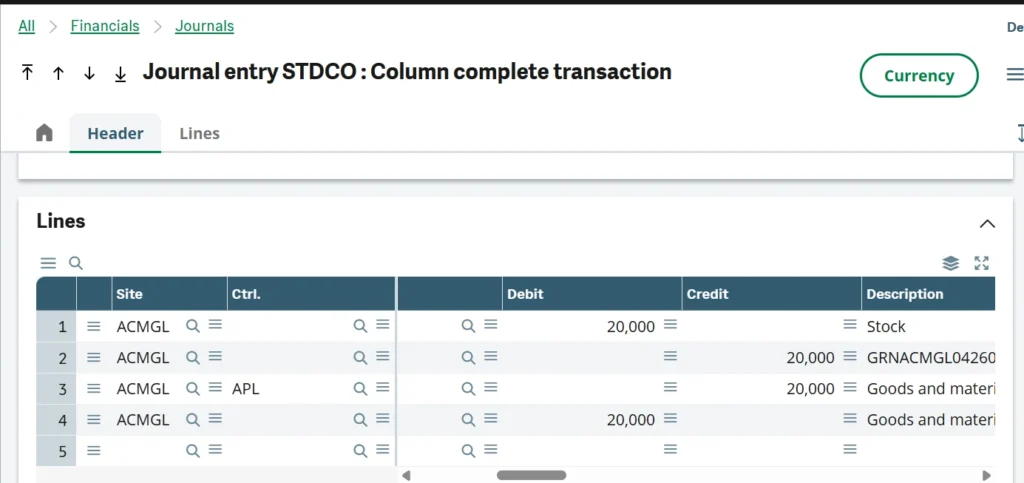
In some configurations, additional lines appear in the stock journal that results from the Purchase Receipt, as shown below.
Solution:
To remove the additional lines, follow the steps below.
Step 1: Navigate to Automatic Journals
Go to All > Setup > Financials > Accounting Interface > Automatic Journals. Select the stock journal used to post the Purchase Receipts — in this case, STKRE.
If you are unsure which Automatic Journal was used to post your Purchase Receipt, you can check directly in the journal itself, as shown below.
Step 2: Identify the Lines Causing the Additional Entries
Once you open the automatic journal navigate to the lines that are posting the additional entries. If you do not know which lines are bringing about the additional lines, you can check on the journal as highlighted below.
Then open the automatic journal (in this case STKRE) and go to the Lines at the top right as shown below.
Select the lines bringing the extra entries to your purchase receipt stock journal.
Then you untick your legislation, thus directing the system to exclude your company’s legislation when generating those lines.
The next time you do an intersite transaction – purchase receipt in particular will have only two lines
DR: Inventory/Stock Account
CR: Goods Received Not Invoiced Account (GRNI)
Conclusion
Extra lines in Sage X3 stock journals from intersite Purchase Receipts are caused by legislation-level settings within the Automatic Journal configuration. By navigating to the STKRE Automatic Journal, identifying the lines generating the additional entries, and unticking the relevant legislation, the journal output is corrected to reflect only the two expected accounting entries. This is a configuration-level resolution that requires no changes to core Sage X3 tables and is safe to apply without affecting other transactions.
About Us
Greytrix Africa is a leading Sage business partner and ISV Partner offering Consulting, Implementation, and Development services for Sage X3, Sage 300, Sage 300 People (HRMS), Sage CRM, and Sage Intacct, covering East Africa, West Africa, SADC, and the Middle East region. We provide professional services including Implementation and Configuration, Business Process Analysis, Project Management, Integrations and Migrations, and Technical and Functional Support across industries such as Manufacturing, Distribution, Healthcare, Non-Profit, and Services.
For more information on Sage X3 solutions, contact us