
If you’ve ever filled out a task, scheduled a meeting, or logged an activity in Creatio, you know the default date picker experience can feel a bit rigid. Selecting a date is straightforward enough, but picking a precise time slot often requires manual typing or clicking through awkward radial controls.
The good news? This feature exists natively in Creatio 8.x and later. You don’t need custom code or complex UI schemas to unlock it, just a single feature flag. Here is how to enable it system-wide in under two minutes.
The Default View: Standard Date & Time Picker
Before toggling the feature, let’s look at how standard “Time” and “Date/Time” fields behave across Creatio object layouts. If you open a New Task window and click on the Due or Start field, Creatio displays the classic calendar pop-up. While functional, selecting an exact minute or time slot isn’t as fast as it could be.
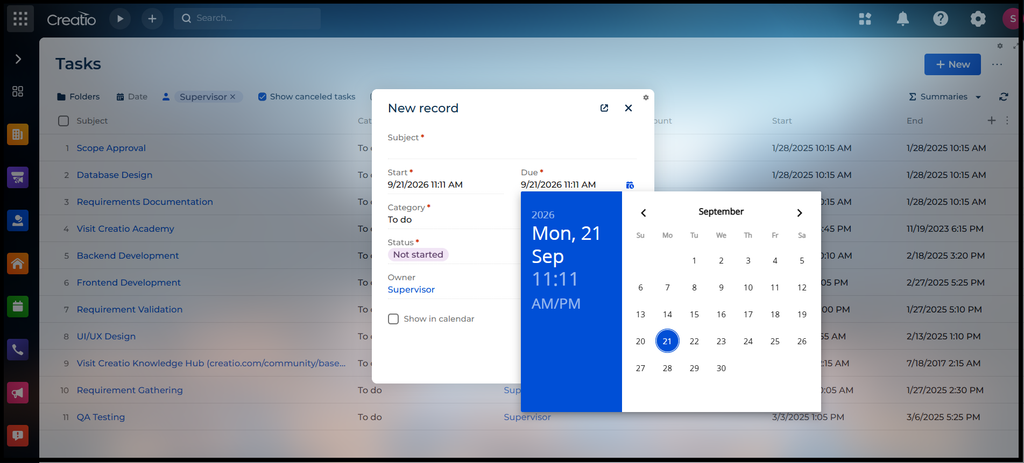
Look, manually typing timestamps works, but giving users a structured drop-down list cuts down on entry errors and speeds up daily logging.
Step 1: Enable the Feature Flag
To get started, you’ll need an administrator account.
- Open a new tab in your browser and append /0/flags or /0/Shell/#Section/AppFeature_ListPage to your Creatio base URL.
- In the search bar on the Feature Management page, search for the code: EnableDateTimeCalendarListPickerView.
- If it doesn’t show up in the list (which is usually the case on default instances), click the New button at the top right.
- Set the Code to EnableDateTimeCalendarListPickerView.
- Check the Is enabled checkbox.
- Click Save in the top right. Creatio will automatically populate the Source as DbFeatureProvider.
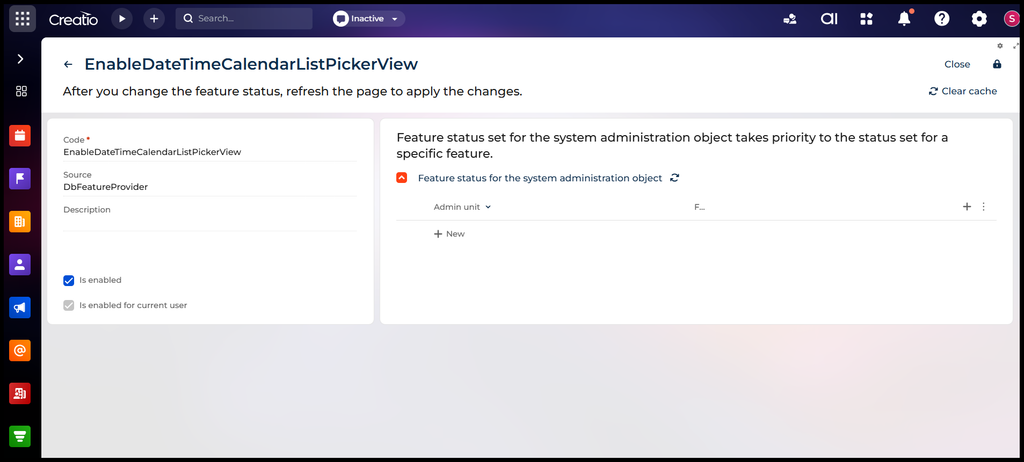
Step 2: Apply the Changes
Once you’ve saved the feature flag, perform a quick refresh (F5 or Ctrl + R) or log out and log back into your Creatio instance to clear the system cache.
Step 3: Review Date-Time field on Tasks section
Now, head back to your Tasks section or any page containing a Date/Time field and open the picker. As you can see, Creatio now appends a dedicated time list right next to the calendar grid. Users can scroll through clean 15-minute intervals and pick exact times with a single click.
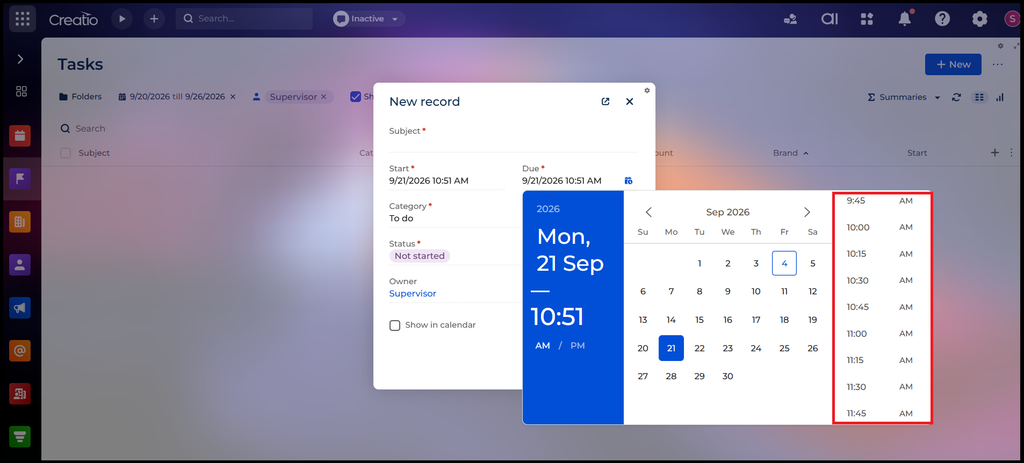
While we used the New Task screen as our example, enabling this single feature flag turns on the list-based picker globally across all objects and layouts in Creatio. Whether your team is scheduling Opportunities, setting up Service Calls, or updating custom date fields, they’ll instantly get the cleaner, faster list-picker experience. It’s one of the easiest quality-of-life upgrades you can give your end users!
About Us
Greytrix is a globally recognized consulting and development partner with 25+ years of expertise in delivering industry-relevant CRM and ERP solutions tailored to business needs. Over the years, we have built strong proficiency in providing end-to-end services, including consultation, implementation, migration, integration, and custom development for Sage ERP, Salesforce, and Sage CRM. With our native cloud integration framework, GUMU™, we power seamless real-time connectivity between leading ERPs and CRMs, helping organizations unlock efficiency and scale. Our solutions have supported businesses across industries, enabling them to modernize legacy systems and keep pace with fast-changing digital demands.
Expanding our capabilities, Greytrix is also a trusted Creatio CRM Consulting and Implementation Partner. Creatio is a leading AI-native, no-code CRM platform that enables businesses to streamline workflows, enhance customer experiences, and accelerate digital transformation. Leveraging our industry experience and in-house innovation, including GUMU™ Copilot AI, we help organizations adopt Creatio CRM with confidence. We ensure the platform supports automation, compliance, and scalability, while tailoring it to unique business needs to deliver measurable results.
Our commitment goes beyond technology; we believe in being a long-term partner. From designing CRM roadmaps to delivering analytics and automation, we help businesses simplify operations, drive growth, and achieve tangible outcomes.
For more information on our Creatio CRM services and solutions, contact us at creatio@greytrix.com. We will be glad to assist you.