
In Creatio, the Feed component is one of the quickest ways for teams to collaborate right on a record layout. By default, the Feed panel is readily available across most standard and custom objects. However, users often get automatically subscribed to record updates without realizing it.
In Creatio, you get auto subscribed to a feed whenever you:
- Create a new record (e.g., creating a new Account or Case).
- Post a message or comment directly in the record’s feed.
- Get assigned as the owner/assignee on the record.
- Manually click “Follow feed” in the action panel.
While getting automatic updates on key records is great, feeds can quickly get noisy especially if you’re assigned to dozens of accounts or commented on a record months ago. If your users need an easy way to opt out of clutter, here is how to configure a dynamic Follow/Unfollow Feed button right inside the Freedom UI page designer.
Step 1: Open the Page Designer
- To add or configure the feed action button, open the section page where your feed panel is located (for this example, we’ll use the Accounts form page).
- Open an Account record and click the Gear icon in the top right corner, then select Edit page.
- Locate the Feed tab or panel component on your canvas.
Step 2: Add a Button to the Feed Component Header
- Inside the page designer, you can add buttons directly to panel headers or tab layouts.
- Select the header space next to the Feed title.
- Drag and drop a Button component into the header area.
- Select the new button to open the Properties panel on the right sidebar.
Step 3: Configure the Action Properties
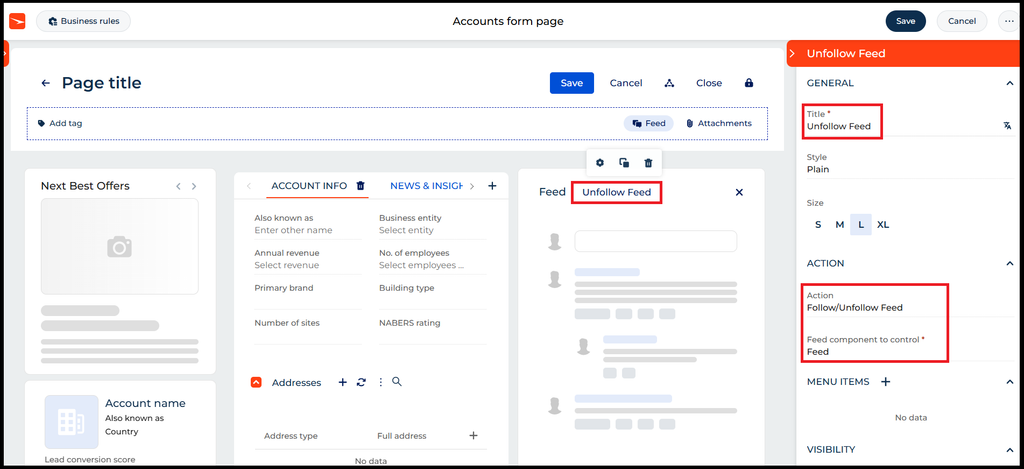
In the button’s setup panel, configure the following settings:
- Title: Set the button label to Unfollow Feed or Follow/Unfollow Feed.
- Action: Select Follow/Unfollow Feed from the drop-down menu.
- Feed component to control: Select Feed (or the specific name of your layout’s feed panel).
- Save and publish your page changes.
Step 4: Apply the Changes Once you’ve saved and published page changes, perform a quick refresh (F5 or Ctrl + R) or log out and log back into your Creatio instance to clear the system cache. Once done, Follow Feed button will be visible into Feed section of Account page. See below.
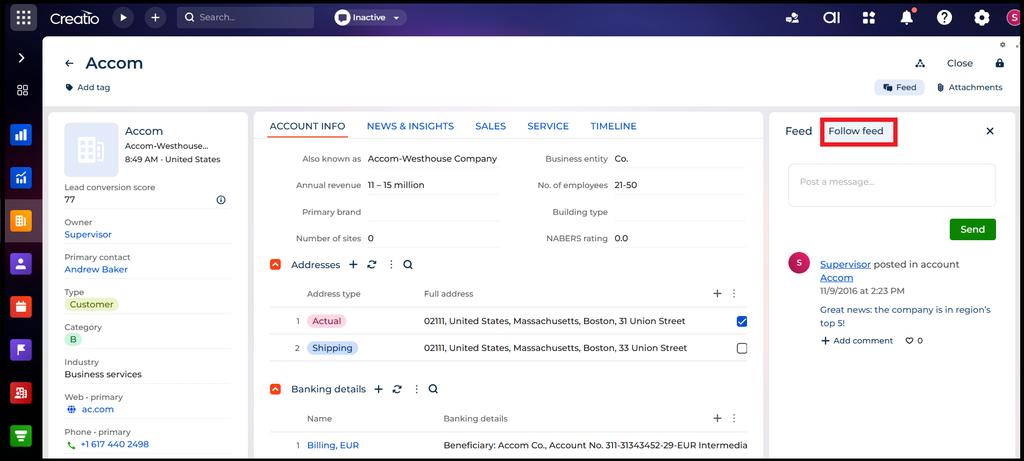
Creatio’s built-in Follow/Unfollow Feed action automatically detects the current user’s subscription state. If you are already following the account, the button dynamically displays Unfollow feed. If you aren’t following it, it automatically flips to Follow feed.
How It Works for End Users
Once published, the button updates automatically based on the user’s current relationship with that record.
- Following Updates
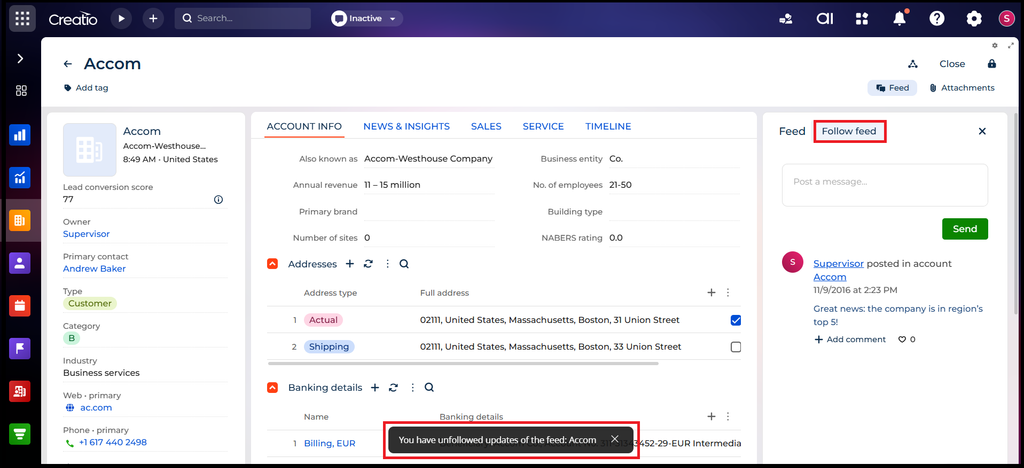
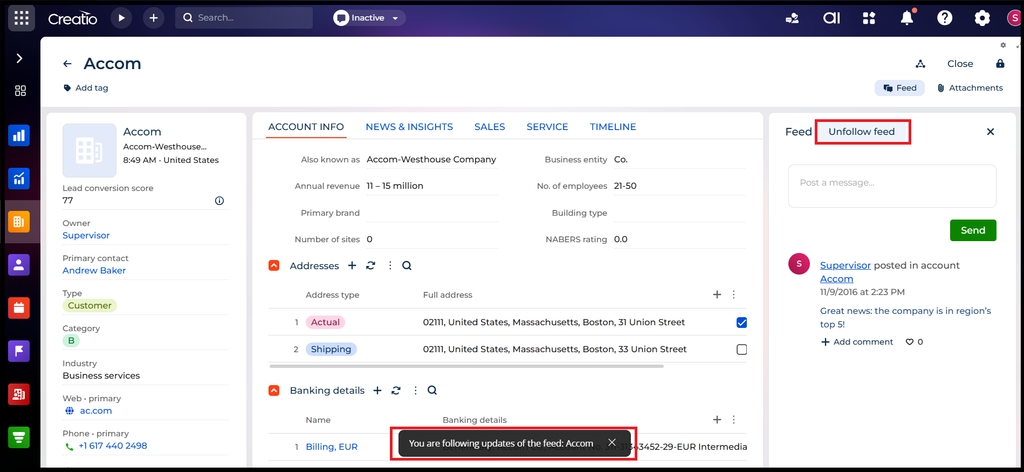
If a user is subscribed to the record (because they created it, posted a comment, or manually followed it), the button displays Unfollow feed. When clicked, a confirmation toast notification pops up: “You have unfollowed updates of the feed“. - Unfollowed State
Once unfollowed, the button label instantly toggles to Follow feed. Clicking it again resubscribes the user, displaying: “You are following updates of the feed“.
Whether you are configuring Accounts, Cases, Leads, Contacts, or a custom entity, these exact steps apply across all Freedom UI object layouts in Creatio. Adding a quick toggle button gives your team full control over their notification chatter, keeping their feeds clean and focused only on the records that matter most right now.
About Us
Greytrix is a globally recognized consulting and development partner with 25+ years of expertise in delivering industry-relevant CRM and ERP solutions tailored to business needs. Over the years, we have built strong proficiency in providing end-to-end services, including consultation, implementation, migration, integration, and custom development for Sage ERP, Salesforce, and Sage CRM. With our native cloud integration framework, GUMU™, we power seamless real-time connectivity between leading ERPs and CRMs, helping organizations unlock efficiency and scale. Our solutions have supported businesses across industries, enabling them to modernize legacy systems and keep pace with fast-changing digital demands.
Expanding our capabilities, Greytrix is also a trusted Creatio CRM Consulting and Implementation Partner. Creatio is a leading AI-native, no-code CRM platform that enables businesses to streamline workflows, enhance customer experiences, and accelerate digital transformation. Leveraging our industry experience and in-house innovation, including GUMU™ Copilot AI, we help organizations adopt Creatio CRM with confidence. We ensure the platform supports automation, compliance, and scalability, while tailoring it to unique business needs to deliver measurable results.
Our commitment goes beyond technology; we believe in being a long-term partner. From designing CRM roadmaps to delivering analytics and automation, we help businesses simplify operations, drive growth, and achieve tangible outcomes.
For more information on our Creatio CRM services and solutions, contact us at creatio@greytrix.com. We will be glad to assist you.