
Effective communication is a cornerstone of any successful business process. Maintaining strong and consistent communication with customers enables organizations to better understand their clients’ needs and expectations, leading to more timely and accurate fulfillment of those needs.
Creatio supports this objective by offering a variety of flexible communication channels, including live chat, phone calls, and email, allowing businesses to engage with their customers seamlessly.
Creatio can be deployed either as a cloud-based (online) solution or installed on-premises (desktop version). It’s important to note that email configuration differs between the two deployment models. In the on-premises version, users must manually install and configure the Exchange Listener service on the server, as this service is not included by default. In contrast, the cloud version of Creatio comes with the Exchange Listener service pre-installed. Below are the steps to install Exchangelistener service:
- Install Redis On system:
Considering this is the mandatory step to install Creatio on premises, Redis must be installed on server. If not install Redis first. - Install Docker on the server using below link:
Docker for windows - Once the docker is installed on server, first you need to pull image for ExchangeListener service into your docker. To do this run below command in PowerShell:
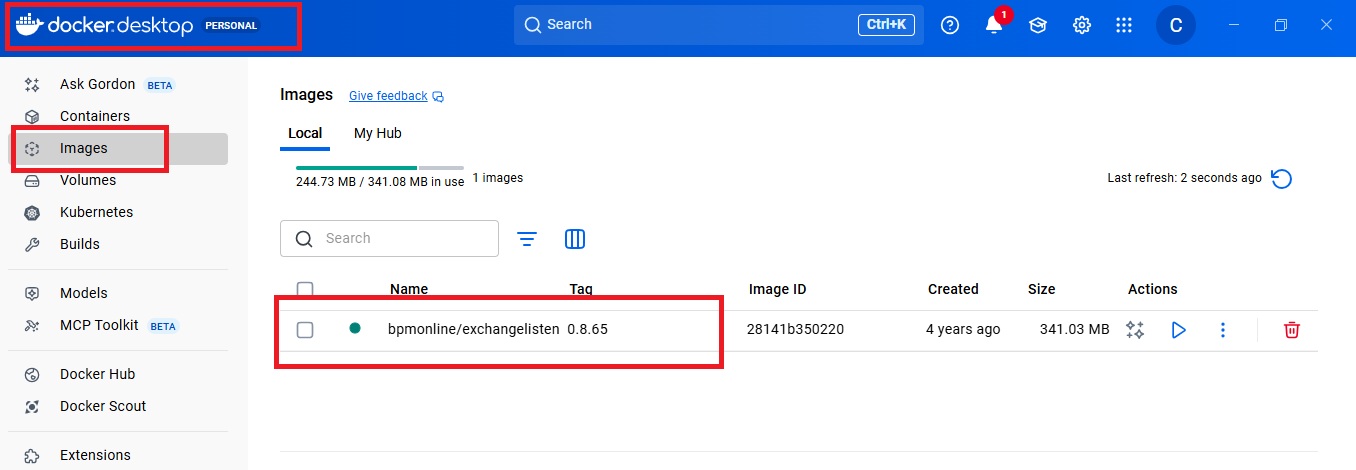
docker pull bpmonline/exchangelistener:0.8.65 - Once command is ran successfully in PowerShell, check Docker desktop’s image tab to verify whether image is created properly or not. Refer below:
- Now, next step is to add container for exchange listener, for this run below command in Powershell:
docker run -d -p 8080:80 –restart unless-stopped –env ExchangeListenerRedisHost=host.docker.internal:6379 –env ExchangeListenerRedisDatabase=0 –env PodName=ExchangeListener –name ExchangeListener bpmonline/exchangelistener:0.8.65 - Once this command is ran successfully in powershell, you can see “ExchangeListener” container in Docker desktop. Refer below:
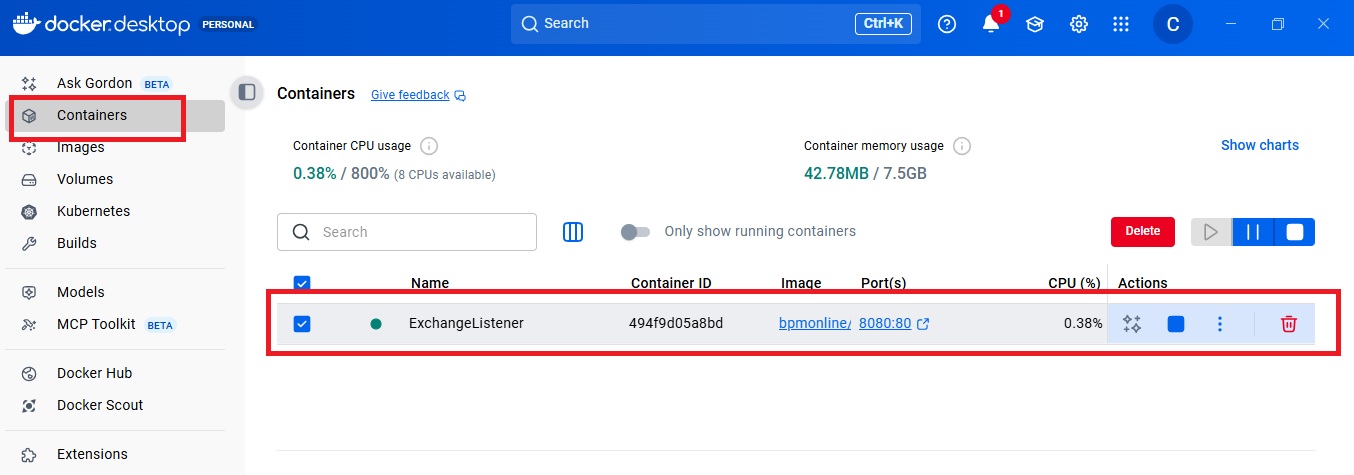
- To verify whether the ExchangeListener service is insatlled correctly in Dcoker, click on arrow shown in above image in Port(s) column. You should get below screen:
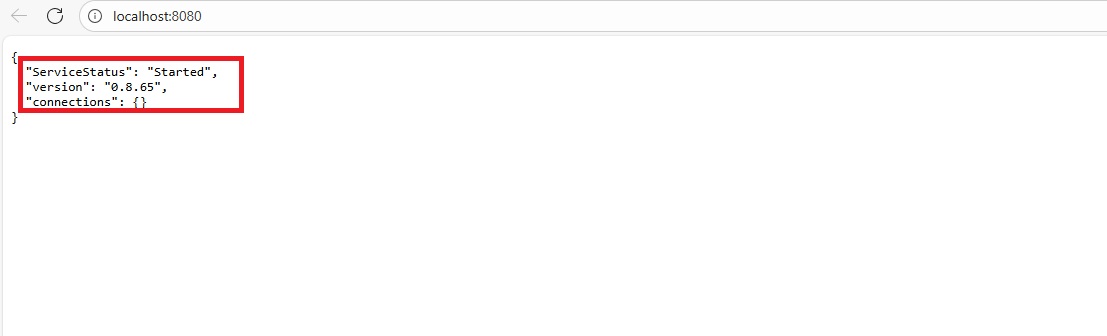
If you get this screen it means Exchangelistener is successfully added into Docker. Now, you need to update two settings in Creatio.
- Go to System Designer.
- Click on “System Settings”.
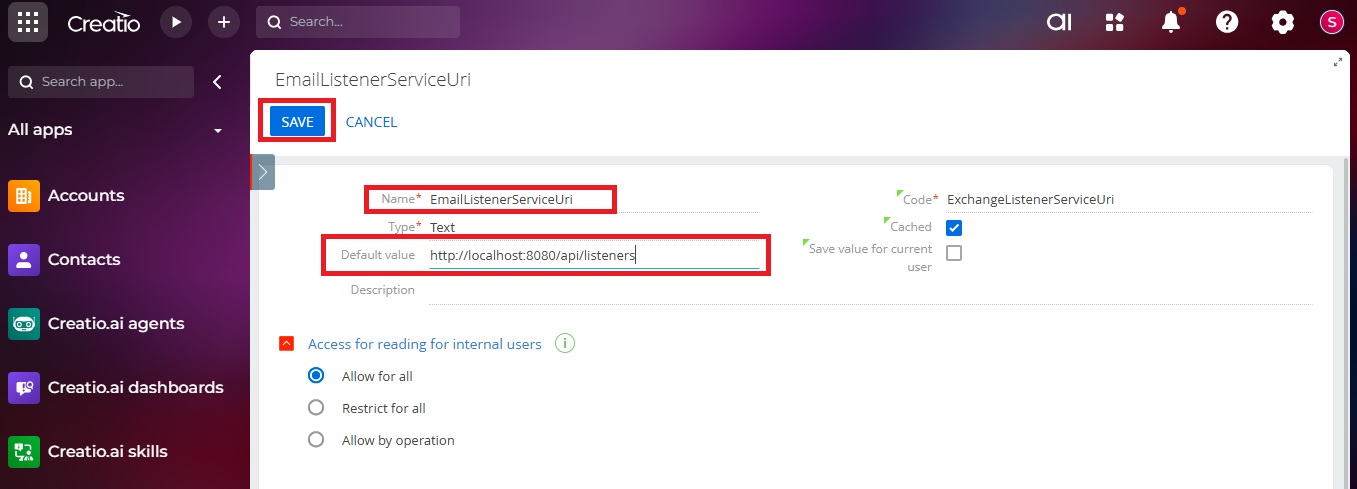
- Search for setting by name “EmailListenerServiceUri”.
- Set “<<Creatio Installation address>>/api/listeners” this value and click on save. Refer to the following:
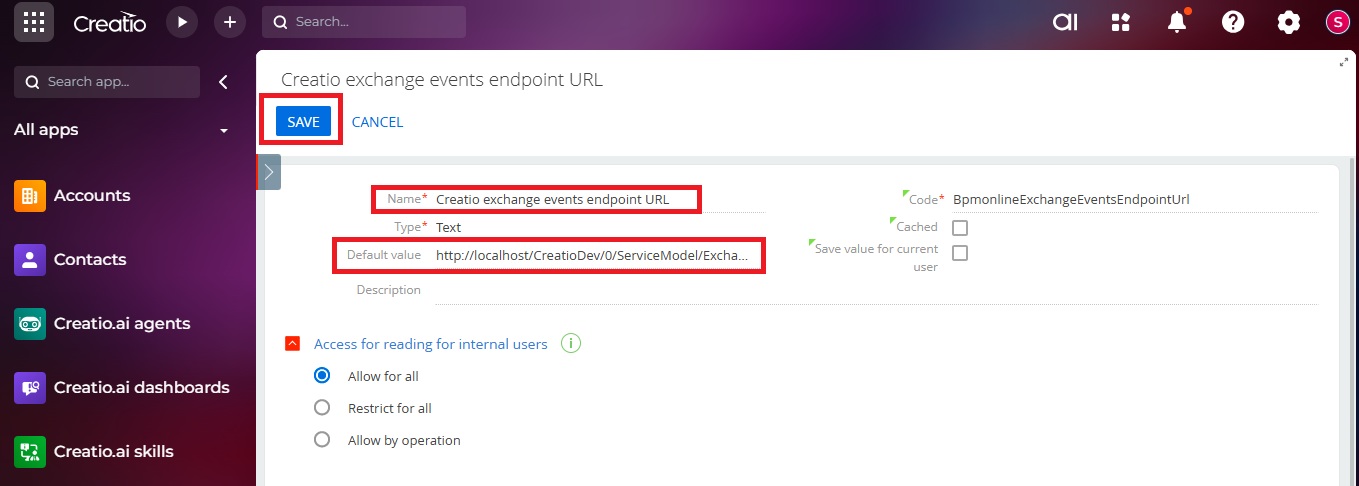
- Now, search for setting by name “Creatio exchange events endpoint URL”.
- Set “<<Creatio Installation address>>/<<Creatio Installation name>>/0/ServiceModel/ExchangeListenerService.svc/ProcessFullEmail” this default value and click on save. Refer to the following:
Once these settings are updated, please follow our blog How to Set Up Incoming & Outgoing Email in Creatio Online for further configuration information.
Conclusion:
Setting up the Exchange Listener service is a crucial step for enabling seamless email integration in the on-premises version of Creatio. By properly installing and configuring this service, businesses can ensure reliable communication through email just as in the cloud version.
About Us
Greytrix is a globally recognized consulting and development partner with 25+ years of expertise in delivering industry-relevant CRM and ERP solutions tailored to business needs. Over the years, we have built strong proficiency in providing end-to-end services, including consultation, implementation, migration, integration, and custom development for Sage ERP, Salesforce, and Sage CRM. With our native cloud integration framework, GUMU™, we power seamless real-time connectivity between leading ERPs and CRMs, helping organizations unlock efficiency and scale. Our solutions have supported businesses across industries, enabling them to modernize legacy systems and keep pace with fast-changing digital demands.
Expanding our capabilities, Greytrix is also a trusted Creatio CRM Consulting and Implementation Partner. Creatio is a leading AI-native, no-code CRM platform that enables businesses to streamline workflows, enhance customer experiences, and accelerate digital transformation. Leveraging our industry experience and in-house innovation, including GUMU™ Copilot AI, we help organizations adopt Creatio CRM with confidence. We ensure the platform supports automation, compliance, and scalability, while tailoring it to unique business needs to deliver measurable results.
Our commitment goes beyond technology; we believe in being a long-term partner. From designing CRM roadmaps to delivering analytics and automation, we help businesses simplify operations, drive growth, and achieve tangible outcomes.
For more information on our Creatio CRM services and solutions, contact us at creatio@greytrix.com. We will be glad to assist you.