
Think about how we receive an email immediately after ordering a product online or signing up for a new subscription. We don’t have to request it, and no one manually sends it, it just happens automatically. These emails confirm our action, share important details, and keep us informed at the right time.This is where email automation in Creatio plays important role. By configuring emails to be sent automatically based on specific events or conditions, teams can ensure consistent communication without relying on manual effort.
Creatio provides flexible and powerful options to automate email sending triggered when a record is created, updated, approved, or moved to a particular stage. These automated emails can use dynamic data from the system, ensuring that every message is personalized, accurate, and sent at the right moment.
In this blog, we’ll explore how to send emails automatically in Creatio, common business scenarios where this feature is useful, and best practices to make your email automation reliable and effective. Let’s consider a simple example. You want an email to send out automatically when a new assignment is added against a job to assigned engineer.
Below are the steps to configure manual email sending using a business process.
- Go to the application hub from system designer.
- Open your application and click on Business processes section from left menu.
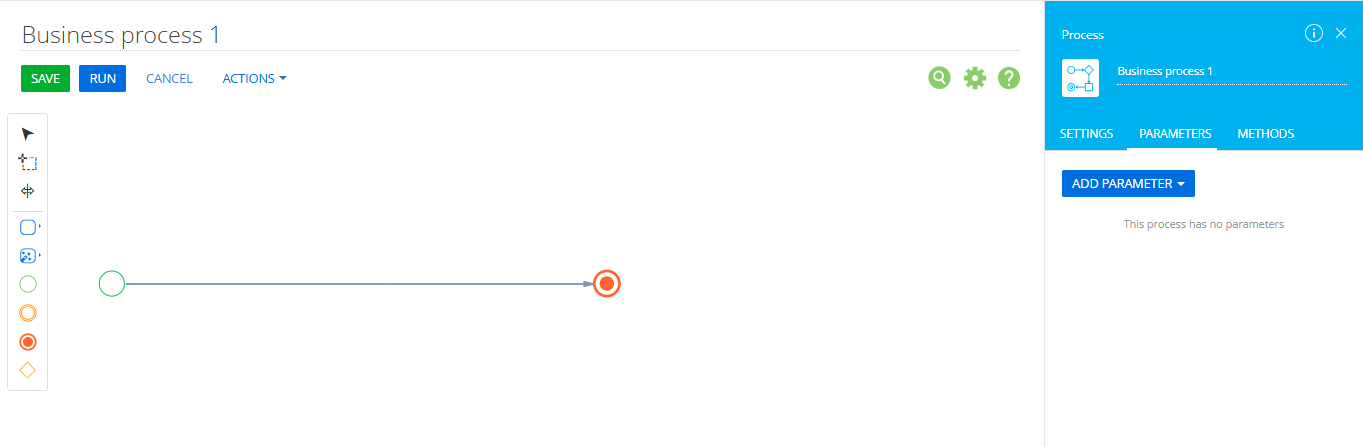
- Click on New process button and you will be presented with business process designer page. Refer below:
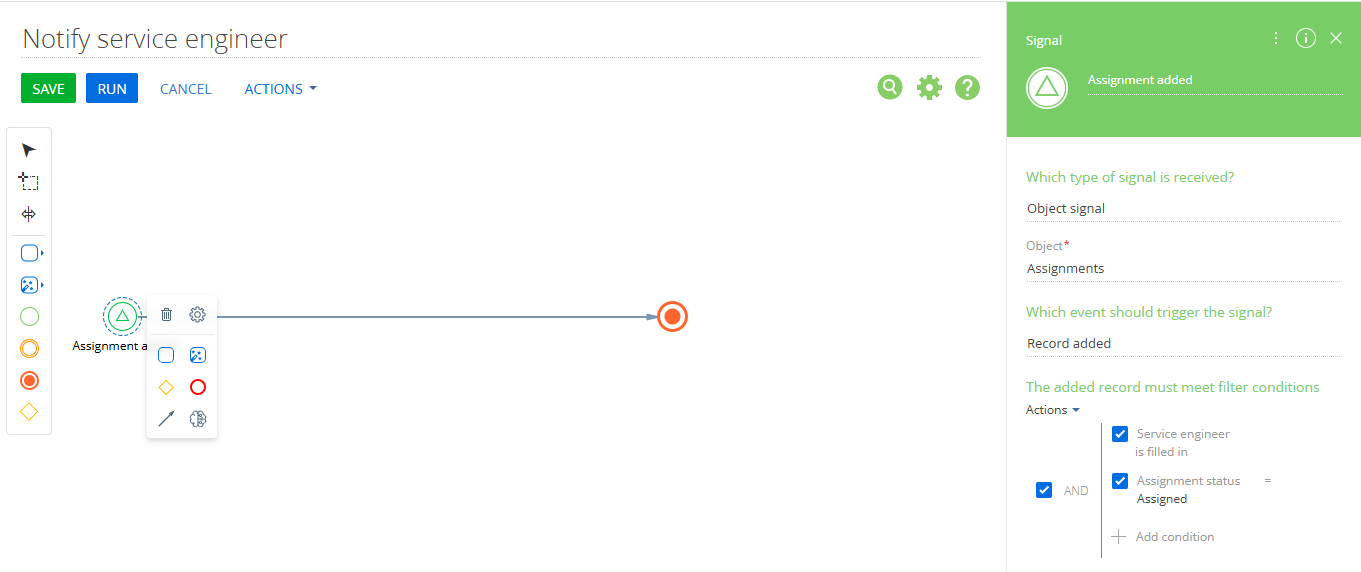
- Give a meaningful name to your process and as we are sending mails on event that is when new assignment is created and assigned to service engineer, change the starting point to signal instead of simple. To do the same click on the circle, you will get the small panel with different icons, click on gear icon and select signal(Circle with triangle icon)from that panel. Set up the element as shown on right hand side.
- The filter conditions are added as per scenario, you can set the filter criteria as per your requirement or just keep it blank so that business process will trigger every time when record is added, updated or deleted. Refer below:
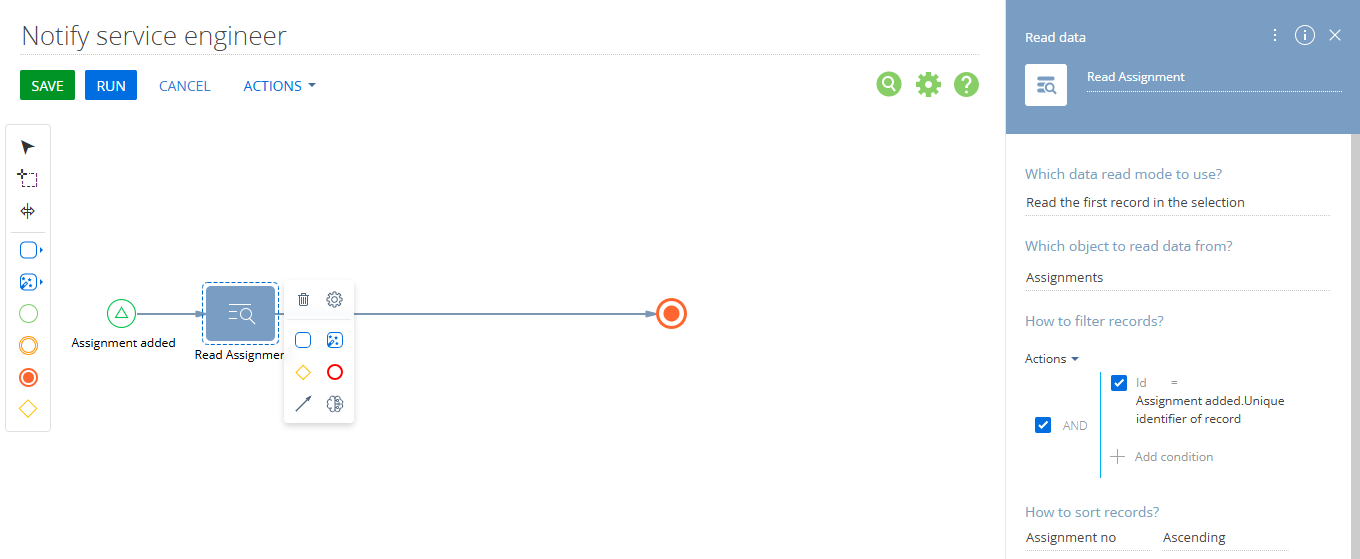
- Add an Read data element to read data from your record as shown below:
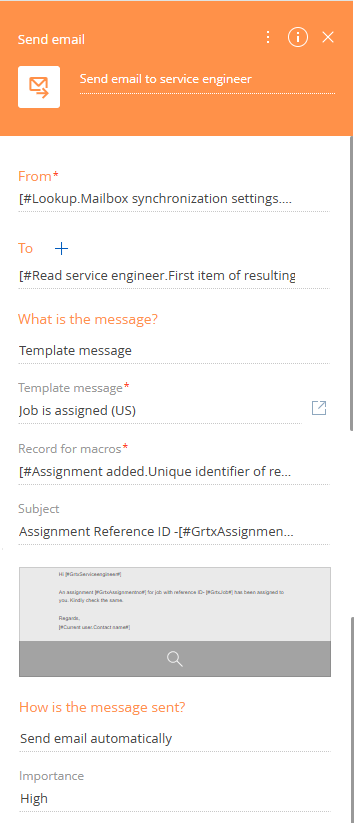
- Now add Send email element to business process and set up the same as follows:
From: Select the email account from which the email should be sent (for example, a configured Creatio email account). If you want to configured the email account in creatio, you can refer to below links:
Online creatio: https://www.greytrix.com/blogs/creatio/2025/10/09/how-to-set-up-incoming-outgoing-email-in-creatio-online/
Desktop creatio: https://www.greytrix.com/blogs/creatio/2025/12/02/email-setup-in-creatio-for-windows-on-premise-environments/
To: Choose the recipient of the email. In this example, we are sending email to service engineer so selected that.
Message content: Choose whether to use a preconfigured email template or a custom message. If you want to send out preconfigured template select message template from dropdown.
Template Message: If you select the message template option in Message content this field is available to define the template name. Select the preconfigured template here. If you need help with configuring custom template for creatio, refer below:
https://www.greytrix.com/blogs/creatio/2026/01/15/how-to-configure-and-manage-email-templates-in-creatio/
Subject: Once the template is selected the subject and email body from template is auto populated in this field. You can keep the same or edit and enter a suitable subject line.
How is the message sent?: Select Send email automatically. This is the key setting, it will be responsible to trigger the email sending automatically.
Importance: Set the importance from low, medium or high.
- Click on Save and once the saving is done close the process designer.
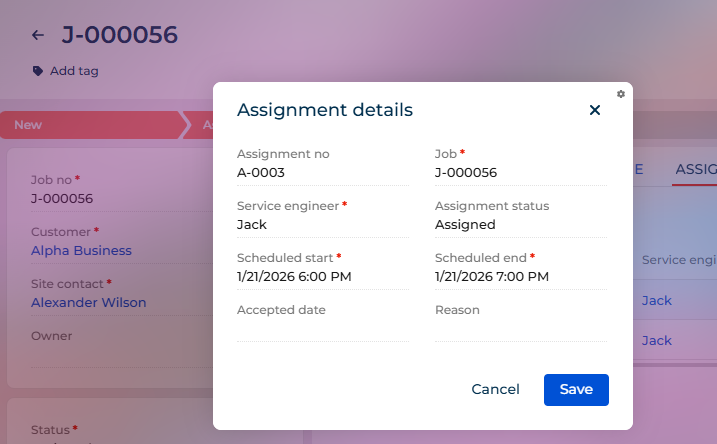
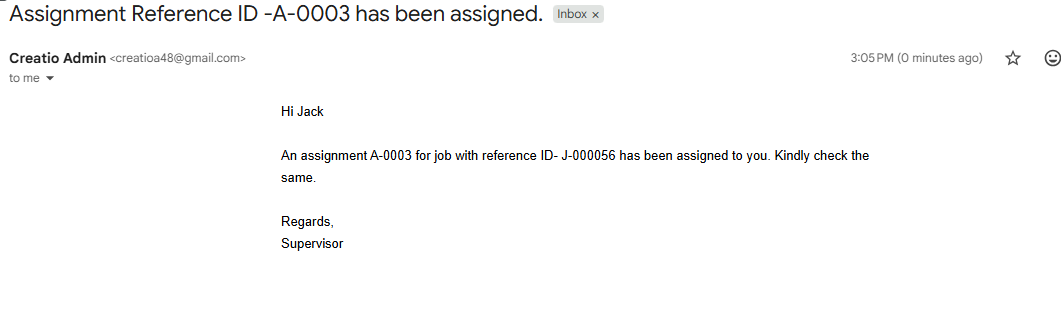
Now, whenever a user creates a new assignment and asassigns it to service engineer and clicks Save, an email will automatically go out to assigned service engineer. To demonstrate. I have created an assignment (A-0002) against a job number(J-000056) and assigned this assignment to Jack. Refer below:
With the configurations covered in this blog, you can set up automated email notifications in Creatio according to your requirements.
About Us
Greytrix is a globally recognized consulting and development partner with 25+ years of expertise in delivering industry-relevant CRM and ERP solutions tailored to business needs. Over the years, we have built strong proficiency in providing end-to-end services, including consultation, implementation, migration, integration, and custom development for Sage ERP, Salesforce, and Sage CRM. With our native cloud integration framework, GUMU™, we power seamless real-time connectivity between leading ERPs and CRMs, helping organizations unlock efficiency and scale. Our solutions have supported businesses across industries, enabling them to modernize legacy systems and keep pace with fast-changing digital demands.
Expanding our capabilities, Greytrix is also a trusted Creatio CRM Consulting and Implementation Partner. Creatio is a leading AI-native, no-code CRM platform that enables businesses to streamline workflows, enhance customer experiences, and accelerate digital transformation. Leveraging our industry experience and in-house innovation, including GUMU™ Copilot AI, we help organizations adopt Creatio CRM with confidence. We ensure the platform supports automation, compliance, and scalability, while tailoring it to unique business needs to deliver measurable results.
Our commitment goes beyond technology; we believe in being a long-term partner. From designing CRM roadmaps to delivering analytics and automation, we help businesses simplify operations, drive growth, and achieve tangible outcomes.
For more information on our Creatio CRM services and solutions, contact us at creatio@greytrix.com. We will be glad to assist you.