
Shopify and Sage X3 Integration using GUMU™ provide a safe, encrypted way to transfer data between your eCommerce site and your ERP application. There is no manual data entry required with this (or any other) method of integration, and both programs remain completely up to date, providing benefits and efficiency gains, such as real-time inventory status on your eCommerce site.
For the Advantages and benefits of this integration, refer to our previous blog.
Boost Efficiency with Seamless Shopify–Sage X3 Integration Powered by GUMU™
This blog post will provide a high-level overview of the data transfer process and how the two applications interact during this process.
Why Integrate Shopify with Sage X3?
An integrated system benefits businesses in the following ways:
- Automates order management
- Ensures accurate inventory levels
- Synchronizes customer information
- Reduces manual entry and errors
- Improves business efficiency
Rather than dealing with two different systems, data is automatically transferred, allowing businesses to focus on expansion.
Important Points of Integration
The following data points are supported for synchronization by GUMU™:
- Customers & Contacts – Two-way synchronization
- Products – Sage X3 to Shopify
- Sales Orders – Shopify to Sage X3
- Order Fulfillment – Sage X3 to Shopify
This ensures that both systems are always in sync.
Instead of managing two separate systems, data flows automatically — allowing teams to focus on growth.
Setting Up the Integration
GUMU™ offers an easy to use configuration interface that allows users to link their Shopify accounts to their Sage X3 software with minimal technical requirements. Users who are members of the BPORTALY can register for the GUMU™ Portal and configure their own setup. Once the users complete their configuration, GUMU™ will automatically connect both systems and synchronise them in real time using secure API’s.
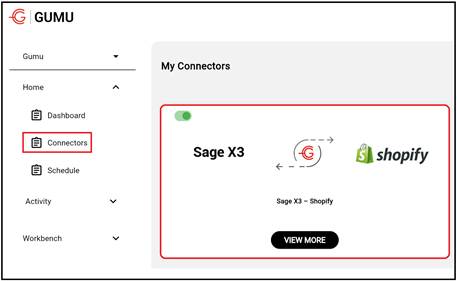
Configuration Overview
To connect Sage X3, users need to provide the following details in the integration settings:
Users need to configure:
- Web Service URL
- Pool Name
- User ID & Password
- Language
- Sales Site
- Storage Site
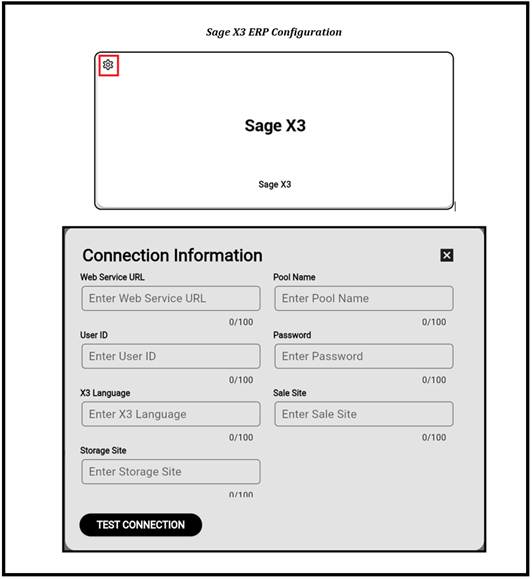
These details allow secure API communication and proper transaction creation.
Shopify Setup
For Shopify, the following details must be entered:
- Web Service URL
- Store Name
- API Version
- Access Token (generated via Shopify Admin Custom App)
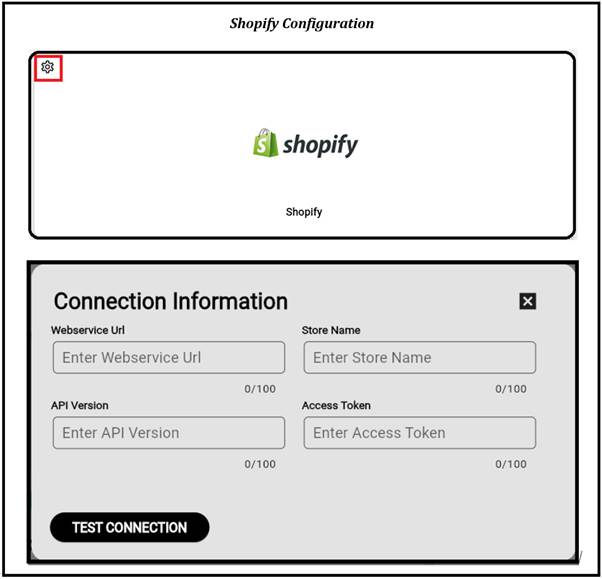
Once both systems are authenticated, the integration is ready.
How Data is Transferred Between two Computer Systems
Once both systems have been verified as being authentic, data will begin to flow back and forth between Shopify and Sage X3.
Let’s look at a typical example of how an order placed on Shopify would be integrated into the Sage X3 application using GUMU™.
- Customer places an order in Shopify.
- Open the GUMU™ Portal, Set the Last Sync Date, and Click Start.
- All orders created after the selected date will be sent to Sage X3.
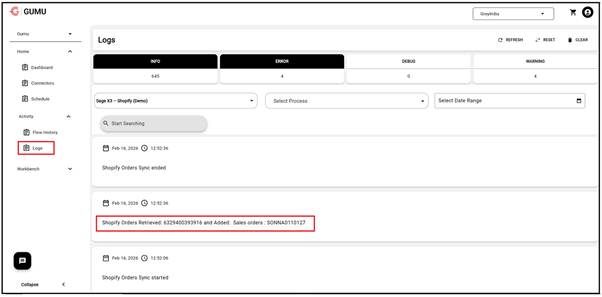
- Use the monitoring logs to check that the synchronization was successful.
- Your sales order is now available within Sage X3 to be processed by your sales team.
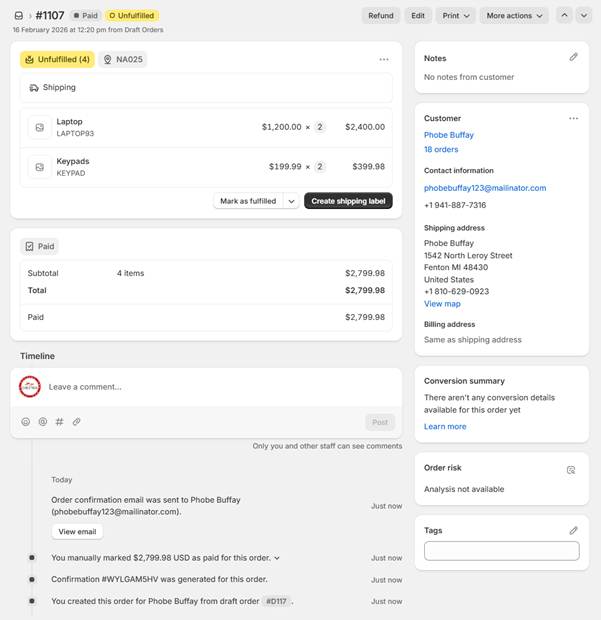
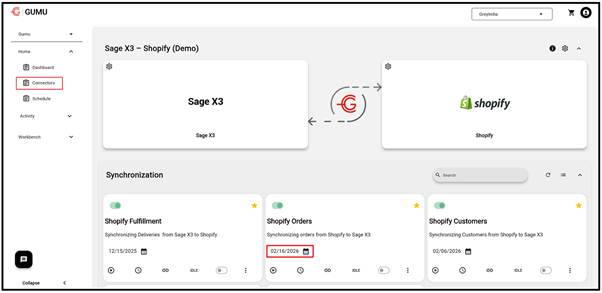
This entire process may either be executed manually or set up to run automatically at regular intervals.
Conclusion
With GUMU™ your Shopify and Sage X3 integrations are simple, safe, and expandable. The automatic synchronization of Customers, Products, Orders, and Fulfillment creates enhanced visibility and efficiency whilst doing so with minimal extra work.