
It’s Monday morning, and a customer has just placed a large order through your online store. Without a Sage 100 ERP integration, someone on your team exports the order, re-keys the details, and then corrects a price that came through wrong.
Now picture the same order with the right Sage 100 integration solutions connecting your online store to your ERP. The moment the customer clicks “place order”, it appears in Sage 100 with the correct customer, items, and price. Your warehouse can start picking, and your team spends the morning serving customers instead of fixing data.
But getting there isn’t as simple as it sounds. This blog covers the most common Sage 100 integration challenges, why they happen, and how you can overcome them, so every order from your online store or CRM reaches Sage 100 on its own, accurate and ready to process.
Why Sage 100 Integration Gets More Complex for Growing Businesses
As your business grows, the workarounds that once kept things running start to slow you down. More orders, customers, and sales channels mean more data moving between your systems, and handling it by hand, one of the most common Sage 100 automation challenges- limits how fast you can grow.
A Sage 100 ERP integration with your online store and CRM removes that limit. Orders, inventory, and customer details move on their own, so you can take on more volume without adding people just to keep your systems in step.
Every business runs Sage 100 in its own way, with its own pricing rules, custom fields and tax setup. A good integration has to work with your business setup, keeping orders, stock levels, prices, and customer records accurate across all your systems, every day, and through every upgrade.
8 Most Common Sage 100 Integration Challenges
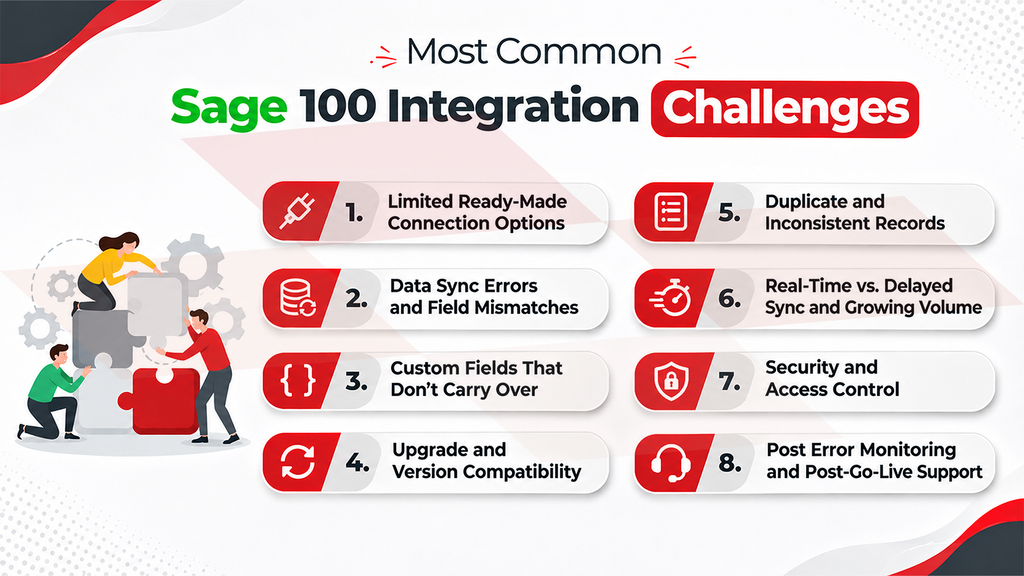
Connecting Sage 100 to your online store and CRM saves time and effort, but it also comes with Sage 100 integration issues that are easy to underestimate. Most of them come down to how data is matched, moved, and maintained between systems. Knowing them before you start helps you plan an integration that holds up as your business grows.
1. Limited Ready-Made Connection Options
Sage 100 doesn’t offer one standard way to connect with other applications, so each Sage 100 API integration is built around the options available. Even a simple flow, like sending an order from your store into Sage 100, can become a development project that depends on people who know Sage 100 well. Shortcuts that skip Sage 100’s own checks can lead to errors in invoicing and reports.
2. Data Sync Errors and Field Mismatches
Your store and Sage 100 describe the same information differently, from product codes to shipping methods. When fields aren’t matched correctly, records fail to sync and orders wait for manual fixes. These are among the most frequent Sage 100 integration problems, delaying fulfillment and adding corrections your team shouldn’t have to make.
3. Custom Fields That Don’t Carry Over
Most Sage 100 setups include custom fields built around how your team works. If the integration doesn’t account for them, that information never reaches the other system. A field added after go-live can also break a sync that was working, leaving teams without data they rely on.
4. Upgrade and Version Compatibility
Sage 100 is updated regularly, so your Sage 100 integration solutions have to keep pace. The 2026 release, for example, is 64-bit only, so connectors built for older setups need to be checked first. A connection that isn’t updated can stop working after an upgrade, interrupting orders and customer updates until it’s fixed.
5. Duplicate and Inconsistent Records
When your store, CRM, and Sage 100 each create their own version of a customer or item, duplicates appear. This splits order history, makes reports harder to trust, and leaves your customer service team unsure which record is correct.
6. Real-Time vs. Delayed Sync and Growing Volume
If stock levels reach your store only once a night, you can sell items that are no longer available. As your orders, products, and users grow, an integration that once ran smoothly can also slow down, creating backlogs on busy days.
7. Security and Access Control
Sage 100 holds your financial and customer data, so every Sage 100 ERP integration needs controlled access. Too little access causes updates to fail, while too much exposes data the integration doesn’t need. Hosted and on-premises setups also need secure network access that is kept up to date.
8. Poor Error Monitoring and Post-Go-Live Support
Integrations rarely fail loudly. An order stops syncing, and nobody notices until a customer calls about it. Without sync logs, alerts, and someone who owns the integration, small changes build up and the connection slowly drifts out of step.
How to Overcome Sage 100 Integration Challenges
Most of these challenges share one cause: the integration was built without a full picture of how your business works. The best way to avoid them is to plan the integration around your own setup, and to choose from the available Sage 100 integration solutions one that can adapt to it. Not every approach handles custom fields, pricing rules, and growing order volume equally well, so it’s worth checking this before you commit.
A reliable integration starts with a clear plan for your data. Map every field that moves between your store, CRM, and Sage 100, including custom fields. Decide which system is the main source for each type of record, and clean up duplicates before go-live, so the first data load doesn’t create Sage 100 data migration issues. Sync what changes quickly, like orders and stock levels, in real time, and schedule the rest.
Testing is what makes that plan hold. Run sample orders and higher volumes on a copy of your system before launch, so Sage 100 integration issues show up there and not in live orders. Do the same before every Sage 100 upgrade, so you know your connectors work with the new version before live orders depend on it.
After go-live, keep the integration secure and visible. Give it its own Sage 100 user with only the access it needs, and set up sync logs and alerts so Sage 100 integration problems are flagged right away. Assign someone to own the integration, and review it whenever Sage 100, your store, or your custom fields change.
Together, these steps make your Sage 100 ERP integration a dependable part of your operations, with fewer manual fixes, accurate records, and a connection that grows with your business.
Choosing the Right Sage 100 Integration Partner
Every step above, from mapping data to testing upgrades, goes more smoothly with hands-on experience. A partner who has worked with Sage 100 before knows which Sage 100 integration challenges to plan for and builds the answers in from the start. When evaluating partners, look for proven Sage 100 expertise, Sage 100 integration solutions that can be tailored to your setup, strong data security, and support that continues after launch.
This is where Greytrix can help. A Sage partner with over 25 years of experience, Greytrix delivers Sage 100 ERP integration with Salesforce, Dynamics 365 CRM, Sage CRM, and Shopify through its GUMU integrations, tailored to how your business runs.
Conclusion
A well-built Sage 100 ERP integration gives your business accurate orders, inventory, and customer data in every system, without anyone moving it by hand. Your team spends less time on corrections and more on customers, and you can add products, channels, and orders as you grow.
Talk to our experts to see how Sage 100 integration can work for your business.
FAQs
Sage 100 doesn’t have a native, fully featured REST API of the kind modern cloud ERPs offer, so a Sage 100 API integration is built on the Business Object Interface (BOI), ODBC, and Visual Integrator. ODBC is read-only, so it suits reporting but can’t create or update orders and customers. Two-way integrations typically write data through BOI, often with a middleware layer that gives your store or CRM a standard connection to work with.
Yes, when your Sage 100 integration solutions support live data updates. New orders and stock changes can move between Sage 100 and your store or CRM as they happen, while less urgent data can run on a schedule. Confirm which data flows can be real time before you choose a solution.
A ready-made connector can cover common flows such as orders, customers, and items. Custom fields, special pricing, and tax rules usually need tailoring on top. The most practical choice is a connector that can be customized to your setup, like Greytrix’s GUMU™, so you don’t start from scratch or settle for a partial fit, a common source of Sage 100 integration problems.
Yes. Sage 100 can run on Sage Partner Cloud or with a third-party hosting provider, and a Sage 100 ERP integration works in most hosted setups. Because outside systems connect through your hosting arrangement, involve your host early and test the integration before you switch over.
It depends on the integration solution. Before you commit, confirm that it supports your Sage 100 version and edition (Standard, Advanced, or Premium), and ask whether it will support the release you plan to move to. Checking this early helps you avoid Sage 100 integration issues after an upgrade.
The cost depends on how many systems you connect, how much customization your setup needs, your data volume, and the level of ongoing support. Because every Sage 100 environment is different, pricing is best based on your requirements. Reach out to our experts for a tailored quote.