
Creatio CRM is packed with smart, AI-driven tools that help teams work faster and make better decisions. The Creatio.ai panel is one of those features it puts AI right at your fingertips. But let’s be honest: not every company is ready to roll out AI to everyone at once. Some organizations may want to keep things simple for now, whether it’s because of compliance rules, licensing limits, performance concerns, or just a phased rollout plan. The good news is that Creatio makes it easy to hide the AI panel without complicated coding or technical tweaks.
Understanding the “Can run Creatio.ai” Permission
Creatio controls access to AI functionality through an operation permission called “Can run Creatio.ai” with the system code CanRunCreatioAI. This permission determines whether a user is allowed to execute and interact with Creatio’s AI features. When this permission is enabled for a user, the Creatio AI panel becomes visible and accessible within the application interface. By managing this permission, administrators can centrally control who can see and use the AI panel—without custom development or configuration changes.
Steps to Hide the Creatio AI Panel
To hide the Creatio AI panel for all users, follow these steps:
1. Log in to Creatio with an administrator account.
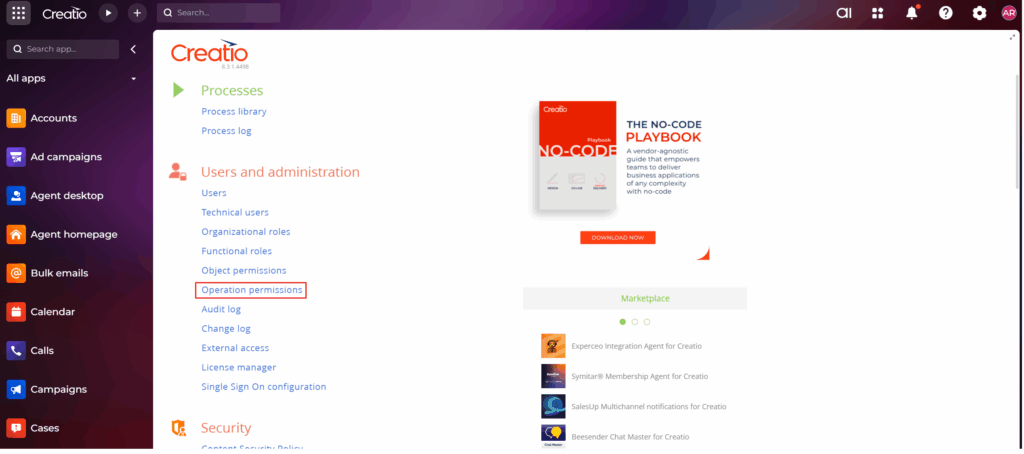
2. Go to System Designer → Users and administration.
3. Open Operation permissions.
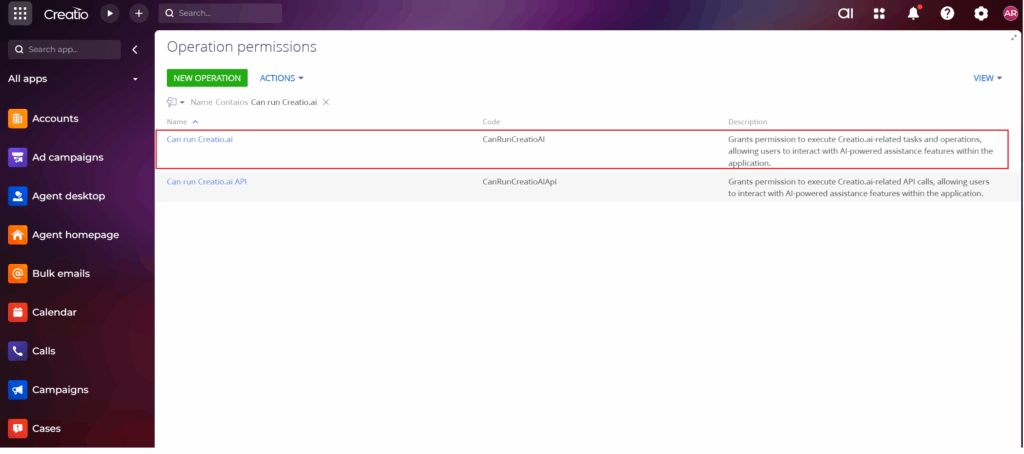
4. Locate the permission named “Can run Creatio.ai” (Code: CanRunCreatioAI).
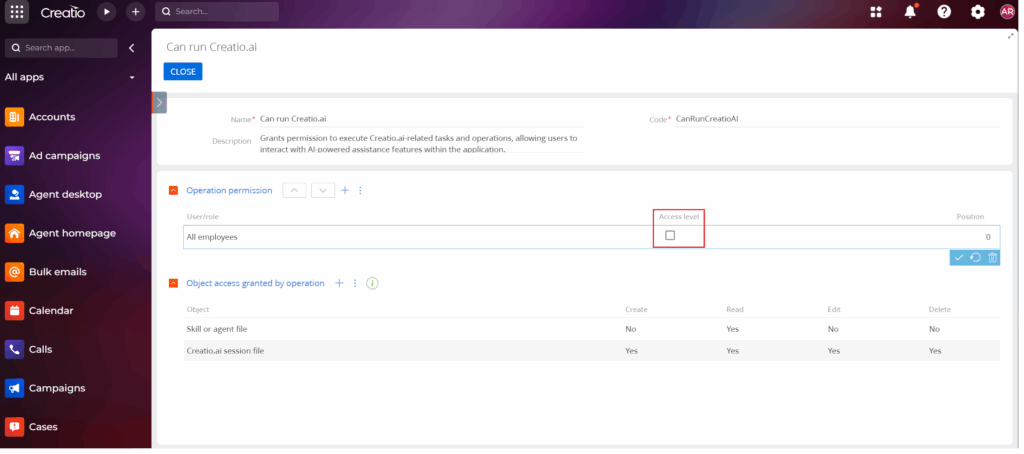
5. Open it and remove all employees, roles, or groups assigned to it (uncheck the “Access Level” box or simply delete the row).
6. Save your changes.
Once this permission is removed, users will no longer be authorized to run Creatio AI features.
Important: User Re-Login Required
For the change to take effect, users need to log out and log back in. After re-authentication, Creatio will refresh permissions, and the AI panel will vanish from their interface. This ensures a clean, consistent experience no confusing leftover buttons or features that users can’t actually use.
Benefits of This Approach
- No coding required: It uses Creatio’s built-in security settings.
- Centralized control: Admins can manage access for everyone or specific roles.
- Easy to reverse: Want to bring AI back later? Just reassign the permission.
- Compliance-friendly – Helps meet regulatory or internal governance requirements.
Final Thoughts Hiding the Creatio AI panel is straightforward and practical. By managing the CanRunCreatioAI permission, administrators can keep the system clean, secure, and aligned with business needs. It’s a flexible approach that lets organizations decide when and how to introduce AI—without disrupting stability or the user experience.
About Us
Greytrix is a globally recognized consulting and development partner with 25+ years of expertise in delivering industry-relevant CRM and ERP solutions tailored to business needs. Over the years, we have built strong proficiency in providing end-to-end services, including consultation, implementation, migration, integration, and custom development for Sage ERP, Salesforce, and Sage CRM. With our native cloud integration framework, GUMU™, we power seamless real-time connectivity between leading ERPs and CRMs, helping organizations unlock efficiency and scale. Our solutions have supported businesses across industries, enabling them to modernize legacy systems and keep pace with fast-changing digital demands.
Expanding our capabilities, Greytrix is also a trusted Creatio CRM Consulting and Implementation Partner. Creatio is a leading AI-native, no-code CRM platform that enables businesses to streamline workflows, enhance customer experiences, and accelerate digital transformation. Leveraging our industry experience and in-house innovation, including GUMU™ Copilot AI, we help organizations adopt Creatio CRM with confidence. We ensure the platform supports automation, compliance, and scalability, while tailoring it to unique business needs to deliver measurable results.
Our commitment goes beyond technology; we believe in being a long-term partner. From designing CRM roadmaps to delivering analytics and automation, we help businesses simplify operations, drive growth, and achieve tangible outcomes.
For more information on our Creatio CRM services and solutions, contact us at creatio@greytrix.com. We will be glad to assist you.