
Creatio is a powerful no-code/low-code CRM platform that enables organizations to automate sales, marketing, and service processes efficiently. One of its most used features by business teams is the Excel Data Import functionality, which allows users to upload bulk records (such as Contacts, Accounts, or Leads) directly into the system without technical assistance. While the import process is simple and user-friendly, certain related data, like Tags cannot be mapped directly when importing Contacts. This creates a common business challenge.
Real-Life Business Scenario
A client needed to import contacts collected old data. Each batch of Contacts had to be tagged appropriately, for example:
- My customers
- Pay attention
- VIP customer
- Ask for recommendation
However, during Excel import into the Contact object, there is no direct field available to assign Tags. Since the import is managed by business users (not administrators), the solution had to be simple, automated, and require minimal configuration.
The Challenge
In Creatio, Tags are stored in a related object (many-to-many relationship). The standard Excel import allows mapping fields that belong directly to the Contact object, but it does not easily allow mapping to the Tag relationship.
So, how do we enable business users to assign tags during import without complex setup?
The Solution: Helper Field + Business Process:
The recommended approach is to:
- Create a custom text field on Contact called “Import Tags”
- Add a similar column in the Excel file
- Use a Business Process to read that field and automatically create/assign Tags
This approach keeps the process clean and user-friendly.
Step 1: Create “Import Tags” Field on Contact
Create a new field in the Contact object:
- Field Name: Import Tags
- Code: UsrImportTags
- Data Type: Text (250 characters)
After publishing the object, this field becomes available for Excel mapping.
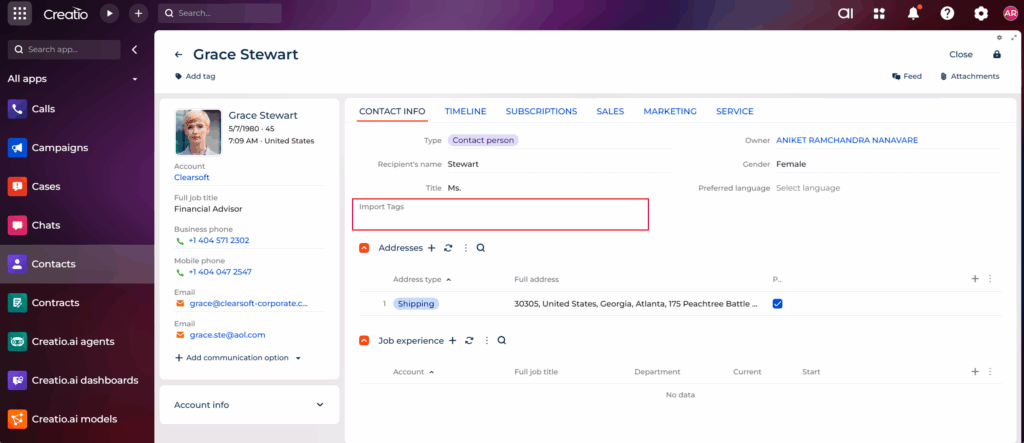
Step 2: Update Excel File
Add a column in Excel named Import Tags:
During import, map this column to the newly created Import Tags field. Now, business users can type the desired tag name in Excel.
Step 3: Create Business Process to Assign Tags
Next, create a Business Process with the following logic:
- Trigger: When Contact is added or modified
- Condition: Import Tags field is not empty
Process Flow:
- Read the value from “Import Tags”
- Create the relationship between Contact and Tag
- Set contact tag
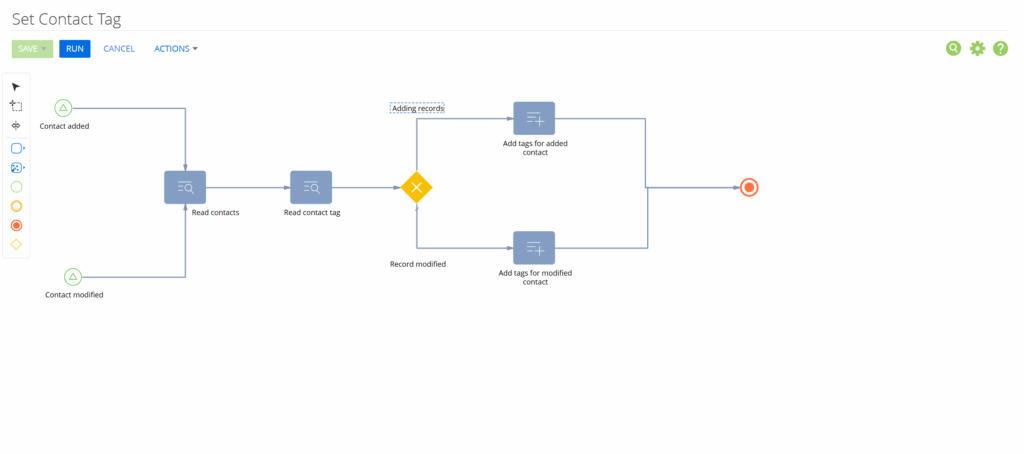
This ensures that once the Contact is imported, the Tag is automatically linked without any manual effort.
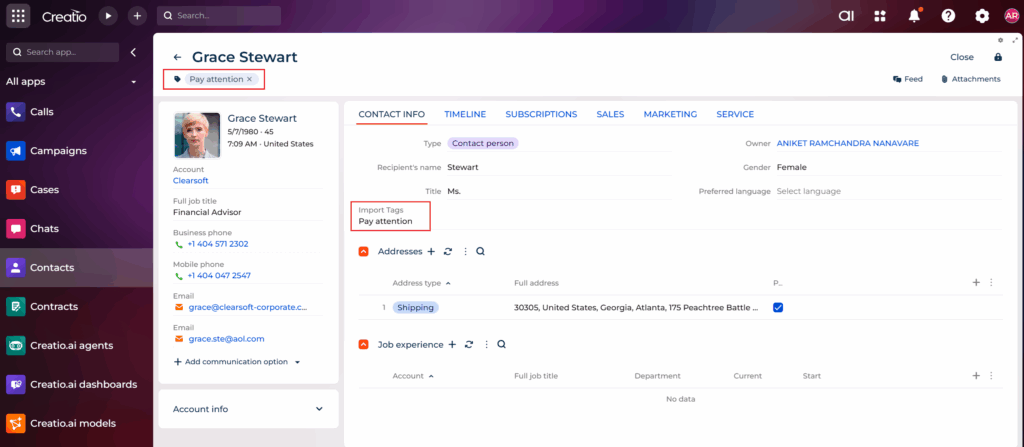
Conclusion
Although Creatio’s Excel import does not directly allow assigning Tags to Contacts, this limitation can be easily managed using a helper field and a Business Process. By creating an “Import Tags” field and automating the logic, we empower business users to manage tagging effortlessly during bulk imports.
If a required field or relationship is not directly available in the same object during import, we can capture the data in a temporary field and use a Business Process to populate the target structure automatically. This flexible approach makes Creatio highly adaptable to real-world business needs.
About Us
Greytrix is a globally recognized consulting and development partner with 25+ years of expertise in delivering industry-relevant CRM and ERP solutions tailored to business needs. Over the years, we have built strong proficiency in providing end-to-end services, including consultation, implementation, migration, integration, and custom development for Sage ERP, Salesforce, and Sage CRM. With our native cloud integration framework, GUMU™, we power seamless real-time connectivity between leading ERPs and CRMs, helping organizations unlock efficiency and scale. Our solutions have supported businesses across industries, enabling them to modernize legacy systems and keep pace with fast-changing digital demands.
Expanding our capabilities, Greytrix is also a trusted Creatio CRM Consulting and Implementation Partner. Creatio is a leading AI-native, no-code CRM platform that enables businesses to streamline workflows, enhance customer experiences, and accelerate digital transformation. Leveraging our industry experience and in-house innovation, including GUMU™ Copilot AI, we help organizations adopt Creatio CRM with confidence. We ensure the platform supports automation, compliance, and scalability, while tailoring it to unique business needs to deliver measurable results.
Our commitment goes beyond technology; we believe in being a long-term partner. From designing CRM roadmaps to delivering analytics and automation, we help businesses simplify operations, drive growth, and achieve tangible outcomes.
For more information on our Creatio CRM services and solutions, contact us at creatio@greytrix.com. We will be glad to assist you.