
Approval processes have always been an essential part of business hierarchies. While higher management is typically responsible for making key decisions and granting approvals, operational tasks are handled by lower management. As a result, seeking approval becomes a routine and integral part of business operations. Creatio simplifies this workflow by making approval processes easy to configure and manage.
In our system, we use an entity called Estimates. Field service engineers create these estimates and submit them to their respective managers for approval. The following sections describe the steps required to configure this approval process in Creatio.
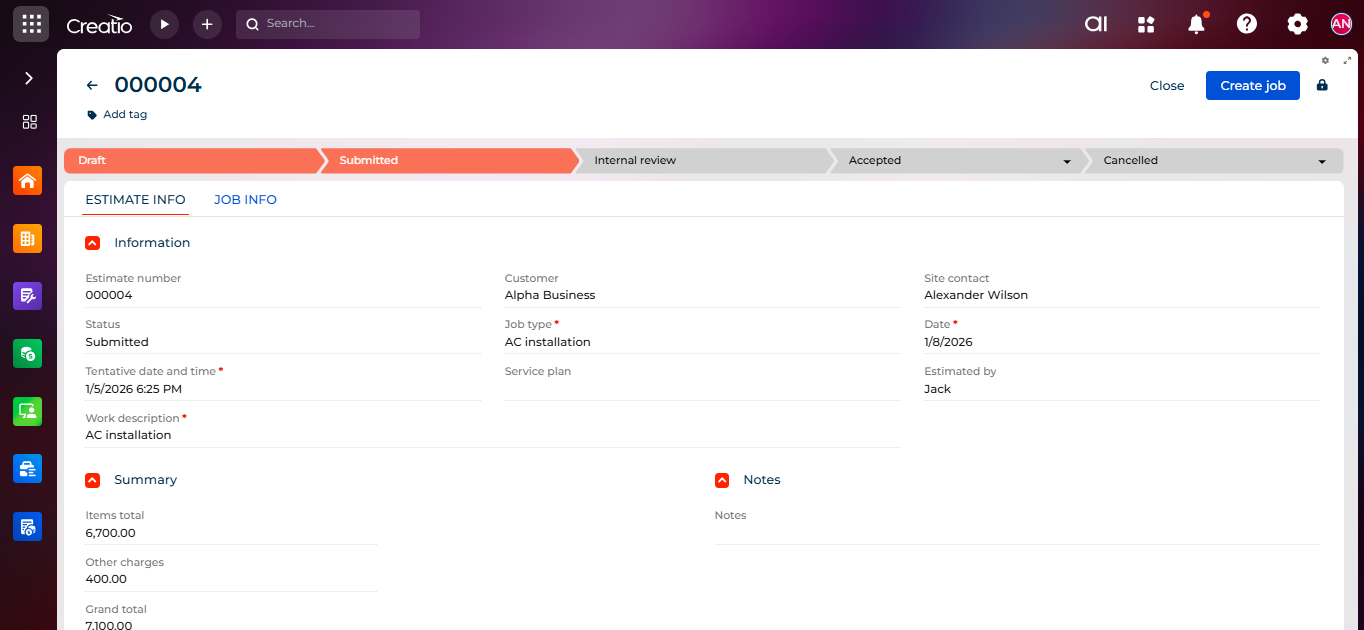
The service engineer first creates the estimate and then submits it for internal review, as shown below:
Configuring the Approval in Creatio
We have configured the approval process at the Internal review stage by following the steps below:
- Go to the designer page by clicking the Settings icon at the top-left of the screen.
- Click Process bar and then select Set up cases.
- On the process designer page, click the stage where you want to configure the approval. In our case, we selected Internal review. Then click Add step and choose Approval.
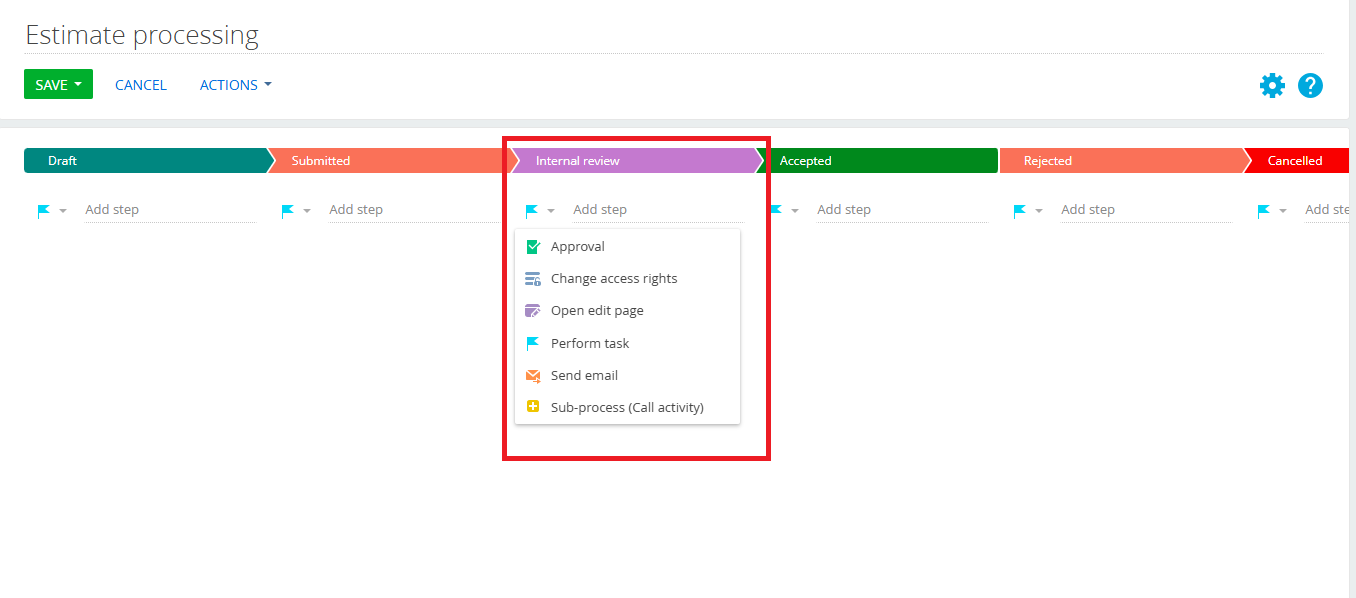
- Provide an appropriate name for the step. The approval settings window will open.
Approval purpose: Enter the message that will appear in the approval notification, e.g., Approval required.
Approval object: Select the entity for which the approval is being configured (Estimates).
Record ID: Click the lightning icon and select Main record column. From the list of fields, choose the ID field.
Approver: Select the appropriate option User, Employee’s Manager, or Role. Since we want the estimate to be approved by the manager, we selected Employee’s Manager.
Employee: This field becomes available when Employee’s Manager is selected. Choose the employee whose manager should receive the approval request. In our case, we selected the Service Engineer.
Change stage after element is completed: Define the next stage based on the approval result:
If result is Positive: Set the stage to Approved.
If result is Negative: Set the stage to Rejected.

- Click Save on both the process designer and page designer.
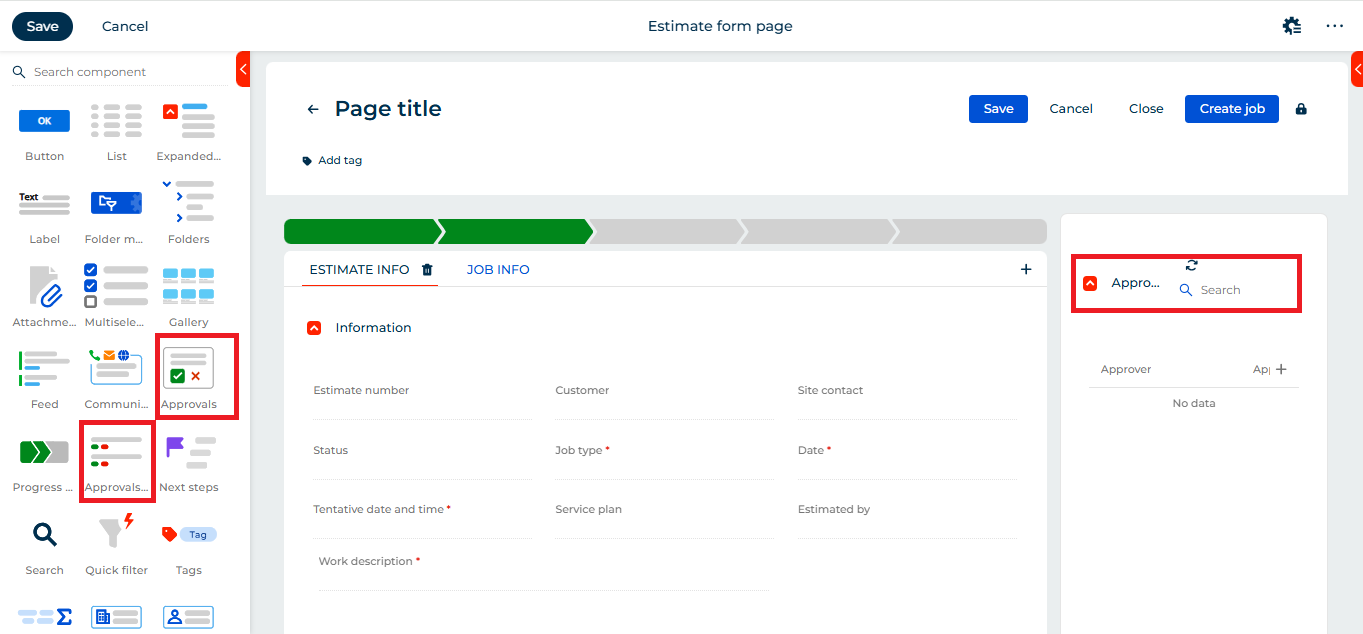
- To provide better visibility of approvals, add the preconfigured elements Approval list and Approvals to the form page. Simply drag and drop them from the components panel. Since these are preconfigured elements, no additional configuration is required. Click Save. Refer below:
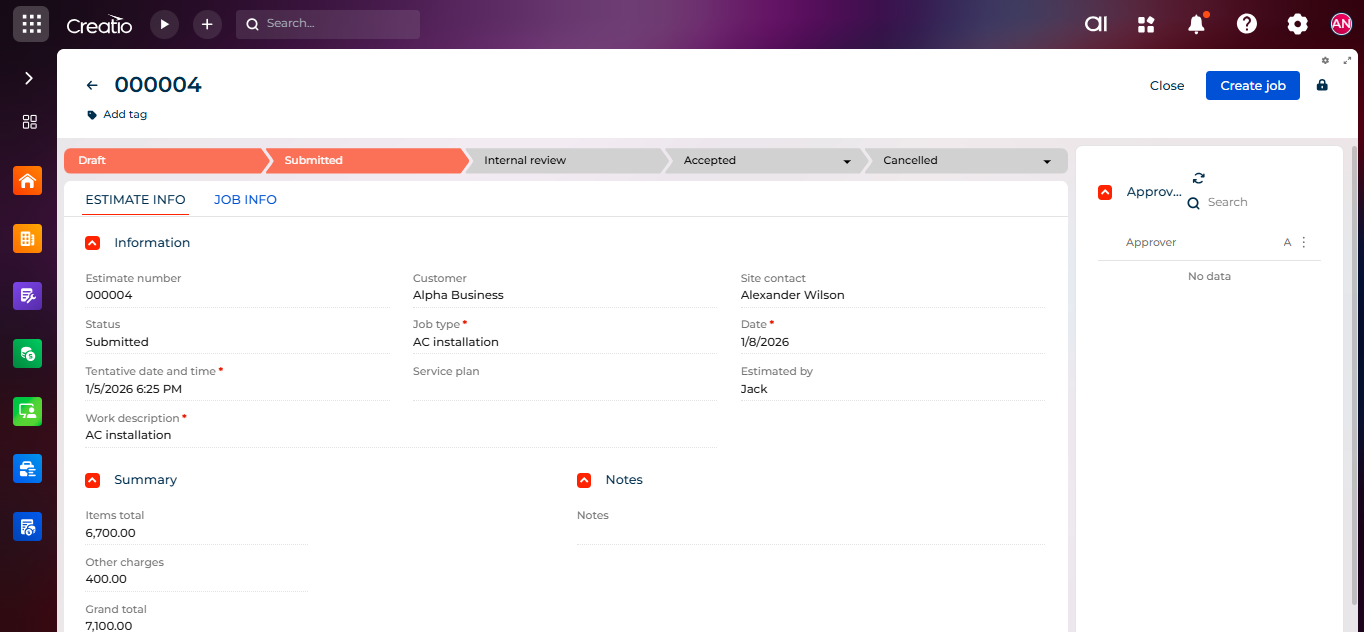
- The summary page will now display the estimate record. While the estimate is still in the Submitted stage and has not yet been sent for approval, the approval list will be empty and the approval element will remain hidden. Refer below:
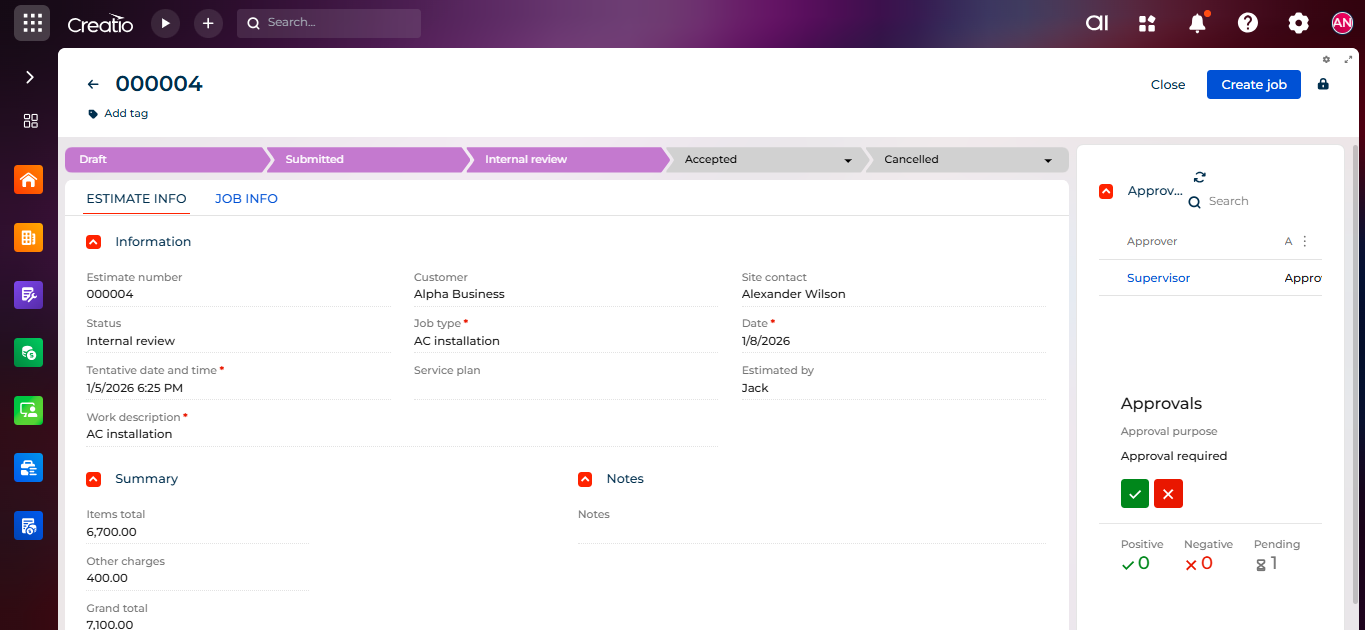
- When the user moves the record to the Internal review stage, the approval list is updated and the approval element becomes visible, indicating whether the approval is pending or completed. Refer below:
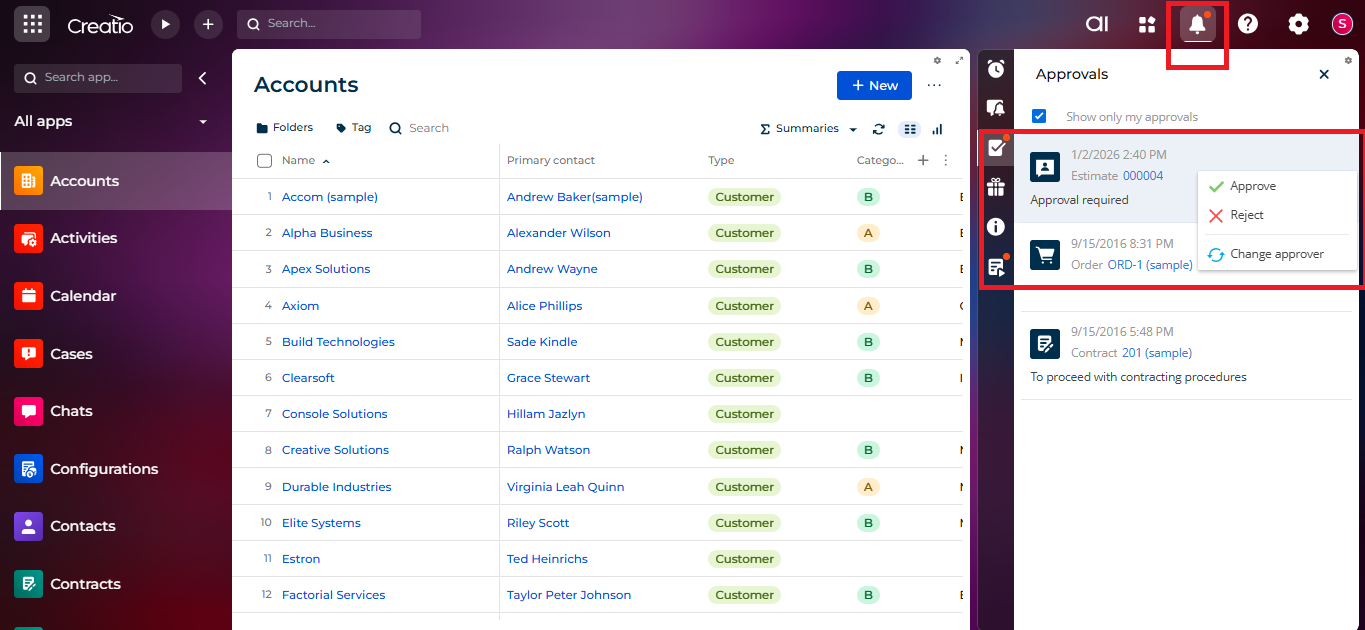
- When the Supervisor logs in, they will receive a notification in the Approvals panel with Accept and Reject options. Refer below:
- After reviewing the estimate, the Supervisor can approve or reject it. If the estimate is approved, Creatio automatically moves the record to the Approved stage based on the configured logic. Refer below:

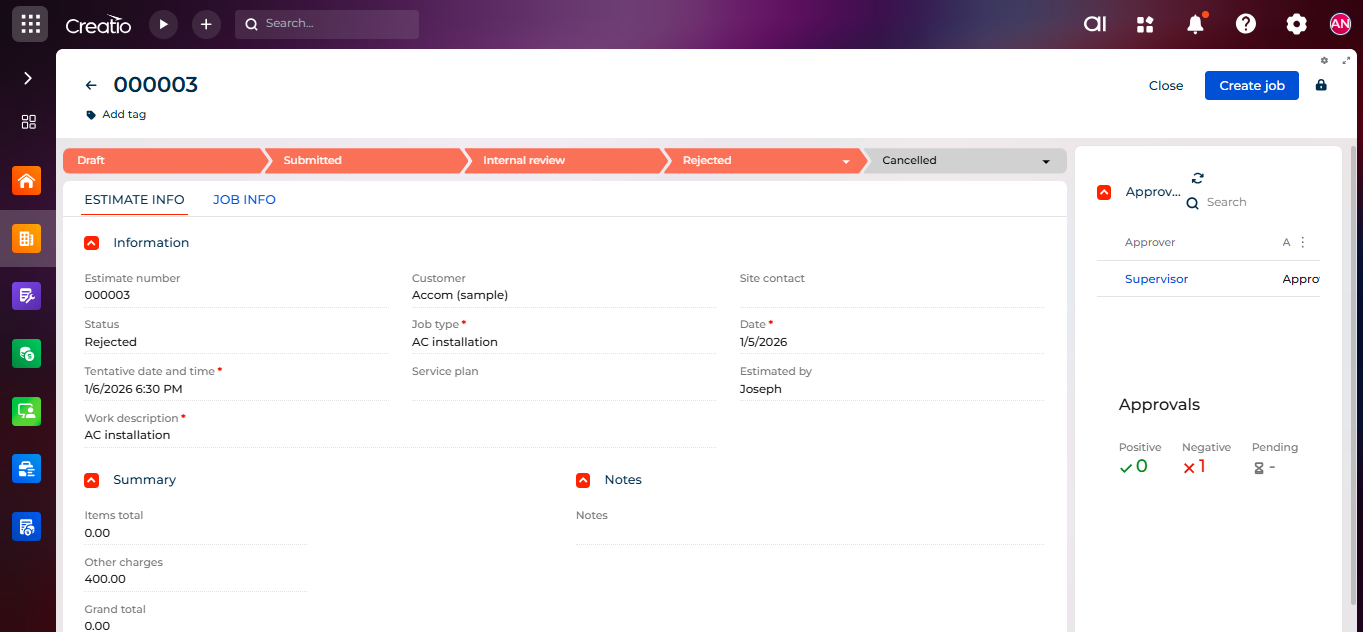
- Similary, if approver reject the estimate, creatio will process the record to Rejected stage. Refer below:
Setting up an approval process in Creatio helps make your workflow smoother and more organized. Managers can easily review and approve estimates, while field engineers can work confidently knowing their submissions are properly tracked. This ensures transparency, saves time, and improves overall efficiency.
About Us
Greytrix is a globally recognized consulting and development partner with 25+ years of expertise in delivering industry-relevant CRM and ERP solutions tailored to business needs. Over the years, we have built strong proficiency in providing end-to-end services, including consultation, implementation, migration, integration, and custom development for Sage ERP, Salesforce, and Sage CRM. With our native cloud integration framework, GUMU™, we power seamless real-time connectivity between leading ERPs and CRMs, helping organizations unlock efficiency and scale. Our solutions have supported businesses across industries, enabling them to modernize legacy systems and keep pace with fast-changing digital demands.
Expanding our capabilities, Greytrix is also a trusted Creatio CRM Consulting and Implementation Partner. Creatio is a leading AI-native, no-code CRM platform that enables businesses to streamline workflows, enhance customer experiences, and accelerate digital transformation. Leveraging our industry experience and in-house innovation, including GUMU™ Copilot AI, we help organizations adopt Creatio CRM with confidence. We ensure the platform supports automation, compliance, and scalability, while tailoring it to unique business needs to deliver measurable results.
Our commitment goes beyond technology; we believe in being a long-term partner. From designing CRM roadmaps to delivering analytics and automation, we help businesses simplify operations, drive growth, and achieve tangible outcomes.
For more information on our Creatio CRM services and solutions, contact us at creatio@greytrix.com. We will be glad to assist you.