
Email is still one of the most common ways we communicate at work whether it’s sharing updates, sending documents, or following up with customers. Creatio makes manual emailing easy by letting users send emails directly from the system, without switching between different tools or inboxes. You can write an email while looking at the exact record you’re working on, attach relevant files, and keep the entire conversation linked to your business data. This helps keep communication organized and ensures nothing gets lost or forgotten.
In this blog, we’ll look at how to send emails manually in Creatio, when it makes sense to use manual emails, and how this small feature can make day-to-day work smoother and more efficient all without getting into technical details.
Let’s consider a simple example. You want an email to be prepared automatically when a new record is created in the Job entity (or any other entity). However, before the email is actually sent, you want the user to review and edit the prefilled content. This can be easily achieved using a business process in Creatio.
Below are the steps to configure manual email sending using a business process.
- Go to the application hub from system designer.
- open your application and click on Business processes section from left menu.
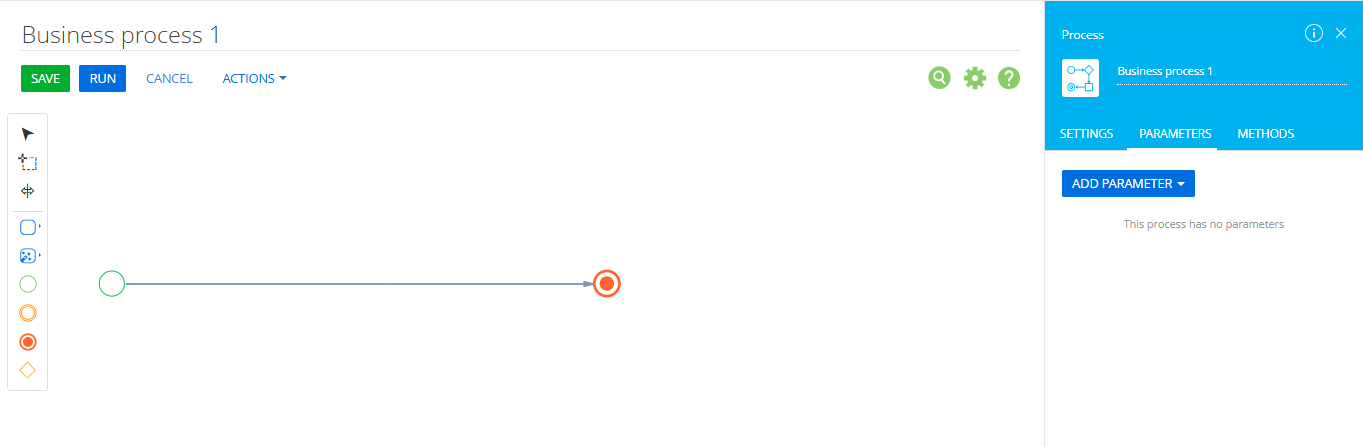
- Click on New process button and you will be presented with business process designer page. Refer below:
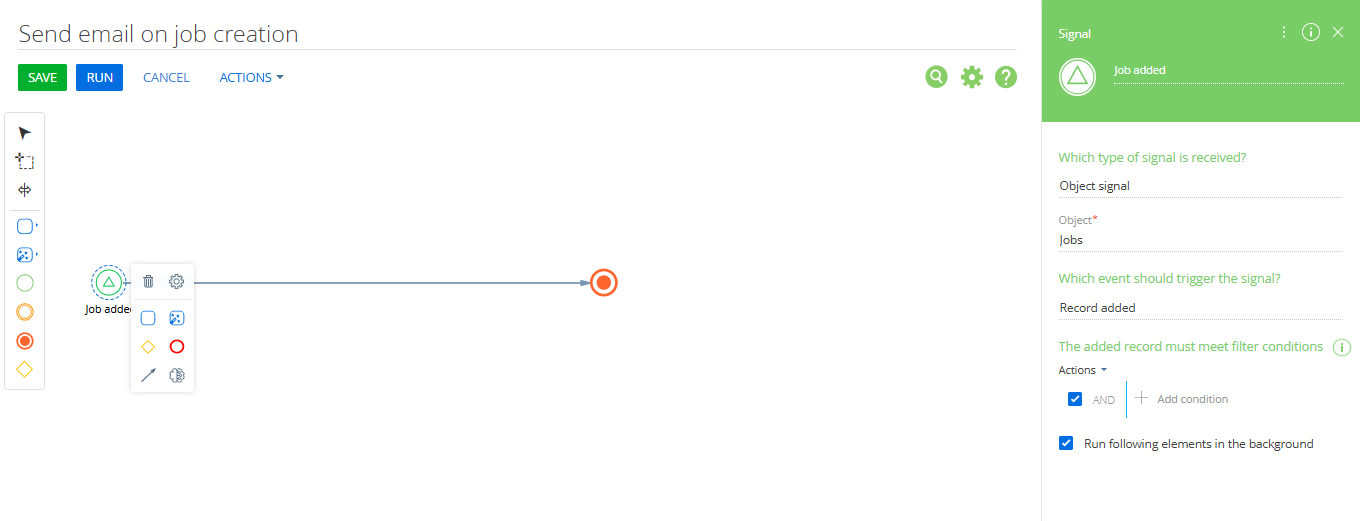
- Now, give a meaningful name to your process and as we are sending mails on event that is when new job is created, change the starting point to signal instead of simple. To do the same click on the circle, you will get the small panel with different icons, click on gear icon and select signal(Circle with triangle icon)from that panel. Set up the element as shown on right hand side. Refer below:
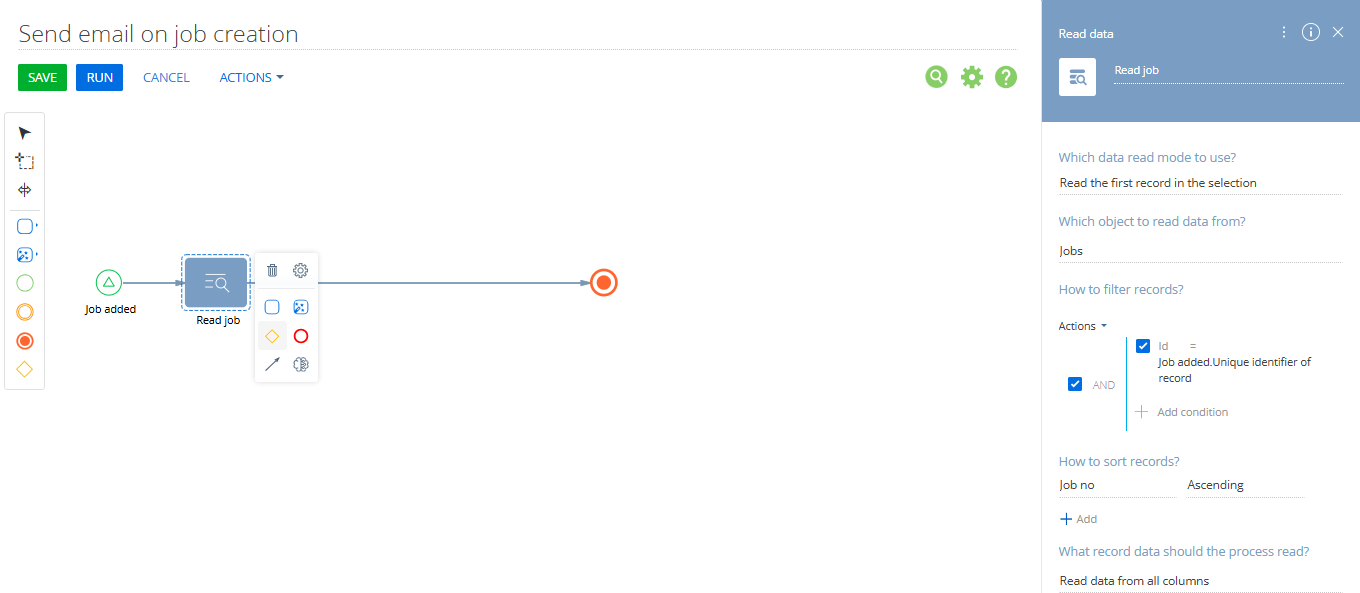
- Add an Read data element to read data from your record as shown below:
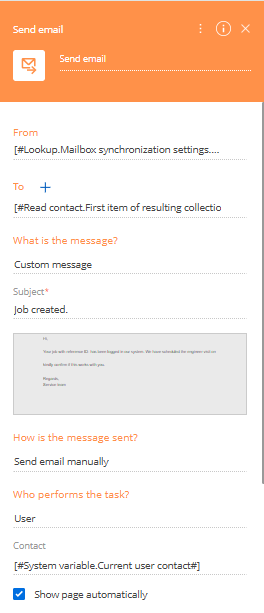
- Now add Send email element to business process and set up the same as follows:
From: Select the email account from which the email should be sent for example, a configured Creatio email account.
To: Choose the recipient of the email. In this example, the email is sent to the Site Contact linked to the Job record.
Message content: Choose whether to use a preconfigured email template or a custom message.
Subject: Enter a suitable subject line. You can click the pencil icon to define or edit the email body.
How is the message sent?: Select Send email manually. This is the key setting it opens the email window before sending, allowing the user to review, edit, or cancel the email.
Who performs the task?: This is usually set to the logged-in user.
Show page automatically: Make sure this option is enabled so the email window opens automatically.
- Click on Save and once the saving is done close the process designer.
Now, whenever a user creates a new Job record and clicks Save, an email window opens automatically. The email is already prefilled with relevant information from the Job record.
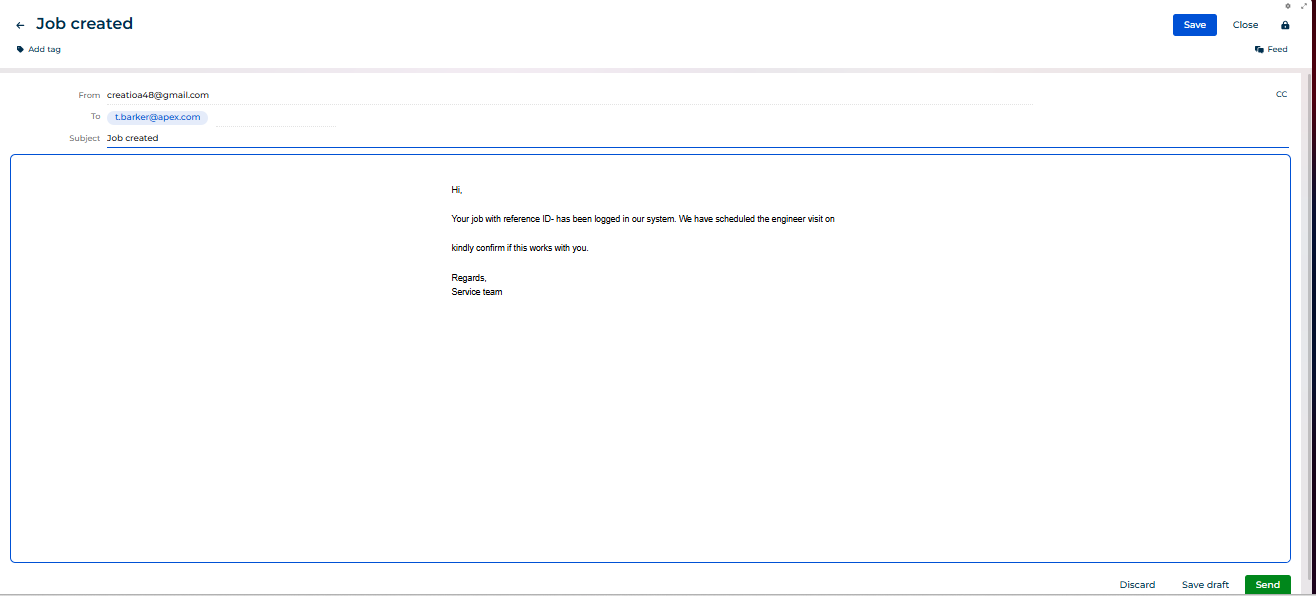
At this point, the user can:
- Update the email content (for example, add a reference ID or additional message)
- Send the email
- Or completely discard it if it’s not required
This approach gives users full control over email communication while still saving time by preparing the email automatically.
About Us
Greytrix is a globally recognized consulting and development partner with 25+ years of expertise in delivering industry-relevant CRM and ERP solutions tailored to business needs. Over the years, we have built strong proficiency in providing end-to-end services, including consultation, implementation, migration, integration, and custom development for Sage ERP, Salesforce, and Sage CRM. With our native cloud integration framework, GUMU™, we power seamless real-time connectivity between leading ERPs and CRMs, helping organizations unlock efficiency and scale. Our solutions have supported businesses across industries, enabling them to modernize legacy systems and keep pace with fast-changing digital demands.
Expanding our capabilities, Greytrix is also a trusted Creatio CRM Consulting and Implementation Partner. Creatio is a leading AI-native, no-code CRM platform that enables businesses to streamline workflows, enhance customer experiences, and accelerate digital transformation. Leveraging our industry experience and in-house innovation, including GUMU™ Copilot AI, we help organizations adopt Creatio CRM with confidence. We ensure the platform supports automation, compliance, and scalability, while tailoring it to unique business needs to deliver measurable results.
Our commitment goes beyond technology; we believe in being a long-term partner. From designing CRM roadmaps to delivering analytics and automation, we help businesses simplify operations, drive growth, and achieve tangible outcomes.
For more information on our Creatio CRM services and solutions, contact us at creatio@greytrix.com. We will be glad to assist you.