
In our previous blog post, “Integrating Bank Feeds from FTP to Sage Intacct Using GUMU™”, we discussed the procedure of fetching bank transaction files from an FTP/SFTP location and transferring them into Sage Intacct. In a similar manner, we have now added this feature to Google Drive.
In this blog, we will elaborate on the process of GUMU™ integration that connects Google Drive with Sage Intacct for the automatic importing of bank transactions, while maintaining the same process and logic throughout.
Reasons for Integrating Bank Feeds into Sage Intacct
With increased transaction volumes, manual data entry of bank transactions becomes not only time-consuming but also prone to errors. The integration of bank feeds directly with Sage Intacct automatically superimposes deposits, payments, and bank charges thus no human intervention is needed; thereby improving the accuracy of transactions as well as the speed of reconciliation.
This whole operation gives the accounting department the capability to close the book earlier than usual and to be in a better position to see the cash flow. The GUMU™ integration is specifically designed for Sage Intacct systems; however, other ERP or financial systems can also use the same approach.
Why Google Drive and Not FTP?
In our previous integration using FTP/SFTP, banks or users uploaded CSV files on an FTP server for GUMU™ to action. However, many businesses now prefer the cloud-based storage solution for keeping and sharing bank files rather than FTP/SFTP.
With Google Drive, it:
- Supports centralized management and easy access for files
- Provides secured access via Google authentication
- Is not reliant at all on the FTP/SFTP infrastructure
GUMU™ makes a safe connection to Google Drive, accesses the bank feed files, and then delivers them to Sage Intacct.
The GUMU™ Google Drive – Sage Intacct Integration Process
Users can subscribe to the GUMU™ Google Drive – Sage Intacct Integration through the GUMU™ Portal. Once the initial setup is completed, the integration follows the same two-step process described in our earlier FTP/SFTP blog.
Step 1: Sync Bank Feeds
GUMU™ reads the bank feed files stored in Google Drive and imports the transactions into Sage Intacct. At this stage, the transactions are synced but not yet visible in the bank register.
Step 2: Bank Reconciliation
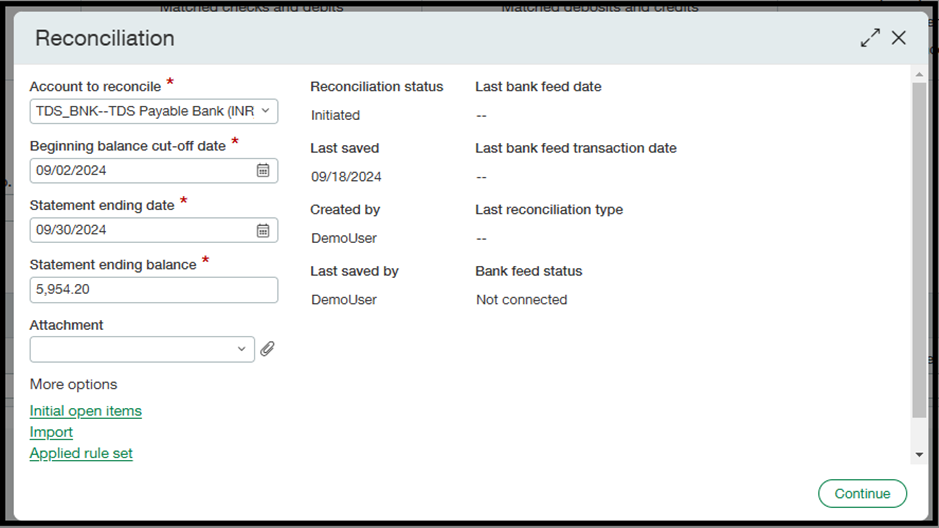
The reconciliation process runs account-wise in Sage Intacct and moves the synced transactions into a review state.
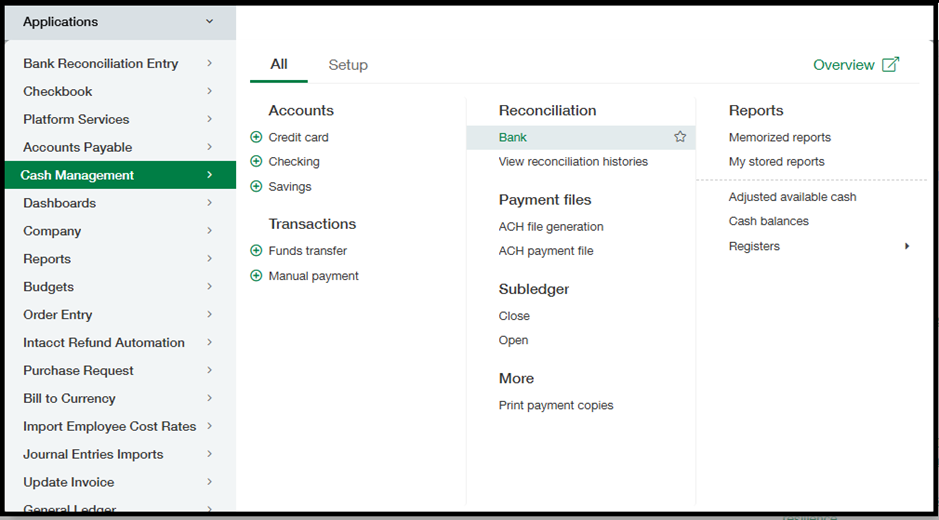
Users can view the transactions by navigating to:
Cash Management > Reconciliation > Bank
Scheduling and Automation
Just like the FTP/SFTP integration, GUMU™ allows users to run the process manually or schedule it to execute automatically at defined intervals. This ensures bank feeds are always updated without manual intervention.

Conclusion
The Google Drive – Sage Intacct integration using GUMU™ offers the same reliable bank feed automation as our FTP/SFTP solution, with the added flexibility of using cloud-based storage. If your bank files are already maintained in Google Drive, this integration provides a simple and efficient way to automate bank transaction syncing and reconciliation in Sage Intacct.
To learn how GUMU™ can help your business achieve operational efficiency and growth, reach out to Greytrix at gumucloud@greytrix.com.