
Make Your Salesforce Record Pages Smarter, Faster, and Cleaner
Salesforce Dynamic Forms are one of the most powerful Lightning features for enhancing user experience on record pages. With Dynamic Forms now supported on standard objects such as Account and Opportunity, Salesforce Admins can finally build cleaner layouts, reduce clutter, improve page performance, and display the right fields to the right users at the right time.
In this step-by-step guide, you’ll learn how to optimize Account and Opportunity record pages using Dynamic Forms – covering template selection, upgrades, field sections, visibility rules, and best practices. This guide is also ideal for blogs that include screenshots at each stage.
What Are Dynamic Forms?
Dynamic Forms allow you to manage fields and sections directly within Lightning App Builder, instead of relying only on traditional page layouts. With Dynamic Forms, you can:
- Show or hide fields based on conditions
- Organize fields into reusable sections
- Reduce the number of page layouts
- Improve page load times
- Build personalized record pages for different teams
This approach provides a modern, flexible, and declarative way to design a clean Salesforce UI.
Why Use Dynamic Forms for Account and Opportunity?
Earlier, Dynamic Forms were limited to custom objects. Salesforce has now extended this feature to key standard objects, including:
- Account
- Opportunity
- Contact
- Lead
This enhancement allows you to optimize the most frequently used pages in Sales Cloud.
Key Benefits
- Eliminates cluttered page layouts
- Improves performance on heavy Opportunity pages
- Enables intelligent, condition-based sections
- Increases user adoption and reduces scrolling
- Delivers a consistent experience across teams
Step-by-Step Guide to Setting Up Dynamic Forms
Below are the exact steps, including recommended templates and component placements
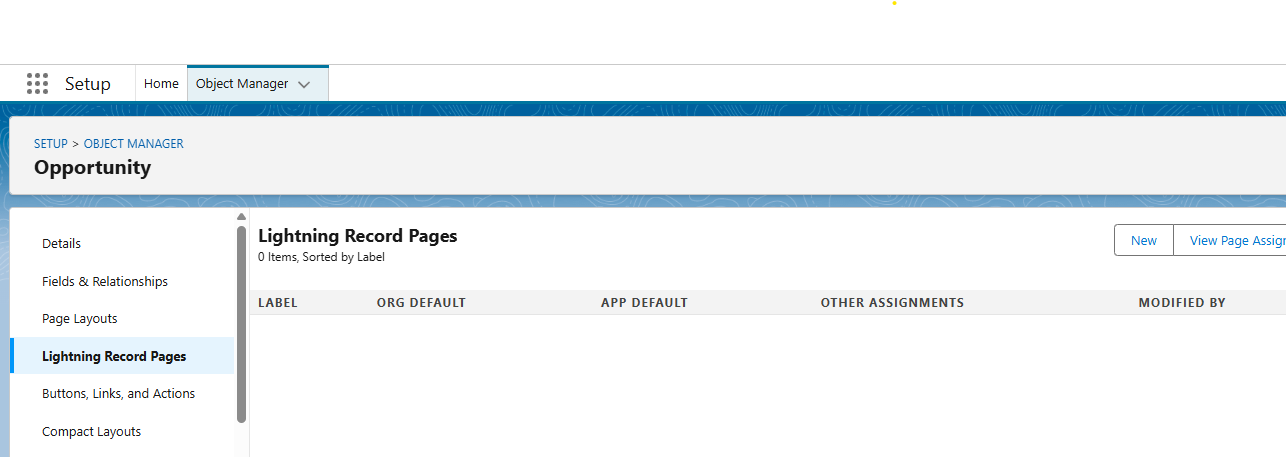
1. Open the Account or Opportunity Record Page in Lightning App Builder
- Navigate to Setup
- Open Object Manager
- Select Account or Opportunity
- Click Lightning Record Pages
- Click New and choose Record Page
2. Choose the Right Template
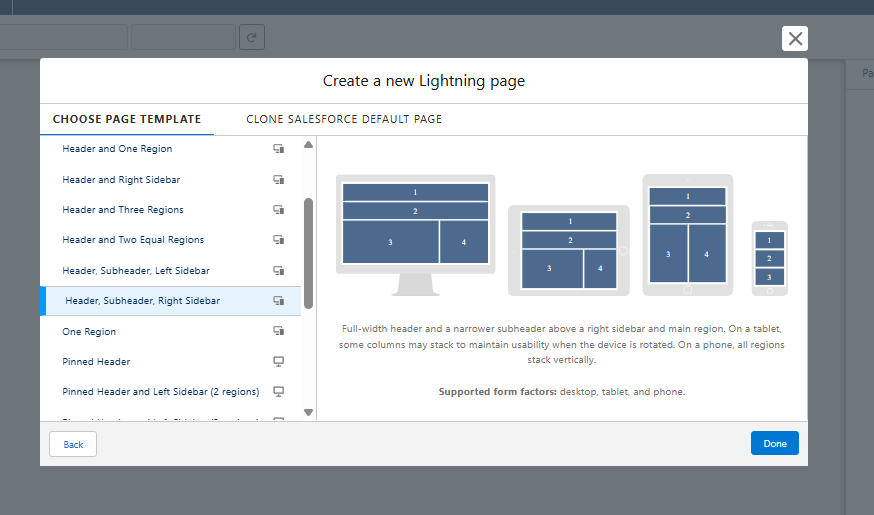
When selecting a page template, choose:
- Header, Subheader, Right Sidebar
This layout provides flexibility and works well with Dynamic Forms
3. Add the Highlights Panel
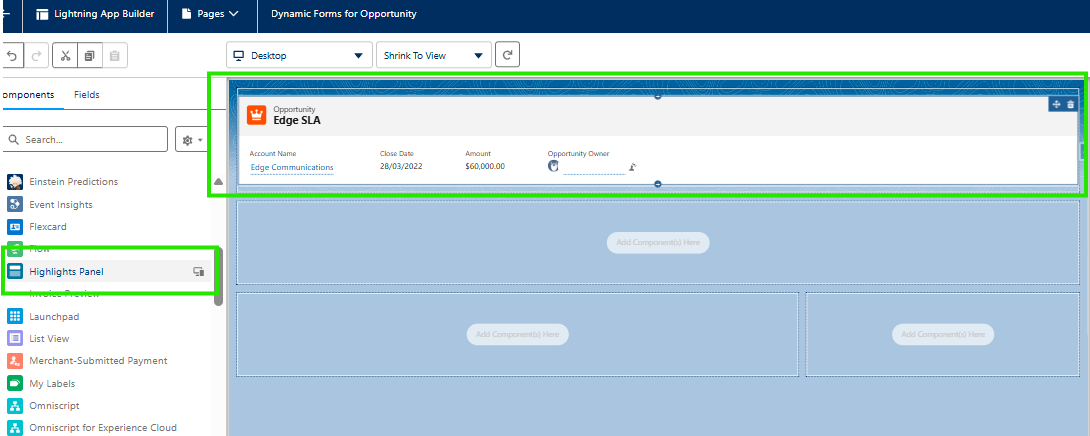
In the Header region:
- Drag and drop the Highlights Panel component
This displays the record title, key actions, and important buttons.
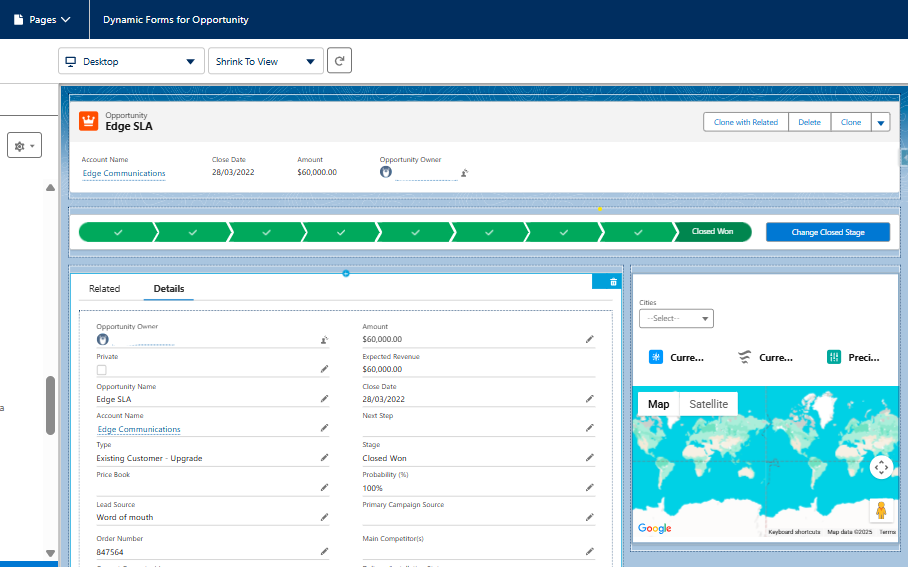
4. Add Tabs for Better Organization
Below the header:
- Drag the Tabs component
- Rename the first tab to Details
- Create a second tab called Related
- Inside the Related tab, add:
- Related List – Single
- Related List – Quick Links
- Custom components can also be added if required
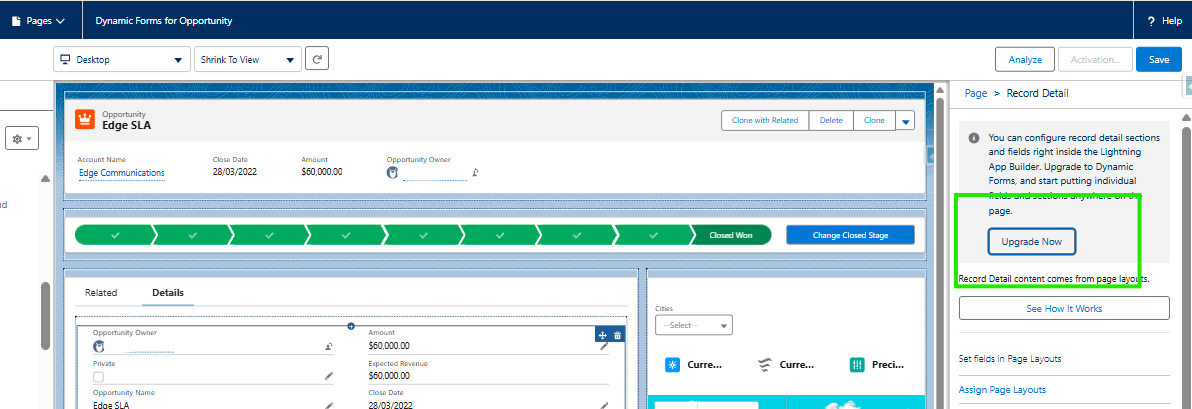
5. Upgrade to Dynamic Forms
Inside the Details tab:
- Drag the Record Detail component
- Select it
- Click Upgrade Now Button
Salesforce automatically converts the existing page layout into:
- Field Sections
- Individual field components
6. Create Custom Field Sections
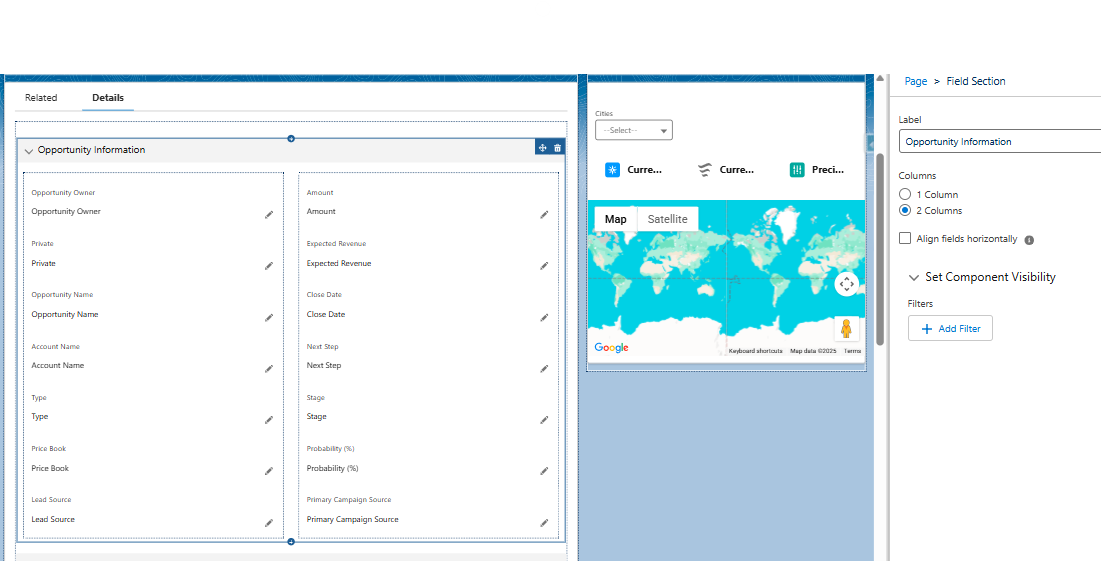
Once upgraded, organize the page as needed:
- Drag Field Section onto the canvas
- Select a two-column layout for better readability
- Name sections based on business requirements
Examples include:
- Opportunity Information
- Billing Details
Fields can be dragged into each section from the left panel.
7. Apply Dynamic Field Visibility Rules
This is where Dynamic Forms truly shine.
To add visibility rules:
- Select a field or section
- In the right panel, locate Set Field Visibility
- Click Add Filter
- Define criteria such as:
Examples:
- Show Credit Limit only when Type = Customer
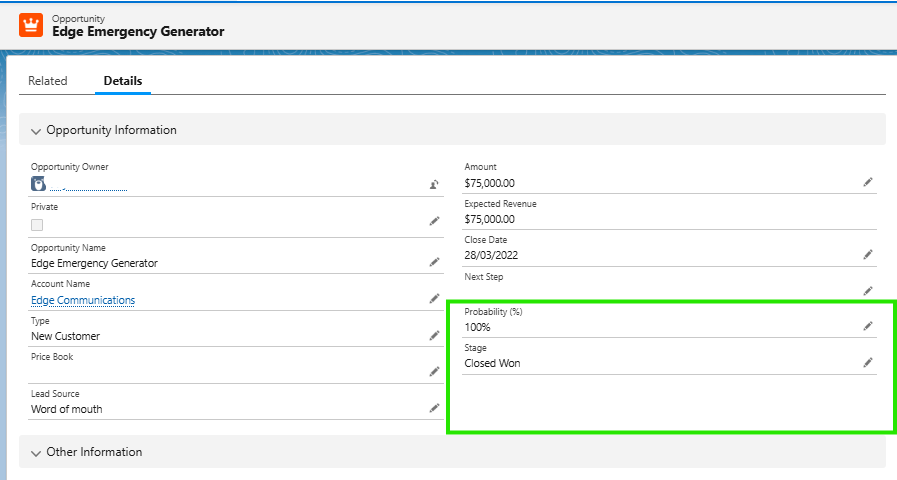
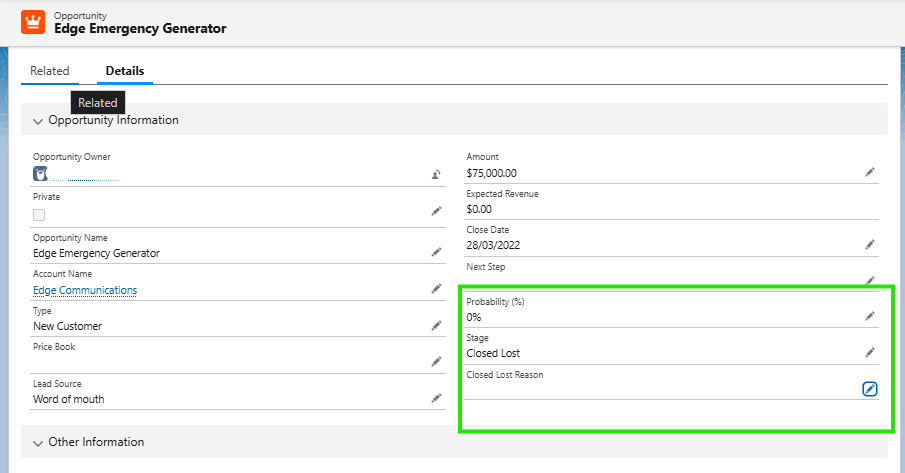
- Show Closed Lost Reason only when Stage = Closed Lost
- Show Discount Approval only when Amount > 50,000
- Display fields based on User Profile (Sales, Finance, Admin)
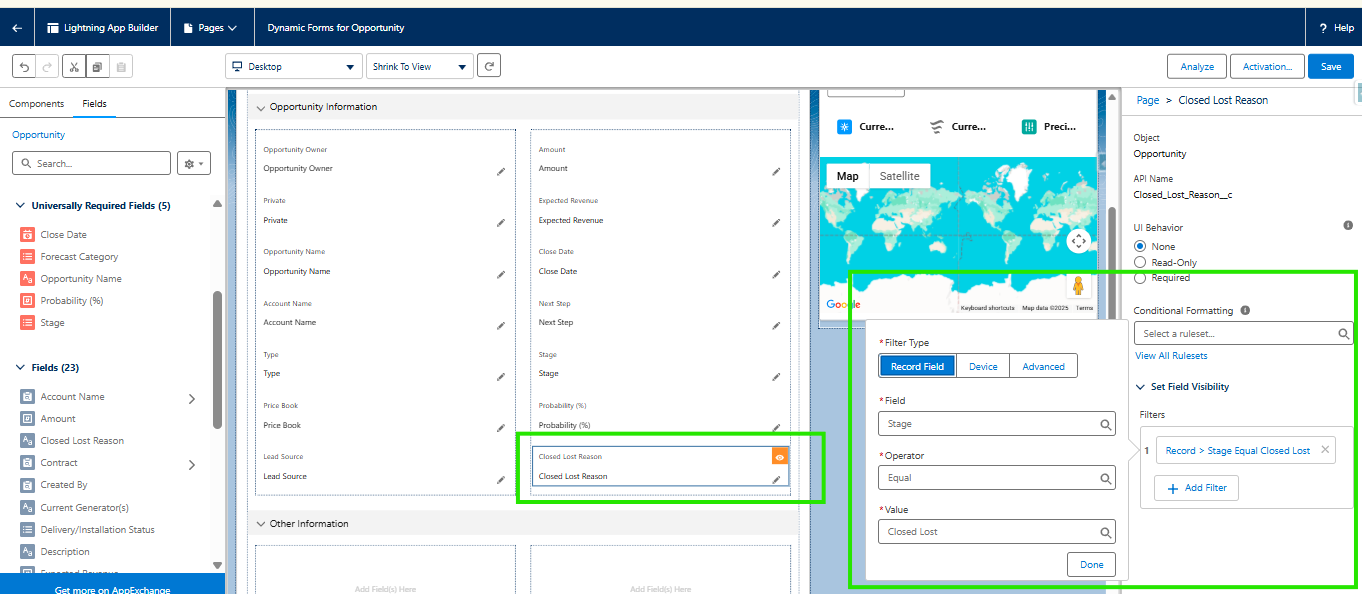
(Show Closed Lost Reason field only when Stage = Closed Lost)
This creates intelligent, personalized record pages.
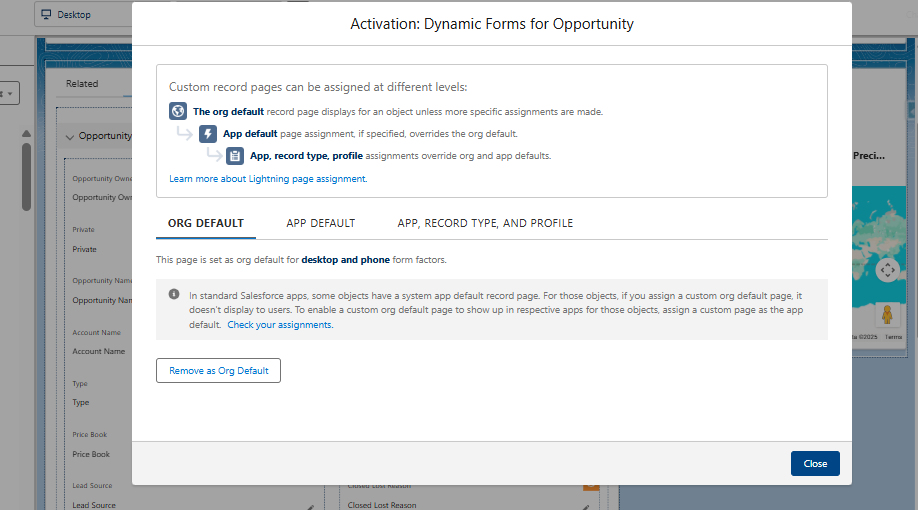
8. Save and Activate the Page
- Click Save
- Click Activation
- Choose one of the following:
- Org Default (for testing or demos)
- Assign by App, Record Type, and Profile
Conclusion
Dynamic Forms transform how Salesforce record pages are built and experienced. By optimizing Account and Opportunity pages with Dynamic Forms, admins can eliminate clutter, improve performance, and deliver smarter, context-aware layouts. This declarative approach not only enhances usability but also boosts adoption by ensuring users see only what matters to them when it matters most.
By following the above blog instructions, you will be able to learn “Optimize Account & Opportunity Record Pages Using Salesforce Dynamic Forms“. If you still have queries or any related problems,
don’t hesitate to contact us at salesforce@greytrix.com. More details about our integration product are available on our website and Salesforce AppExchange.
We hope you may find this blog resourceful and helpful. However, if you still have concerns and need more help, please contact us at salesforce@greytrix.com.
About Us
Greytrix – a globally recognized and one of the oldest Sage Development Partner and a Salesforce Product development partner offers a wide variety of integration products and services to the end users as well as to the Partners and Sage PSG across the globe. We offer Consultation, Configuration, Training and support services in out-of-the-box functionality as well as customizations to incorporate custom business rules and functionalities that require apex code incorporation into the Salesforce platform.
Greytrix has some unique solutions for Cloud CRM such as Salesforce Sage integration for Sage X3, Sage 100 and Sage 300 (Sage Accpac). We also offer best-in-class Cloud CRM Salesforce customization and development services along with services such as Salesforce Data Migration, Integrated App development, Custom App development and Technical Support business partners and end users. Salesforce Cloud CRM integration offered by Greytrix works with Lightning web components and supports standard opportunity workflow. Greytrix GUMU™ integration for Sage ERP – Salesforce is a 5-star rated app listed on Salesforce AppExchange.
The GUMU™ Cloud framework by Greytrix forms the backbone of cloud integrations that are managed in real-time for processing and execution of application programs at the click of a button.
For more information on our Salesforce products and services, contact us at salesforce@greytrix.com. We will be glad to assist you.