
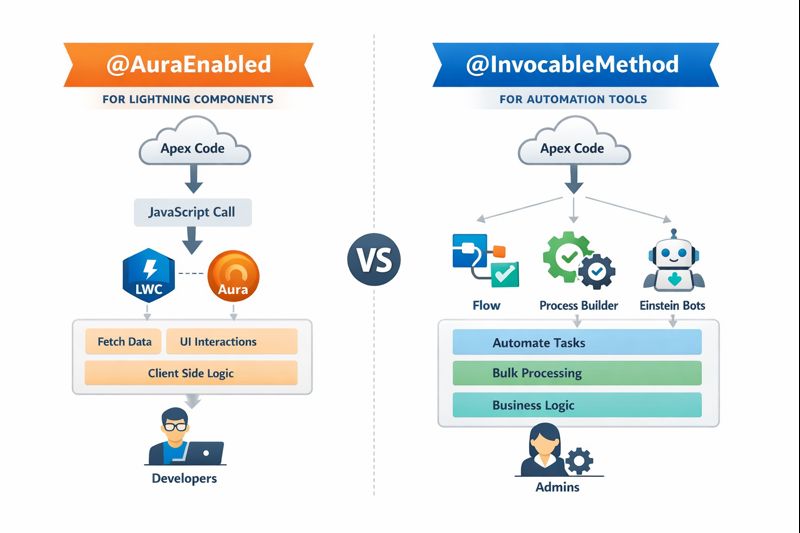
Salesforce Apex annotations may look simple at first glance, but choosing the wrong one can silently introduce performance issues, scalability limitations, and long-term technical debt. A single annotation – @AuraEnabled or @InvocableMethod – defines how your Apex logic interacts with Lightning Web Components (LWC) and Salesforce Flow, and misusing them can quickly push your solution into governor limit trouble.
Over the years, many well-intentioned teams have applied these annotations interchangeably, only to later discover automation bottlenecks, rigid architectures, and maintenance challenges.
In this blog, we’ll clearly explain how these annotations work, when to use each one, and how data flows between Apex, LWC, and Flow – so you can design scalable, enterprise-ready Salesforce solutions.
What You’ll Learn
- How to expose Apex methods and variables to LWC using @AuraEnabled
- How Lightning Web Components call Apex and receive data
- How to expose Apex logic to Salesforce Flow using @InvocableMethod
- How @InvocableVariable passes data between Flow and Apex
- The correct method signatures and patterns for each use case
Let’s dive in.
Using @AuraEnabled with Lightning Web Components (LWC)
@AuraEnabled is used to expose Apex methods or properties so they can be called from Lightning Web Components.
Apex: @AuraEnabled Method
public with sharing class AccountController {
@AuraEnabled
public static String getAccountName(Id accountId) {
Account acc = [
SELECT Name
FROM Account
WHERE Id = :accountId
LIMIT 1
];
return acc.Name;
}
}
Key Points
- Method must be public or global
- Method must be static
- Annotated with @AuraEnabled
- Can return primitive types, sObjects, lists, or custom classes
LWC: Calling an @AuraEnabled Method
import { LightningElement } from ‘lwc’;
import getAccountName from ‘@salesforce/apex/AccountController.getAccountName’;
export default class AccountViewer extends LightningElement {
accountName;
handleClick() {
getAccountName({ accountId: ‘001XXXXXXXXXXXX’ })
.then(result => {
this.accountName = result;
})
.catch(error => {
console.error(error);
});
}
}
How the Data Flows
- LWC calls the Apex method
- Parameters are passed as a JavaScript object
- Apex executes and returns data
- LWC receives the result asynchronously (Promise)
Using @AuraEnabled Variables
public class AccountWrapper {
@AuraEnabled
public String accountName;
@AuraEnabled
public Decimal revenue;
}
Why This Is Used
- To return structured data to LWC
- To bundle multiple values into a single response
- Each property must be annotated individual
Using @InvocableMethod with Salesforce Flow
@InvocableMethod exposes Apex logic to Flow, allowing admins to use Apex as a Flow Action.
Apex: @InvocableVariable (Input from Flow)
Input Wrapper Class
public class AccountInput {
@InvocableVariable(required=true)
public Id accountId;
}
Important Rules
- Properties must be public
- Annotated with @InvocableVariable
- Used to receive values from Flow
- Flow passes a list of these objects
Apex: @InvocableMethod
Invocable Method Example
public with sharing class AccountFlowAction {
@InvocableMethod(label=’Get Account Names’)
public static List<String> getAccountNames(List<AccountInput> inputs) {
List<String> results = new List<String>();
for (AccountInput input : inputs) {
Account acc = [SELECT Name FROM Account WHERE Id = :input.accountId LIMIT 1 ];
results.add(acc.Name);
}
return results;
}
}
Key Rules
- Method must be public static
- Only one parameter, always a List
- Can return
- Void
- A list of primitives
- A list of output wrapper classes
Using the Invocable Method in Flow
Flow Configuration Steps
- Open Flow Builder
- Add an Action element
- Select Apex Action
- Choose Get Account Names
- Map Flow variables to accountId
- Use the output in subsequent Flow elements
Invocable Output Variables (mainly used in agentforce agent)
Output Wrapper Example
public class AccountOutput {
@InvocableVariable
public String accountName;
}
The method returns List<AccountOutput>, allowing Flow to reference each output field directly.
Conclusion
Understanding how data moves between Apex, Lightning Web Components, and Salesforce Flow is foundational Salesforce knowledge. When you clearly separate UI communication using @AuraEnabled from automation logic using @InvocableMethod, your solutions become easier to build, easier to explain, and far easier to maintain.
By applying the right annotation in the right context, you avoid governor limit issues, reduce technical debt, and create scalable, enterprise-grade Salesforce architectures.
By following the above blog instructions, you will be able to learn “The Apex Annotation Trap in Salesforce: @AuraEnabled vs @InvocableMethod Explained“. If you still have queries or any related problems, don’t hesitate to contact us at salesforce@greytrix.com. More details about our integration product are available on our website and Salesforce AppExchange.
We hope you may find this blog resourceful and helpful. However, if you still have concerns and need more help, please contact us at salesforce@greytrix.com.
About Us
Greytrix – a globally recognized and one of the oldest Sage Development Partner and a Salesforce Product development partner offers a wide variety of integration products and services to the end users as well as to the Partners and Sage PSG across the globe. We offer Consultation, Configuration, Training and support services in out-of-the-box functionality as well as customizations to incorporate custom business rules and functionalities that require apex code incorporation into the Salesforce platform.
Greytrix has some unique solutions for Cloud CRM such as Salesforce Sage integration for Sage X3, Sage 100 and Sage 300 (Sage Accpac). We also offer best-in-class Cloud CRM Salesforce customization and development services along with services such as Salesforce Data Migration, Integrated App development, Custom App development and Technical Support business partners and end users. Salesforce Cloud CRM integration offered by Greytrix works with Lightning web components and supports standard opportunity workflow. Greytrix GUMU™ integration for Sage ERP – Salesforce is a 5-star rated app listed on Salesforce AppExchange.
The GUMU™ Cloud framework by Greytrix forms the backbone of cloud integrations that are managed in real-time for processing and execution of application programs at the click of a button.
For more information on our Salesforce products and services, contact us at salesforce@greytrix.com. We will be glad to assist you.