
Files and Collaboration: A Daily Reality for Salesforce Users
Files sit at the core of collaboration in Salesforce. From contracts and invoices to proposals and internal documentation, files are attached to Accounts, Opportunities, custom objects, and shared extensively through Chatter.
For Salesforce Admins, however, one critical question has always remained: who should actually be allowed to delete these files?
With the Spring ’26 release, Salesforce directly addresses this long-standing concern by introducing Improved File Deletion Permissions, giving admins stronger control over file management while preserving seamless collaboration for users.
The Challenge Before Spring ’26: Unpredictable File Deletions
Before Spring ’26, file deletion behavior often felt inconsistent and risky. Users could delete files simply because they uploaded them, even when those files were shared across teams or linked to important business records.
For admins managing large or complex Salesforce orgs, this frequently resulted in:
- Missing or permanently deleted documents
- Compliance and audit concerns
- Support tickets asking the inevitable question: “Where did this file go?”
Spring ’26 changes this narrative.
What’s New in Spring ’26: Separating Access from Deletion
The Improved File Deletion Permissions enhancement introduces a clear separation between file access and file deletion rights.
Users can continue to:
- View files
- Collaborate on shared documents
- Attach files to records
At the same time, deletion rights can now be restricted to only the roles that genuinely require them. This ensures that critical documents remain protected, even in highly collaborative environments.
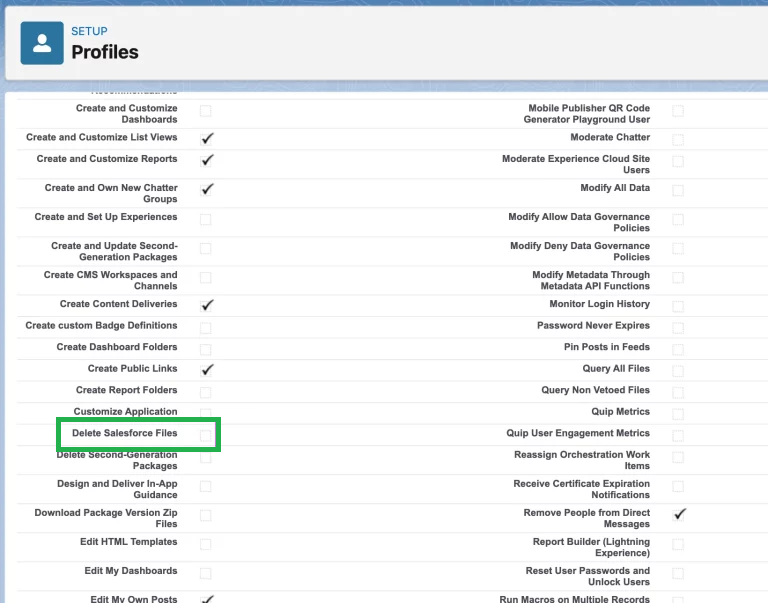
Enabling file deletion permissions under Profiles in Spring ’26
Profiles and Permission Sets: Smarter Control for Admins
One of the most impactful improvements in Spring ’26 is how file deletion access can now be cleanly managed using profiles and permission sets.
Instead of relying on overly broad permissions, admins can now design a more intentional access model:
- Standard users continue to work with files as usual
- Elevated delete access can be selectively granted to admins, compliance teams, or trusted power users
This approach scales better and aligns with modern Salesforce security best practices.
Why This Matters: Governance, Security, and Compliance
From a governance and data security perspective, this enhancement is a major win. Improved control over file deletion:
- Reduces the risk of accidental data loss
- Strengthens compliance readiness
- Improves audit confidence
- Gives admins better visibility and control
For industries handling legal records, financial data, or customer-sensitive documents, this Spring ’26 feature delivers immediate and tangible value.
Admin Best Practices for Improved File Deletion Permissions
To get the most out of Improved File Deletion Permissions, Salesforce Admins should start by reviewing existing profiles to identify users with unnecessary delete access. Where file deletion is required for specific roles, permission sets should be used instead of expanding profile-level permissions.
Conclusion
Improved File Deletion Permissions in Salesforce Spring ’26 may not be the most eye-catching release feature, but its impact is significant. With fewer missing files, stronger security controls, improved compliance, and reduced admin firefighting, this enhancement delivers value exactly where admins need it most.
By reviewing access carefully, leveraging permission sets effectively, and communicating changes clearly, Salesforce Admins can create a safer and more governed file management experience without sacrificing collaboration. Spring ’26 once again proves that thoughtful platform improvements can make a meaningful difference in everyday admin life.
By following the above blog instructions, you will be able to learn “Salesforce Spring ’26 File Deletion Permissions Explained: A Complete Admin Configuration Guide“. If you still have queries or any related problems, don’t hesitate to contact us at salesforce@greytrix.com. More details about our integration product are available on our website and Salesforce AppExchange.
We hope you may find this blog resourceful and helpful. However, if you still have concerns and need more help, please contact us at salesforce@greytrix.com.
About Us
Greytrix – a globally recognized and one of the oldest Sage Development Partner and a Salesforce Product development partner offers a wide variety of integration products and services to the end users as well as to the Partners and Sage PSG across the globe. We offer Consultation, Configuration, Training and support services in out-of-the-box functionality as well as customizations to incorporate custom business rules and functionalities that require apex code incorporation into the Salesforce platform.
Greytrix has some unique solutions for Cloud CRM such as Salesforce Sage integration for Sage X3, Sage 100 and Sage 300 (Sage Accpac). We also offer best-in-class Cloud CRM Salesforce customization and development services along with services such as Salesforce Data Migration, Integrated App development, Custom App development and Technical Support business partners and end users. Salesforce Cloud CRM integration offered by Greytrix works with Lightning web components and supports standard opportunity workflow. Greytrix GUMU™ integration for Sage ERP – Salesforce is a 5-star rated app listed on Salesforce AppExchange.
The GUMU™ Cloud framework by Greytrix forms the backbone of cloud integrations that are managed in real-time for processing and execution of application programs at the click of a button.
For more information on our Salesforce products and services, contact us at salesforce@greytrix.com. We will be glad to assist you.