
With the Salesforce Spring ’26 release, Salesforce introduces the Error Console, a centralized monitoring interface designed to help administrators track, analyze, and manage system errors more effectively.
As organizations continue scaling automation, integrations, and AI-driven processes, maintaining clear visibility into system failures has become increasingly critical. The Error Console represents a significant step forward in enabling proactive governance, operational stability, and improved system health monitoring.
The Challenge: Fragmented Error Monitoring in Salesforce
Before Spring ’26, tracking errors in Salesforce often required navigating multiple tools and disconnected systems, including:
- Flow error notification emails
- Debug Logs for Apex exceptions
- Setup-based monitoring for automation failures
- Manual feedback from end users
This fragmented approach made it difficult to identify recurring patterns, assess impact, and resolve issues efficiently. In complex Salesforce environments with layered automation and integrations, silent failures could remain undetected for extended periods — increasing operational risk.
Introducing the Salesforce Error Console
The Error Console consolidates system and automation error data into a single interface within Setup. This unified view enables administrators to:
- Monitor Flow execution errors
- Review Apex exceptions
- Track automation and background process failures
- Identify recurring issues
- Analyze impacted users and records
- Review timestamps and contextual error details
By centralizing error tracking, the Error Console improves transparency, simplifies root cause analysis, and enhances overall system governance.
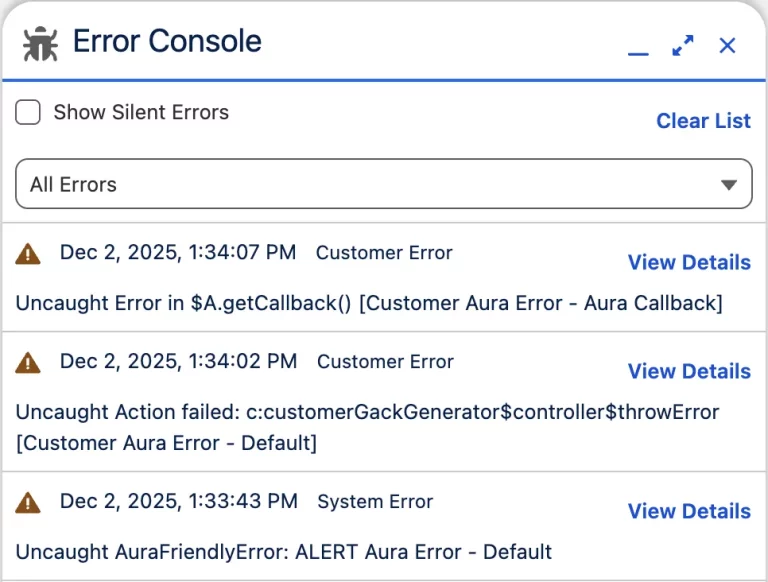
Key Benefits of the Error Console in Spring ’26
Centralized Visibility
All automation and system errors are accessible from one location, eliminating the need to cross-reference multiple monitoring tools.
Pattern Recognition
Administrators can quickly detect recurring errors and prioritize fixes based on frequency and business impact.
Reduced Operational Noise
Instead of relying solely on large volumes of error notification emails, admins can review structured error logs in a controlled environment.
Stronger Governance and Compliance
As organizations adopt advanced capabilities such as AI-driven automation through platforms like Agentforce, maintaining oversight across system layers becomes essential. The Error Console supports compliance initiatives, operational reliability, and proactive system health monitoring.
How to Enable the Error Console in Lightning Experience
After your Salesforce org is upgraded to Spring ’26, administrators can enable the Error Console by following these steps:
- Navigate to Setup
- In the Quick Find box, search for User Interface
- Click User Interface under Setup
- Locate the checkbox labeled: “Use Error Console for errors in Lightning Experience”
- Check the box to enable the feature
- Click Save
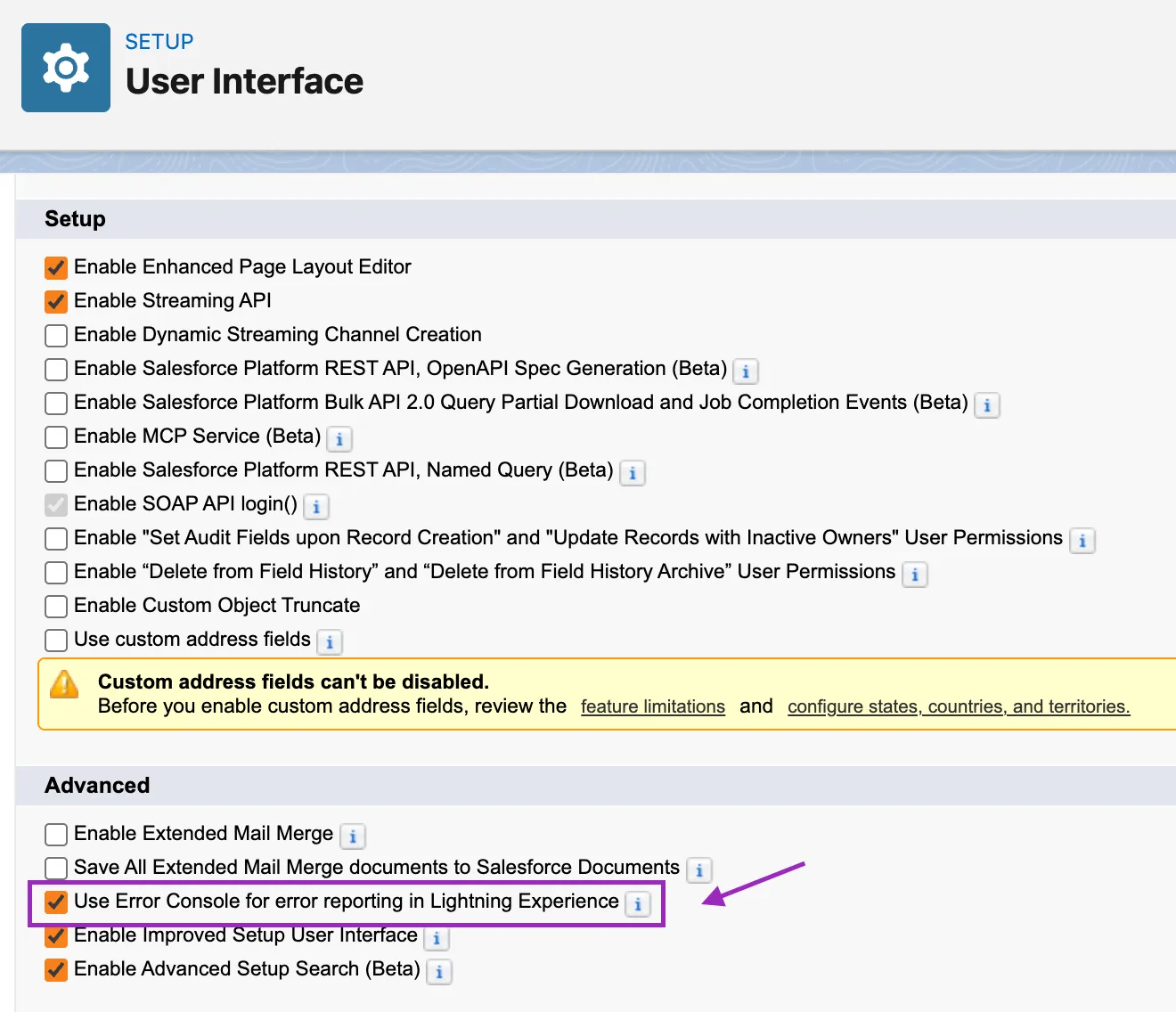
Once enabled, the Error Console becomes available within Lightning Experience, allowing administrators to monitor and analyze system errors from a centralized interface.
It is recommended to review user permissions to ensure that appropriate administrative users have access to monitor and analyze error logs effectively.
Why This Matters for Salesforce Administrators
In modern Salesforce ecosystems driven by automation, integrations, and AI-enabled workflows, error visibility is no longer optional – it is essential.
The Error Console enables admins to move from reactive troubleshooting to proactive error management by:
- Detecting issues earlier
- Identifying recurring patterns
- Improving automation reliability
- Strengthening operational governance
This shift supports both technical stability and business continuity.
Conclusion
The Error Console in Salesforce Spring ’26 significantly improves how administrators monitor and manage system reliability. By centralizing error tracking into a single interface, it enables proactive oversight instead of reactive troubleshooting.
In automation-heavy environments, early detection of recurring issues is essential. The Error Console strengthens governance, enhances system stability, and adds a powerful monitoring capability to the Salesforce administration toolkit.
By following the above blog instructions, you will be able to learn “Salesforce Spring ’26 Error Console: Centralized Error Monitoring for Smarter Admin Governance“. If you still have queries or any related problems, don’t hesitate to contact us at salesforce@greytrix.com. More details about our integration product are available on our website and Salesforce AppExchange.
We hope you may find this blog resourceful and helpful. However, if you still have concerns and need more help, please contact us at salesforce@greytrix.com.
About Us
Greytrix – a globally recognized and one of the oldest Sage Development Partner and a Salesforce Product development partner offers a wide variety of integration products and services to the end users as well as to the Partners and Sage PSG across the globe. We offer Consultation, Configuration, Training and support services in out-of-the-box functionality as well as customizations to incorporate custom business rules and functionalities that require apex code incorporation into the Salesforce platform.
Greytrix has some unique solutions for Cloud CRM such as Salesforce Sage integration for Sage X3, Sage 100 and Sage 300 (Sage Accpac). We also offer best-in-class Cloud CRM Salesforce customization and development services along with services such as Salesforce Data Migration, Integrated App development, Custom App development and Technical Support business partners and end users. Salesforce Cloud CRM integration offered by Greytrix works with Lightning web components and supports standard opportunity workflow. Greytrix GUMU™ integration for Sage ERP – Salesforce is a 5-star rated app listed on Salesforce AppExchange.
The GUMU™ Cloud framework by Greytrix forms the backbone of cloud integrations that are managed in real-time for processing and execution of application programs at the click of a button.
For more information on our Salesforce products and services, contact us at salesforce@greytrix.com. We will be glad to assist you.