
Salesforce introduces three major releases every year, each bringing enhancements designed to improve productivity for administrators and business users. The Salesforce Spring ’26 Release continues this trend by delivering several reporting improvements that enhance efficiency, consistency, and data security.
Among the most practical updates in this release are retained table settings for dashboard reports, smarter report sharing, and custom disclaimers for exported reports. While these updates may seem like small improvements, they can significantly streamline how organizations create, manage, and share reports in Salesforce.
For organizations that rely heavily on Salesforce reports and dashboards to support data-driven decisions, these enhancements help ensure greater accuracy, improved collaboration, and better control over report access.
In this blog, we explore these Salesforce Spring ’26 reporting enhancements and understand how they improve the overall Salesforce reporting experience.
Retained Table Settings in Dashboard Reports
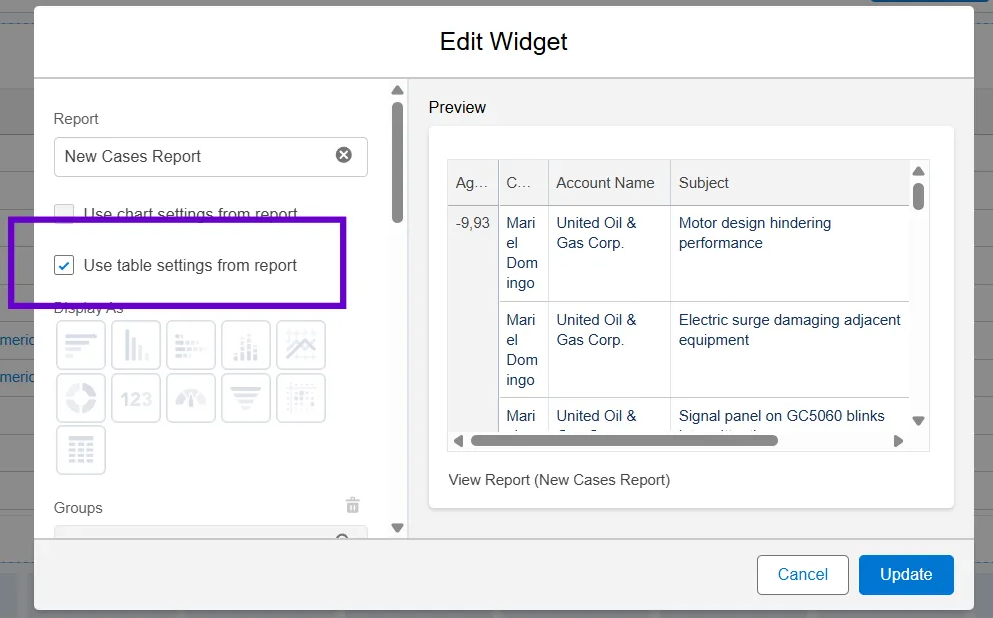
One of the most practical enhancements introduced in Salesforce Spring ’26 reporting updates is the ability to retain report table settings when adding reports to dashboards.
Previously, when a report was added as a table component within a dashboard, users often needed to manually configure several settings such as:
- Column sorting
- Grouping levels
- Custom formulas
- Bucket fields
- Column visibility
This manual setup could sometimes create inconsistencies between the original report configuration and the dashboard view, especially when complex reports were involved.
With the Spring ’26 update, Salesforce now allows dashboard tables to automatically inherit the configuration from the source report. This ensures that the dashboard displays data exactly as it appears in the original report.
By retaining table settings, Salesforce eliminates the need for repeated configuration and ensures consistent reporting across dashboards and reports.
Benefits of Retained Table Settings
This enhancement provides several advantages for both Salesforce administrators and business users.
- Improved Data Consistency
Dashboards now reflect the same configuration as the original report, reducing discrepancies between dashboard metrics and report data.
- Reduced Manual Effort
Administrators no longer need to manually recreate complex report settings when adding reports to dashboards.
- Faster Dashboard Creation
Dashboards can be built more quickly because table configurations are automatically inherited from the source report.
- Better Decision-Making
Managers and executives viewing dashboards will see accurate insights that match the underlying reports, improving trust in the data.
Smarter Report Sharing in Salesforce
Another key improvement in the Salesforce Spring ’26 release focuses on improving report and dashboard sharing.
In Salesforce, reports and dashboards are typically shared through folders. Administrators grant access permissions to users, roles, or groups so they can view or edit the reports stored within those folders.
Previously, when sharing a report folder, administrators could only search for users by display name. In large organizations where multiple users may have similar names, this sometimes created confusion when assigning permissions.
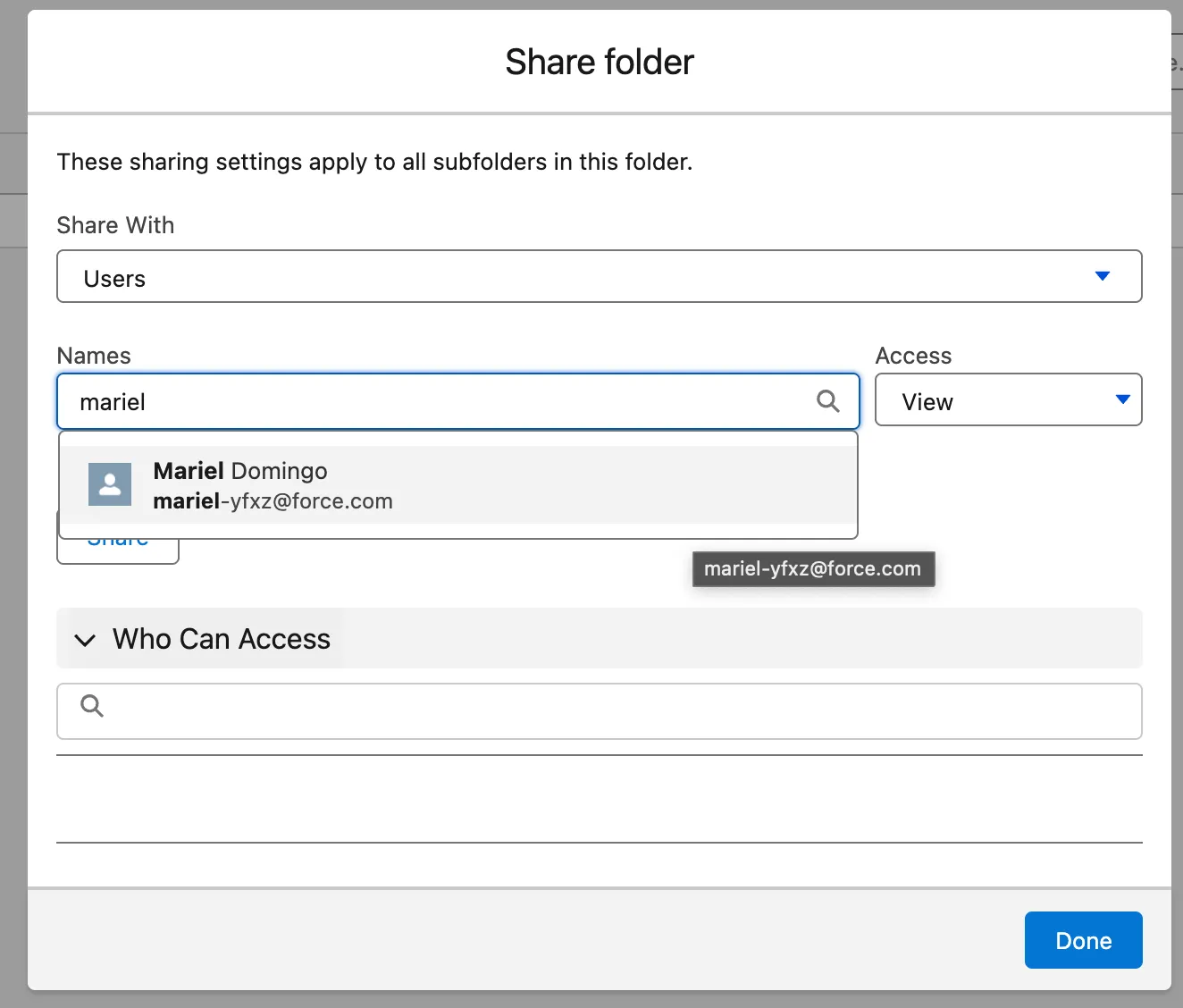
With the Spring ’26 update, administrators can now search and share report folders using unique usernames.
This improvement ensures that administrators can easily identify the correct user when assigning report access.
Why Smarter Report Sharing Matters
Although this enhancement may appear small, it plays an important role in security, governance, and access management.
- Better Access Control
Using unique usernames ensures that report access is granted to the correct individuals.
- Improved Data Security
Sensitive reports such as financial, revenue, or operational reports can be shared confidently with the appropriate stakeholders.
- Easier User Management
In organizations with hundreds or thousands of Salesforce users, searching by username makes permission management more accurate and efficient.
Custom Disclaimers for Exported Reports
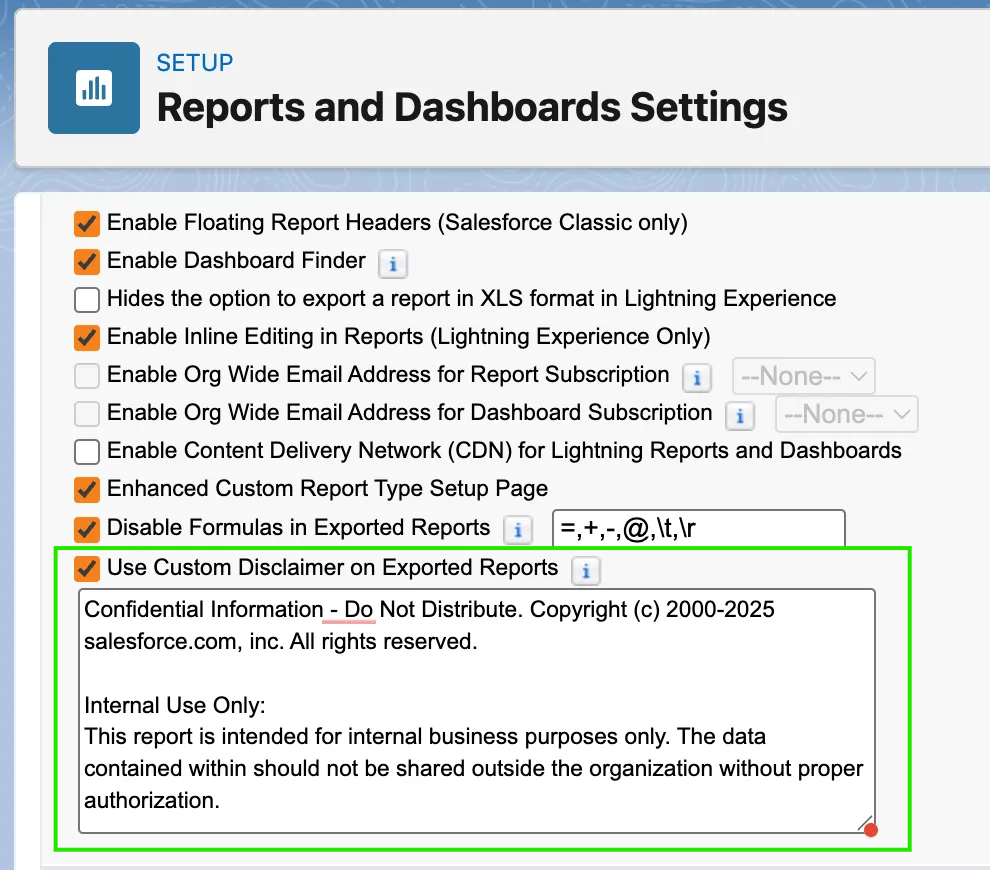
Another valuable enhancement in the Salesforce Spring ’26 reporting updates is the ability to add custom disclaimers to exported reports.
Organizations frequently export reports in formats such as Excel or CSV for further analysis or distribution. However, once data leaves Salesforce, it may be shared with external stakeholders or used in contexts where important information about the data source or confidentiality may not be clear.
With this new feature, administrators can configure a custom disclaimer message that automatically appears whenever a report is exported.
This ensures that anyone accessing exported reports is aware of important notes such as data confidentiality, usage guidelines, or reporting limitations.
Why Custom Disclaimers Are Important
Adding disclaimers to exported reports offers several benefits, especially for organizations that manage sensitive business or financial data.
- Improved Data Governance
Disclaimers communicate important information such as confidentiality notices and data usage restrictions. - Compliance and Security
For organizations operating in regulated industries, disclaimers help ensure exported data includes necessary compliance statements. - Better Data Context
Users receiving exported reports will better understand where the data originated and how it should be interpreted.
Additional Reporting Improvements in Spring ’26
Along with these new features, Salesforce continues to enhance its reporting and analytics capabilities to help organizations gain better business insights.
Some additional improvements introduced in recent releases include:
- Improved report export options
- Enhanced report filtering capabilities
- Better dashboard performance
- Stronger data governance features
These improvements allow organizations to make better use of Salesforce analytics and reporting tools.
References
- Salesforce Release Notes – Spring ’26
- Trailhead – Spring ’26 Release Highlights for Admins
- Jen’s Top Spring ’26 Features for Admins
Conclusion
The Salesforce Spring ’26 release introduces several important enhancements that improve the overall reporting experience. Features such as retained table settings for dashboard reports reduce manual configuration and ensure dashboards accurately reflect the setup of the underlying reports, helping maintain consistency across the platform.
Enhancements like smarter report sharing using usernames enable administrators to assign permissions more precisely, which improves access control and reduces the risk of incorrect report sharing. Additionally, custom disclaimers for exported reports strengthen data governance by ensuring that important information about data usage, confidentiality, and reporting context remains attached to exported reports.
Together, these updates make Salesforce reporting more efficient, secure, and reliable, helping organizations manage their reporting processes and data access more effectively while supporting better decision-making across the business.
By following the above blog instructions, you will be able to learn “Salesforce Spring ’26 Reporting Enhancements: Retained Table Settings, Smarter Sharing, and Export Disclaimers“. If you still have queries or any related problems, don’t hesitate to contact us at salesforce@greytrix.com. More details about our integration product are available on our website and Salesforce AppExchange.
We hope you may find this blog resourceful and helpful. However, if you still have concerns and need more help, please contact us at salesforce@greytrix.com.
About Us
Greytrix – a globally recognized and one of the oldest Sage Development Partner and a Salesforce Product development partner offers a wide variety of integration products and services to the end users as well as to the Partners and Sage PSG across the globe. We offer Consultation, Configuration, Training and support services in out-of-the-box functionality as well as customizations to incorporate custom business rules and functionalities that require apex code incorporation into the Salesforce platform.
Greytrix has some unique solutions for Cloud CRM such as Salesforce Sage integration for Sage X3, Sage 100 and Sage 300 (Sage Accpac). We also offer best-in-class Cloud CRM Salesforce customization and development services along with services such as Salesforce Data Migration, Integrated App development, Custom App development and Technical Support business partners and end users. Salesforce Cloud CRM integration offered by Greytrix works with Lightning web components and supports standard opportunity workflow. Greytrix GUMU™ integration for Sage ERP – Salesforce is a 5-star rated app listed on Salesforce AppExchange.
The GUMU™ Cloud framework by Greytrix forms the backbone of cloud integrations that are managed in real-time for processing and execution of application programs at the click of a button.
For more information on our Salesforce products and services, contact us at salesforce@greytrix.com. We will be glad to assist you.