
If you’re transitioning to Salesforce Second-Generation Packaging (2GP), one of the first things you’ll notice is that your metadata looks different after packaging. Objects, fields, Apex classes, and components suddenly appear with a namespace prefix, even though your original source code contains no such prefix.
This can be confusing at first but this behavior is completely expected. In this blog, we’ll explain why Salesforce automatically injects namespaces in 2GP, how it rewrites code internally, and why everything works seamlessly even though you never see the transformed code.
What This Blog Covers
- Why 2GP automatically adds a namespace
- How Salesforce rewrites code internally
- Why you don’t see namespaced code after installation
- Why the code works without namespace prefixes
- Why the namespace never appears in your Git repository
Why 2GP Automatically Adds the Namespace
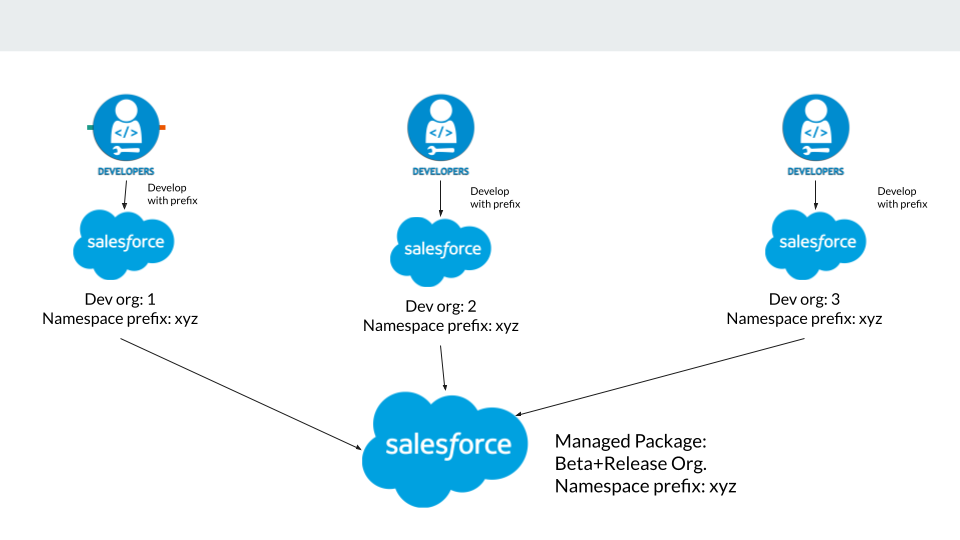
When you create a 2GP managed package, Salesforce automatically applies the package namespace to all metadata included in the package, such as:
- Apex classes
- Lightning Web Components (LWC)
- Custom objects
- Custom fields
- Permission sets
- Any additional packaged metadata
With 2GP, the namespace is mandatory and is applied at build time. You never add the namespace manually in your code – Salesforce handles it automatically.
How Salesforce Rewrites Code Internally
Even though your source code does not contain a namespace, Salesforce injects it during the packaging process.
For example, if your Apex code looks like this:
insert new Invoice__c(Amount__c = 100);
During packaging, Salesforce internally transforms it into:
insert new abc__Invoice__c(abc__Amount__c = 100);
Here, abc represents the package namespace.
You should never make this change yourself. This transformation happens only within the compiled package – not in your source repository.
Why You Don’t See the Namespaced Code After Installation
Second-Generation Packaging is source-driven, which means:
- Subscriber orgs receive compiled components, not your original source
- The namespaced version of the code is not visible
- Installed metadata is fully namespaced, even though you didn’t write it that way
This often leads developers to wonder how everything still works when no namespace was added manually.
Why the Code Still Works Without Namespace Prefixes
Salesforce automatically updates all internal references during packaging, including:
- Object references
- Field references
- Apex class references
- LWC references
As long as the references are within the same package, Salesforce ensures they are correctly namespaced.
That’s why your code behaves exactly as expected without any manual changes. Behind the scenes, Salesforce adjusts everything automatically, even though the installed version appears fully namespaced.
Why the Namespace Doesn’t Appear in Your Git Repository
You might expect your Git repository to contain namespaced code—but it never will. Your repo always remains namespace-agnostic.
This is because namespaces are applied only at packaging time. Keeping the source clean ensures that it:
- Works in scratch orgs
- Works without a namespace
- Works with future packages
- Avoids hard-coded prefixes
This design is intentional and follows Salesforce best practices.
Conclusion
Salesforce Second-Generation Packaging may seem confusing at first, especially when you see namespaced metadata in subscriber orgs while your source code contains no namespace references. However, this behavior is predictable, consistent, and fully automated.
With 2GP, Salesforce always applies the package namespace at build time. Developers should never manually add namespace prefixes in their source code. Salesforce injects namespaces internally, ensuring that installed packages are properly namespaced, protected, and isolated – while keeping your repository clean, reusable, and future-proof.
By following the above blog instructions, you will be able to learn “Understanding Namespace Behavior in Salesforce Second Generation Packaging (2GP)“. If you still have queries or any related p roblems,don’t hesitate to contact us at salesforce@greytrix.com. More details about our integration product are available on our website and Salesforce AppExchange.
We hope you may find this blog resourceful and helpful. However, if you still have concerns and need more help, please contact us at salesforce@greytrix.com.
About Us
Greytrix – a globally recognized and one of the oldest Sage Development Partner and a Salesforce Product development partner offers a wide variety of integration products and services to the end users as well as to the Partners and Sage PSG across the globe. We offer Consultation, Configuration, Training and support services in out-of-the-box functionality as well as customizations to incorporate custom business rules and functionalities that require apex code incorporation into the Salesforce platform.
Greytrix has some unique solutions for Cloud CRM such as Salesforce Sage integration for Sage X3, Sage 100 and Sage 300 (Sage Accpac). We also offer best-in-class Cloud CRM Salesforce customization and development services along with services such as Salesforce Data Migration, Integrated App development, Custom App development and Technical Support business partners and end users. Salesforce Cloud CRM integration offered by Greytrix works with Lightning web components and supports standard opportunity workflow. Greytrix GUMU™ integration for Sage ERP – Salesforce is a 5-star rated app listed on Salesforce AppExchange.
The GUMU™ Cloud framework by Greytrix forms the backbone of cloud integrations that are managed in real-time for processing and execution of application programs at the click of a button.
For more information on our Salesforce products and services, contact us at salesforce@greytrix.com. We will be glad to assist you.