
Agentforce Vibes introduces intelligent modes that define how an AI agent approaches a task. Instead of responding the same way to every request, these modes allow users to control whether the agent should first think and structure, immediately execute, or deeply analyze a complex problem. The three core modes – Plan, Act, and Deep Planning are designed to support different levels of decision-making and execution.
Understanding these modes helps teams work more efficiently, reduce errors, and get more predictable results from Agentforce.
Plan Mode: Structured Thinking Before Execution
Plan Mode is used when you want the agent to focus on thinking and organizing before taking action. In this mode, the agent breaks down the task into clear steps, highlights dependencies, and outlines a logical approach without immediately executing anything.
This mode is especially useful when requirements are still being discussed or when multiple stakeholders need to review the approach before moving forward.
Common scenarios for Plan Mode include:
- Designing Salesforce automations or flows
- Outlining steps for a new Agentforce implementation
- Reviewing logic before development begins
- Preparing a rollout or configuration plan
Plan Mode helps ensure alignment and reduces the risk of rework later.
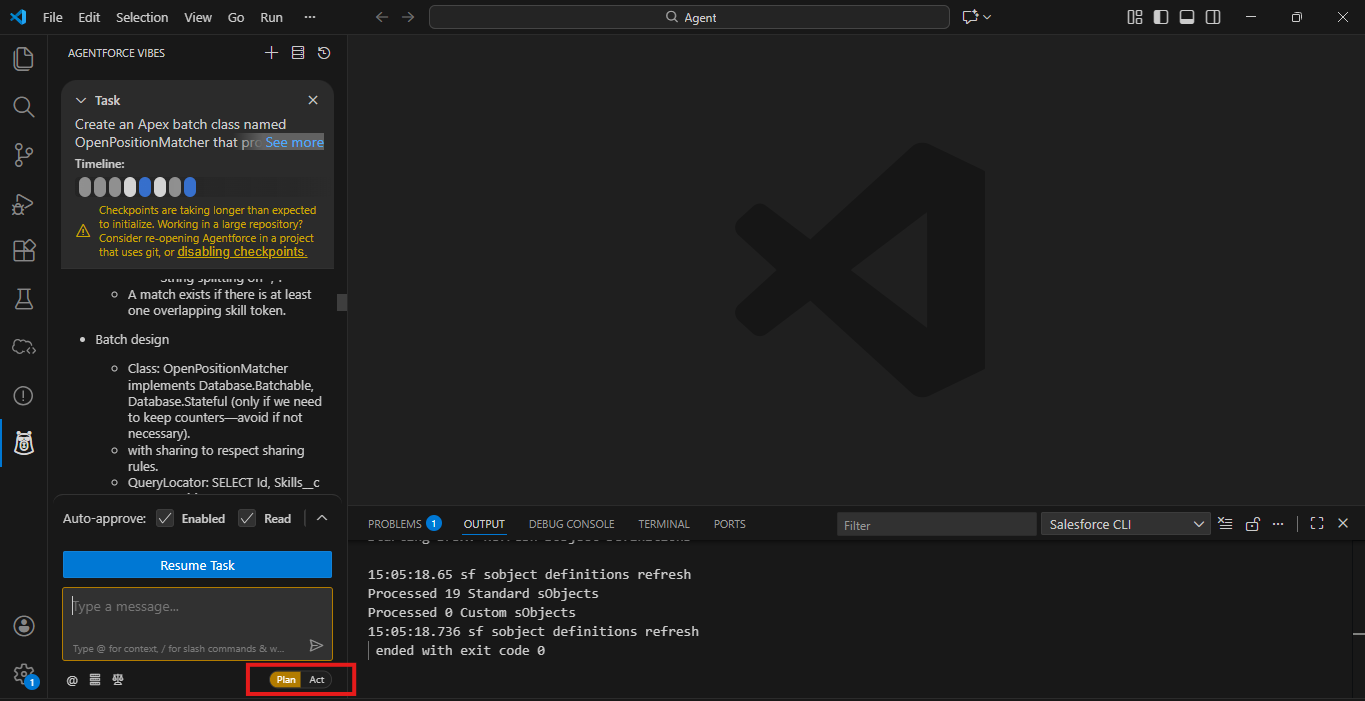
Steps to Enable Plan Mode in VS Code
- Open VS Code and launch your Salesforce project.
Make sure the Agentforce extension is installed and your org is authenticated. - Open the Agentforce Panel
In the left-hand sidebar, click on the Agentforce icon to open the extension workspace. - Locate the Vibes Mode toggle
- Selecte plan mode → The agent will structure and outline tasks before execution.
- Enter your prompt, and the agent will behave according to the selected mode.
Act Mode: Direct and Immediate Execution
Act Mode is designed for straightforward tasks where the requirements are already clear and approved. In this mode, the agent focuses on execution rather than analysis or planning.
This is ideal for operational work that needs to be done quickly and accurately.
Common scenarios for Act Mode include:
- Creating or updating Salesforce records
- Running predefined automations
- Generating reports or summaries
- Performing repeatable administrative tasks
Act Mode saves time by removing unnecessary planning when speed and efficiency are the priority.
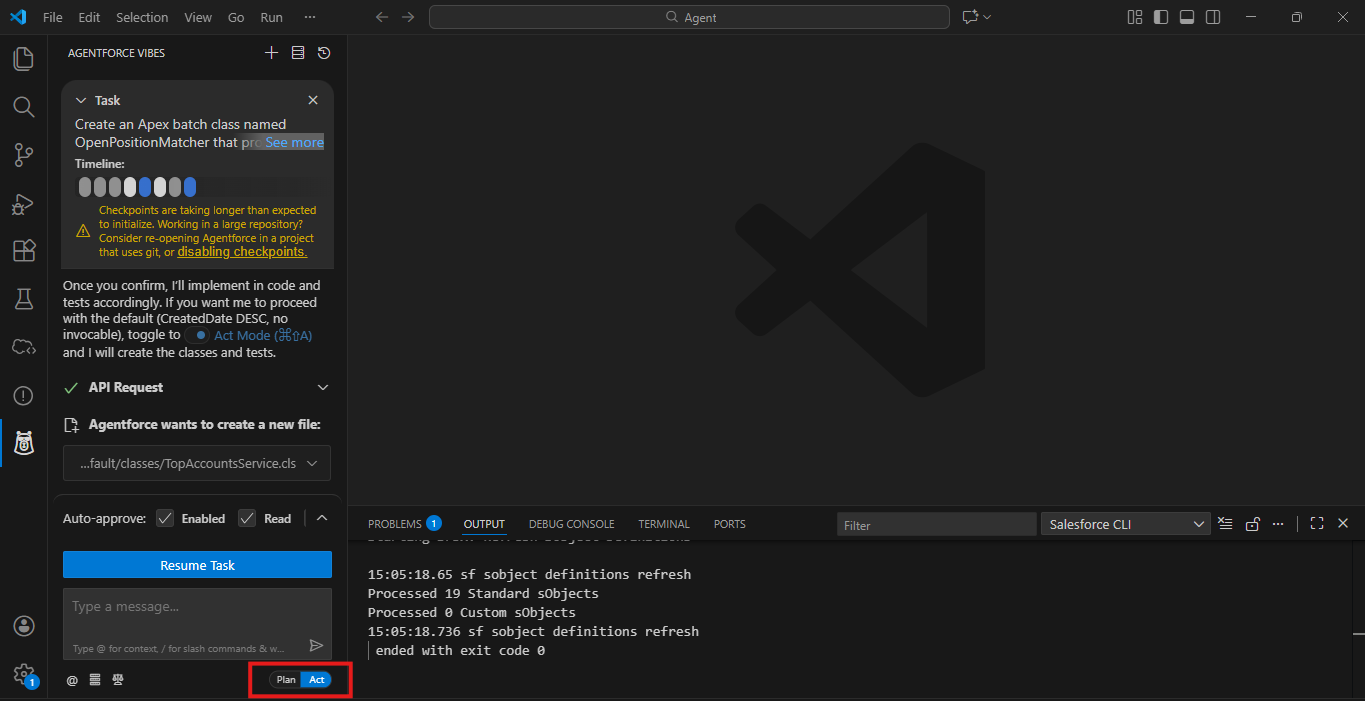
Steps to Enable Act Mode in VS Code
- Open VS Code and launch your Salesforce project.
Make sure the Agentforce extension is installed and your org is authenticated. - Open the Agentforce Panel
In the left-hand sidebar, click on the Agentforce icon to open the extension workspace. - Locate the Vibes Mode toggle
- Selecte plan mode → The agent will execute tasks immediately.
- Enter your prompt and let the agent perform the action.
Deep Planning Mode: Architect-Level Planning for Complex Tasks
Deep Planning Mode is like Plan Mode, but taken to a much deeper, more strategic level. This is the mode you use when a task feels less like a quick change and more like something an architect or senior engineer should design. It’s ideal for complex workflows, multi-step projects, or critical system changes.
Deep Planning Mode works in four main phases:
Silent Investigation
The agent first analyzes your codebase or project deeply, reviewing:
- File structure
- Patterns and conventions
- Relationships between components
- Naming and architecture choices
This phase gives the agent full context before it even asks questions or makes suggestions.
Question Phase
Next, the agent begins asking clarifying questions, customized for your project and prompt. This helps ensure it fully understands your intent. Questions can cover:
- Your goals for the task
- Preferred coding patterns or design approaches
- Assumptions the agent may be making
- Edge cases or missing details
Each session generates slightly different questions, because they are based on your actual code and prompt, not fixed templates.
Plan Documentation Phase
After gathering context, the agent generates a full Markdown plan file (.md). This acts like a technical design document and includes:
- High-level architecture
- Step-by-step implementation instructions
- Which files and methods will be created
- Detailed explanations of design choices
You can review this plan as if it were written by a human architect, ensuring it meets your requirements before starting implementation.
Task Creation
Finally, the agent asks whether you want to create a new task from the plan:
- Yes → starts the implementation process directly
- No → keeps the plan as a reference to discuss with your team or refine further
This ensures you have full control over how and when the plan is executed.
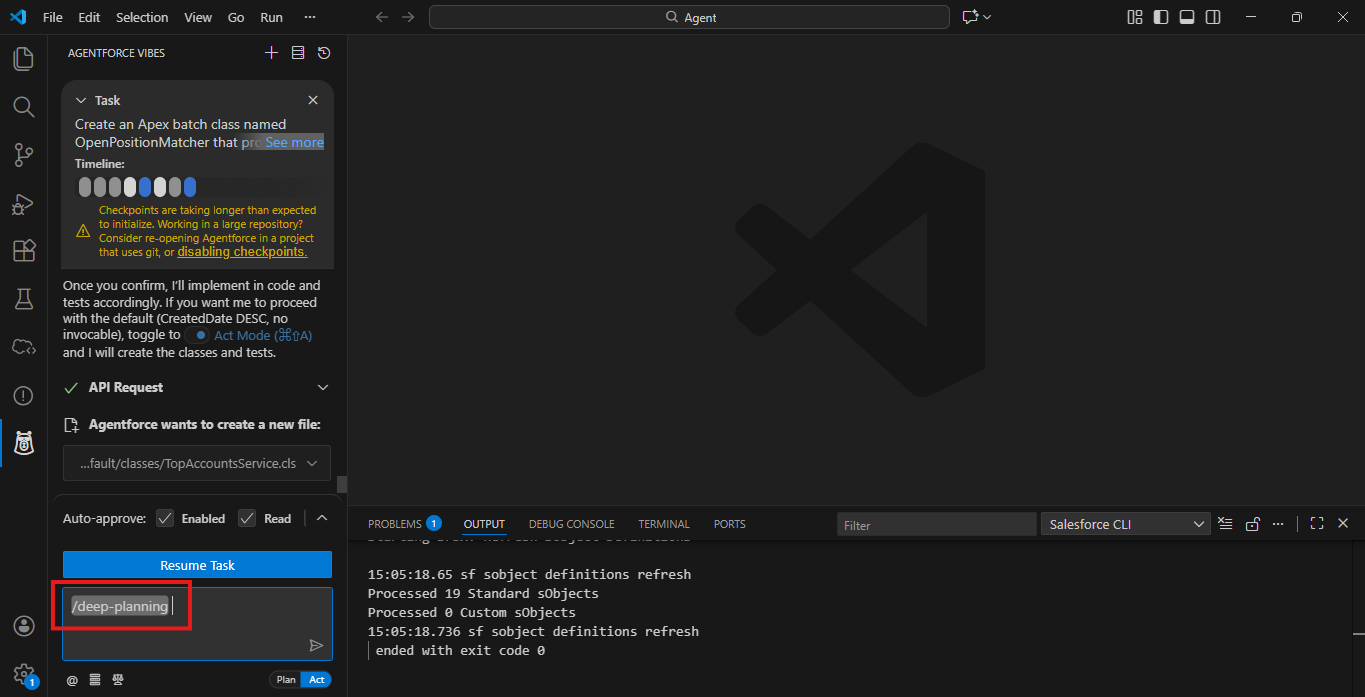
Steps to Enable Deep planning in VS Code
- Open VS Code and launch your Salesforce project.
Make sure the Agentforce extension is installed and your org is authenticated. - Open the Agentforce Panel
In the left-hand sidebar, click on the Agentforce icon to open the extension workspace. - Type / and select deep-planning, then write your prompt.
Choosing the Right Agentforce Vibes Mode
Selecting the right Agentforce Vibes mode depends on the nature of the task:
- Use Plan Mode when you need structure and clarity
- Use Act Mode when you need quick execution
- Use Deep Planning Mode when the task is complex and strategic
Using the appropriate mode ensures better outcomes and more controlled AI behavior.
Conclusion
Agentforce Vibes Modes give Salesforce teams precise control over how AI agents think, plan, and act. By applying Plan, Act, and Deep Planning modes effectively, teams can boost productivity, reduce risk, and unlock the full potential of Agentforce for both simple tasks and complex enterprise workflows.
By following the above blog instructions, you will be able to learn “Understanding Agentforce Vibes Modes: Plan, Act, and Deep Planning“. If you still have queries or any related problems, don’t hesitate to contact us at salesforce@greytrix.com. More details about our integration product are available on our website and Salesforce AppExchange.
We hope you may find this blog resourceful and helpful. However, if you still have concerns and need more help, please contact us at salesforce@greytrix.com.
About Us
Greytrix – a globally recognized and one of the oldest Sage Development Partner and a Salesforce Product development partner offers a wide variety of integration products and services to the end users as well as to the Partners and Sage PSG across the globe. We offer Consultation, Configuration, Training and support services in out-of-the-box functionality as well as customizations to incorporate custom business rules and functionalities that require apex code incorporation into the Salesforce platform.
Greytrix has some unique solutions for Cloud CRM such as Salesforce Sage integration for Sage X3, Sage 100 and Sage 300 (Sage Accpac). We also offer best-in-class Cloud CRM Salesforce customization and development services along with services such as Salesforce Data Migration, Integrated App development, Custom App development and Technical Support business partners and end users. Salesforce Cloud CRM integration offered by Greytrix works with Lightning web components and supports standard opportunity workflow. Greytrix GUMU™ integration for Sage ERP – Salesforce is a 5-star rated app listed on Salesforce AppExchange.
The GUMU™ Cloud framework by Greytrix forms the backbone of cloud integrations that are managed in real-time for processing and execution of application programs at the click of a button.
For more information on our Salesforce products and services, contact us at salesforce@greytrix.com. We will be glad to assist you.