
While migrating automation is usually straightforward, developers may encounter an unexpected issue: a Flow performing the same update as a Workflow Rule fails because of a Validation Rule.This happens because Workflow Rules and Flows behave differently during Salesforce’s order of execution.
Business Requirement
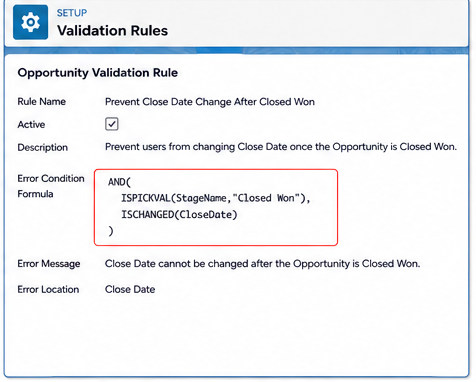
An organization has implemented a Validation Rule that prevents users from changing the Opportunity Close Date after the Opportunity reaches the Closed Won stage.
At the same time, the business requires the system to automatically update the Close Date to the actual deal closure date whenever the Opportunity is marked as Closed Won.
Previously, this automation was implemented using a Workflow Rule and worked as expected. After migrating it to a Record-Triggered Flow, the Flow started failing because the Validation Rule blocked the update.
Validation Rule
AND(
ISPICKVAL(StageName,"Closed Won"),
ISCHANGED(CloseDate)
)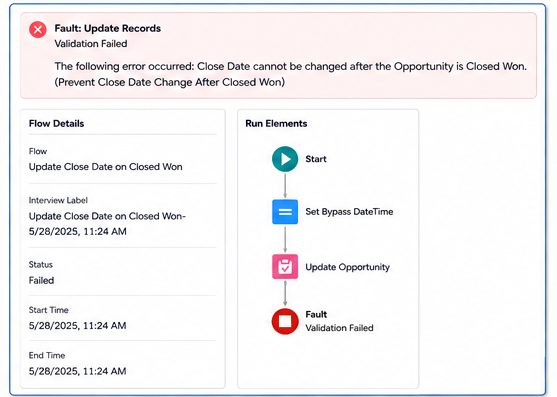
Why does this happen?
Workflow Rules can update records without re-triggering Validation Rules, whereas Record-Triggered Flows execute within the normal transaction lifecycle and must satisfy all Validation Rules.
Solution:
Instead of disabling the Validation Rule, we implemented a temporary automation bypass.
The solution uses:
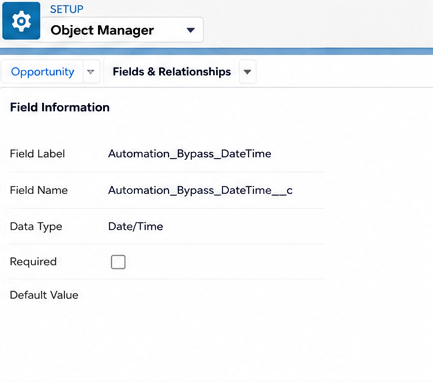
- Automation_Bypass_DateTime__c (Date/Time)
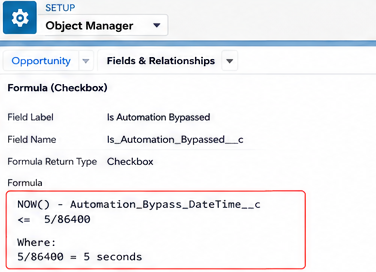
- Is_Automation_Bypassed__c (Formula Checkbox)
When the Flow starts, it stores the current timestamp in the Date/Time field. The Formula Checkbox returns TRUE if that timestamp is within the last five seconds.
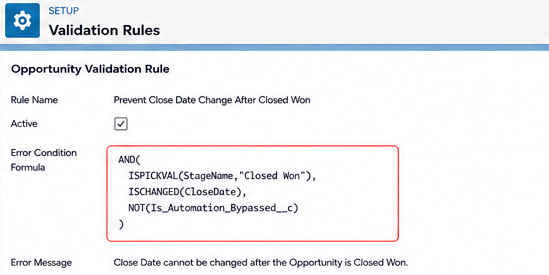
The Validation Rule is then updated to execute only when the checkbox is FALSE.
AND(
    ISPICKVAL(StageName,"Closed Won"),
    ISCHANGED(CloseDate),
    NOT(Is_Automation_Bypassed__c)
)
Finally, before updating the Opportunity, the Flow sets:
Automation_Bypass_DateTime__c = $Flow.CurrentDateTimeThis temporarily bypasses the Validation Rule, allowing the Flow to complete successfully.
After five seconds, the Formula Checkbox automatically evaluates back to FALSE, restoring the Validation Rule without requiring any cleanup logic.
Step 1: Create a Date/Time field
Create the following Date/Time field:
Step 2: Create a Formula Checkbox
Create the following Formula Checkbox:
Step 3: Update the Validation Rule
Update the Validation Rule to include:
NOT(Is_Automation_Bypassed__c)
Step 4: In the Flow, assign:
Automation_Bypass_DateTime__c =$Flow.CurrentDateTime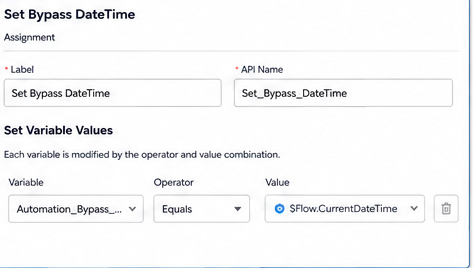
Flow Overview

Conclusion
Migrating Workflow Rules to Record-Triggered Flows can introduce unexpected validation failures because Flows don’t inherit the same validation bypass behavior as Workflow Rules.Using a temporary Date/Time field and a Formula Checkbox provides a simple, secure, and maintainable solution. It keeps Validation Rules active for users while allowing trusted automation to complete system-driven updates.
By following the above blog instructions, you will be able to learn “How to Bypass Validation Rules in Salesforce Record-Triggered Flows“. If you still have queries or any related problems, don’t hesitate to contact us at salesforce@greytrix.com. More details about our integration product are available on our website and Salesforce AppExchange.
We hope you may find this blog resourceful and helpful. However, if you still have concerns and need more help, please contact us at salesforce@greytrix.com.
About Us
Greytrix – a globally recognized and one of the oldest Sage Development Partner and a Salesforce Product development partner offers a wide variety of integration products and services to the end users as well as to the Partners and Sage PSG across the globe. We offer Consultation, Configuration, Training and support services in out-of-the-box functionality as well as customizations to incorporate custom business rules and functionalities that require apex code incorporation into the Salesforce platform.
Greytrix has some unique solutions for Cloud CRM such as Salesforce Sage integration for Sage X3, Sage 100 and Sage 300 (Sage Accpac). We also offer best-in-class Cloud CRM Salesforce customization and development services along with services such as Salesforce Data Migration, Integrated App development, Custom App development and Technical Support business partners and end users. Salesforce Cloud CRM integration offered by Greytrix works with Lightning web components and supports standard opportunity workflow. Greytrix GUMU™ integration for Sage ERP – Salesforce is a 5-star rated app listed on Salesforce AppExchange.
The GUMU™ Cloud framework by Greytrix forms the backbone of cloud integrations that are managed in real-time for processing and execution of application programs at the click of a button.
For more information on our Salesforce products and services, contact us at salesforce@greytrix.com. We will be glad to assist you.