
GUMU™ for Sage CRM – Sage X3 is a real-time, bi-directional integration solution that ensures seamless data flow between Sage CRM and Sage X3. One of its key strengths is its highly customizable architecture, enabling businesses to configure the integration based on their unique operational needs.
To further improve performance and flexibility in large-scale deployments, Greytrix has introduced a new enhancement:
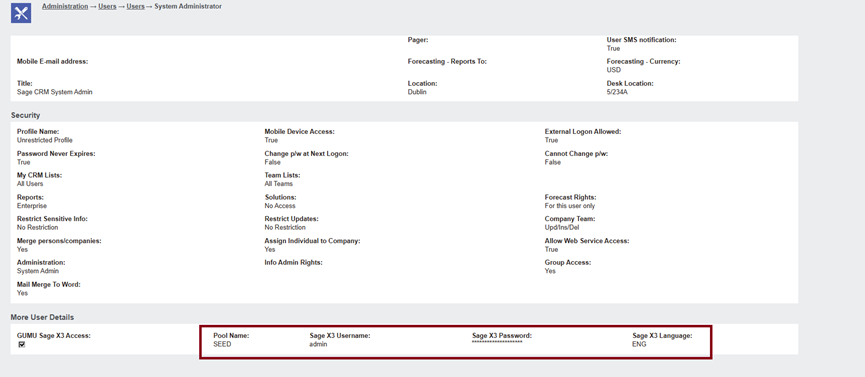
User-level connection settings for Sage X3 in GUMU™.
Why User-Level Connections?
Earlier, GUMU™ relied solely on a global configuration-level connection to Sage X3. In organizations with 50+ CRM users, this could result in:
- Increased system load
- Slower response times
- Longer process queues
- Occasional timeouts during peak usage
With the user-level connection enhancement, each CRM user can now be mapped directly to a dedicated Sage X3 pool, improving overall integration throughput.
Key Benefits of User-Level Integration
| Benefit | Impact |
|---|---|
| Improved performance | Connections distributed across users, reducing overload |
| Faster processing | Users avoid waiting for a single shared pool |
| Fewer timeouts | Busy periods handled more efficiently |
| Higher system stability | One user’s failure won’t affect others |
| Greater flexibility | Admins can allocate different pools per user |
If a user-level connection fails due to incorrect credentials, GUMU™ alerts the user with an error both in the UI and in integration logs, improving traceability and troubleshooting.
How It Works
Whenever an integration process runs, GUMU™:
1️⃣ Checks if the logged-in CRM user has assigned Sage X3 connection settings
2️⃣ Uses that connection to run the operation
3️⃣ If missing → falls back to the standard global configuration-level connection
This dynamic fallback approach ensures business continuity, even if some user-level settings aren’t configured.
How to Configure User-Level Sage X3 Connections
Follow these simple steps:
- Log in to Sage CRM
- Go to Administration → Users
- Open a CRM user record and click Edit
- Enter the Sage X3 connection details:
- Sage X3 Pool Name
- Sage X3 Username
- Sage X3 Password
- Sage X3 Language
- Save the record
- Refresh metadata for changes to take effect
Once configured, integration processes like promotions, account inquiry, order sync, etc., will run using the logged-in user’s assigned Sage X3 connection.
About Us
Greytrix – a globally recognized and one of the oldest Sage Development Partners is a one-stop solution provider for Sage ERP and Sage CRM organizational needs. Being acknowledged and rewarded for multi-man years of experience and expertise, we bring complete end-to-end assistance for your technical consultations, product customizations, data migration, system integrations, third-party add-on development, and implementation competence.
Greytrix has some unique integration solutions developed for Sage CRM with Sage ERPs namely Sage X3, Sage Intacct, Sage 100, Sage 500, and Sage 300. We also offer best-in-class Sage ERP and Sage CRM customization and development services to Business Partners, End Users, and Sage PSG worldwide. Greytrix helps in the migration of Sage CRM from Salesforce | ACT! | SalesLogix | Goldmine | Sugar CRM | Maximizer. Our Sage CRM Product Suite includes add-ons like Greytrix Business Manager, Sage CRM Project Manager, Sage CRM Resource Planner, Sage CRM Contract Manager, Sage CRM Event Manager, Sage CRM Budget Planner, Gmail Integration, Sage CRM Mobile Service Signature, Sage CRM CTI Framework.
Greytrix is a recognized Sage Champion Partner for GUMU™ Sage X3 – Sage CRM integration listed on Sage Marketplace and Sage CRM – Sage Intacct integration listed on Sage Intacct Marketplace. The GUMU™ Cloud framework by Greytrix forms the backbone of cloud integrations that are managed in real-time for the processing and execution of application programs at the click of a button.
For more information on our integration solutions, please contact us at sage@greytrix.com. We will be glad to assist you.