
In Salesforce, the Created Date is a system-generated field that records when a record is initially created. By design, this field is read-only to preserve data integrity. However, in certain scenarios like data migration or testing, Salesforce allows you to set this field under controlled conditions.
This guide provides a complete, step-by-step explanation of how to work with the Created Date field in Salesforce.
Understanding Created Date in Salesforce
- Auto-generated by Salesforce at record creation
- Read-only by default
- Cannot be modified after the record is inserted
- Can only be set during record creation with special permissions
When You Can Edit Created Date
You can set the Created Date only in the following cases:
- During data migration
- While inserting records using Data Loader or Apex
- When audit field permissions are enabled
Step-by-Step Setup to Enable Created Date Editing
Step 1: Enable Audit Field Settings
- Go to Setup
- Search for User Interface
- Enable the following options:
- Set Audit Fields upon Record Creation
- Update Records with Inactive Owners
- Click Save
Step 2: Create and Assign Permission Set
- Navigate to Setup → Permission Sets
- Create a new Permission Set
- Go to System Permissions
- Enable:
- Set Audit Fields upon Record Creation
- Assign this Permission Set to your user
Note: This permission is not available directly in Profiles (including System Administrator).
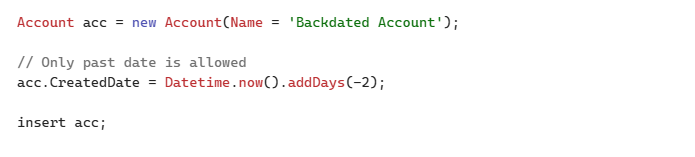
Step 3: Use Apex to Set Created Date
You can set the Created Date while inserting records using Apex (with proper permissions enabled).
Important Considerations
Editing Created Date in Salesforce is restricted by design to ensure:
- Data accuracy
- Compliance with audit standards
- Reliable historical tracking
By following the correct setup and understanding these limitations, you can safely manage Created Date for migration and testing scenarios without unexpected issues.
Conclusion
Although the Created Date field is read-only by default, Salesforce provides a controlled way to set it during record creation when audit field permissions are enabled. This is especially useful for data migration and testing purposes. By properly configuring permissions and using tools like Apex or Data Loader, you can manage this field effectively while maintaining data integrity.
By following the above blog instructions, you will be able to learn “How to Edit Created Date in Salesforce (Step-by-Step Guide)“. If you still have queries or any related problems, don’t hesitate to contact us at salesforce@greytrix.com. More details about our integration product are available on our website and Salesforce AppExchange.
We hope you may find this blog resourceful and helpful. However, if you still have concerns and need more help, please contact us at salesforce@greytrix.com.
About Us
Greytrix – a globally recognized and one of the oldest Sage Development Partner and a Salesforce Product development partner offers a wide variety of integration products and services to the end users as well as to the Partners and Sage PSG across the globe. We offer Consultation, Configuration, Training and support services in out-of-the-box functionality as well as customizations to incorporate custom business rules and functionalities that require apex code incorporation into the Salesforce platform.
Greytrix has some unique solutions for Cloud CRM such as Salesforce Sage integration for Sage X3, Sage 100 and Sage 300 (Sage Accpac). We also offer best-in-class Cloud CRM Salesforce customization and development services along with services such as Salesforce Data Migration, Integrated App development, Custom App development and Technical Support business partners and end users. Salesforce Cloud CRM integration offered by Greytrix works with Lightning web components and supports standard opportunity workflow. Greytrix GUMU™ integration for Sage ERP – Salesforce is a 5-star rated app listed on Salesforce AppExchange.
The GUMU™ Cloud framework by Greytrix forms the backbone of cloud integrations that are managed in real-time for processing and execution of application programs at the click of a button.
For more information on our Salesforce products and services, contact us at salesforce@greytrix.com. We will be glad to assist you.
Related Posts