
Validation Rules are one of Salesforce’s most powerful declarative features for maintaining data quality. They ensure that users enter complete and accurate information by preventing records from being saved when business rules are violated.
However, not every update originates from a user. Modern Salesforce implementations rely heavily on Record-Triggered Flows, Scheduled Flows, Platform Events, and integrations to automate business processes. These automated processes often need to update fields that users are intentionally restricted from editing.
For example, an integration may need to update an Opportunity that has already been marked as Closed Won, or a Scheduled Flow may need to populate renewal information on records that are otherwise locked by Validation Rules.
The challenge is enabling trusted automation to perform these updates without weakening the Validation Rules that protect data quality for end users.
In this blog, we’ll explore a secure, scalable, and reusable approach using Custom Permissions to selectively bypass Validation Rules for Salesforce automation.
Business Scenario
Consider a technology company that uses Salesforce to manage its sales pipeline.
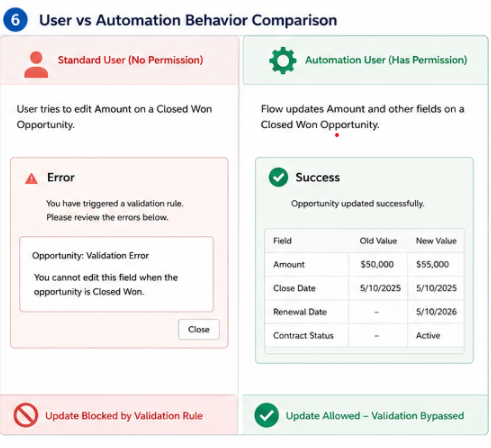
To maintain the integrity of completed deals, the Salesforce Administrator has implemented a Validation Rule that prevents users from editing a Closed Won Opportunity.
Business Rule
Once an Opportunity reaches Closed Won, users should not be able to modify important business fields such as:
- Opportunity Name
- Amount
- Close Date
- Contract Start Date
This rule works perfectly for sales users.
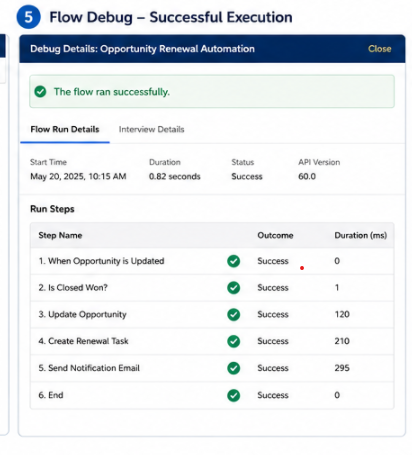
However, the company introduces a Record-Triggered Flow that automatically updates renewal information after the Opportunity is won.
The Flow needs to:
- Calculate the Renewal Date
- Populate the Renewal Owner
- Update Contract Status
- Generate Renewal Reminders
When tested, the Flow fails because the Validation Rule blocks the update.
The business now faces three options:
- Disable the Validation Rule and risk poor data quality.
- Rewrite the automation in Apex.
- Implement a controlled Validation Rule bypass mechanism.
The third option provides the best balance between automation and governance.
Solution Overview
Instead of disabling the Validation Rule, we’ll allow only trusted automation users to bypass it using Custom Permissions.
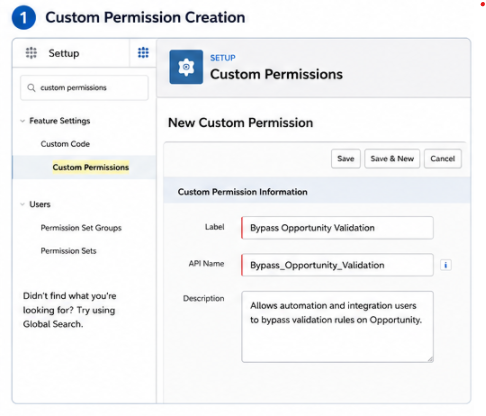
Step 1: Create a Custom Permission
Navigate to:
Setup → Custom Permissions
Create a new Custom Permission.
Example:
Bypass_Opportunity_Validation
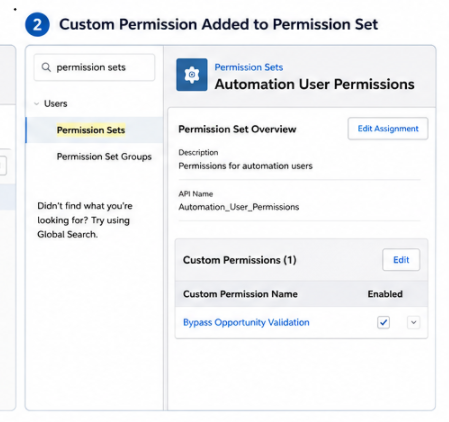
Step 2: Create a Permission Set
Navigate to:
Setup → Permission Sets
Create a new Permission Set.
Example:
Automation User Permissions
Add the newly created Custom Permission to the Permission Set.
Assign this Permission Set only to trusted users such as:
- Integration User
- Automation User
- Middleware User
Important: Do not assign this Permission Set to regular business users.
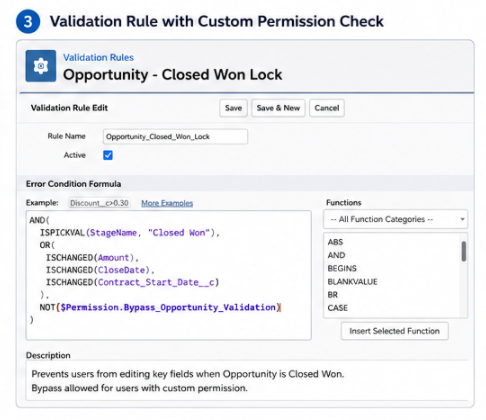
Step 3: Modify the Validation Rule
Suppose your existing Validation Rule prevents users from editing Closed Won Opportunities.
Before
AND(
ISPICKVAL(StageName,"Closed Won"),
ISCHANGED(Amount)
)
This rule blocks everyone.
After
Update the Validation Rule to check for the Custom Permission.
AND(
ISPICKVAL(StageName,"Closed Won"),
ISCHANGED(Amount),
NOT($Permission.Bypass_Opportunity_Validation)
)
Now the Validation Rule behaves intelligently.
- If the running user does not have the Custom Permission → the Validation Rule executes normally.
- If the running user has the Custom Permission → the Validation Rule is skipped.
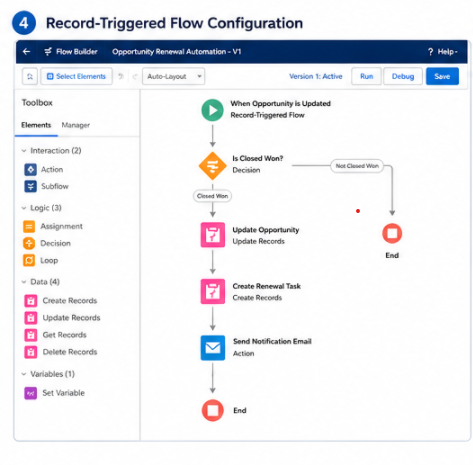
Step 4: Configure Your Flow
Create a Record-Triggered Flow that performs the required updates.
Since the Flow runs using a user with the Custom Permission, it can successfully update the record without being blocked by the Validation Rule.
Benefits of This Approach
Using Custom Permissions to bypass Validation Rules offers several advantages:
- Secure and controlled access to bypass Validation Rules.
- No Apex code required.
- Reusable across multiple Validation Rules.
- Easy to maintain and scale.
- Preserves data quality for business users.
- Allows trusted automation and integrations to run without interruption.
- Aligns with Salesforce security and governance best practices.
Conclusion
Validation Rules and automation should complement each other—not compete.
While Validation Rules protect the quality and consistency of Salesforce data, automated business processes often need the flexibility to update records that users cannot modify.
Using Custom Permissions provides a secure, declarative, and scalable way to selectively bypass Validation Rules without compromising security or maintainability. By granting bypass access only to trusted automation and integration users, organizations can maintain strong data governance while ensuring that Flows and integrations continue to operate reliably and efficiently.
By following the above blog instructions, you will be able to learn “How to Bypass Validation Rules in Salesforce Flow Using Custom Permissions“. If you still have queries or any related problems, don’t hesitate to contact us at salesforce@greytrix.com. More details about our integration product are available on our website and Salesforce AppExchange.
We hope you may find this blog resourceful and helpful. However, if you still have concerns and need more help, please contact us at salesforce@greytrix.com.
About Us
Greytrix – a globally recognized and one of the oldest Sage Development Partner and a Salesforce Product development partner offers a wide variety of integration products and services to the end users as well as to the Partners and Sage PSG across the globe. We offer Consultation, Configuration, Training and support services in out-of-the-box functionality as well as customizations to incorporate custom business rules and functionalities that require apex code incorporation into the Salesforce platform.
Greytrix has some unique solutions for Cloud CRM such as Salesforce Sage integration for Sage X3, Sage 100 and Sage 300 (Sage Accpac). We also offer best-in-class Cloud CRM Salesforce customization and development services along with services such as Salesforce Data Migration, Integrated App development, Custom App development and Technical Support business partners and end users. Salesforce Cloud CRM integration offered by Greytrix works with Lightning web components and supports standard opportunity workflow. Greytrix GUMU™ integration for Sage ERP – Salesforce is a 5-star rated app listed on Salesforce AppExchange.
The GUMU™ Cloud framework by Greytrix forms the backbone of cloud integrations that are managed in real-time for processing and execution of application programs at the click of a button.
For more information on our Salesforce products and services, contact us at salesforce@greytrix.com. We will be glad to assist you.