
Have you ever faced this situation in Salesforce?
You Login As a User, perform your testing, click Logout… and suddenly you’re logged out of Salesforce completely.
Instead of returning to your Admin session, Salesforce redirects you straight to the login page.
If this sounds familiar, don’t worry – this behavior is completely expected and is controlled by a single session setting in Salesforce.
The Setting Behind the Issue
This behavior is driven by a session configuration in Salesforce.
Navigate to:
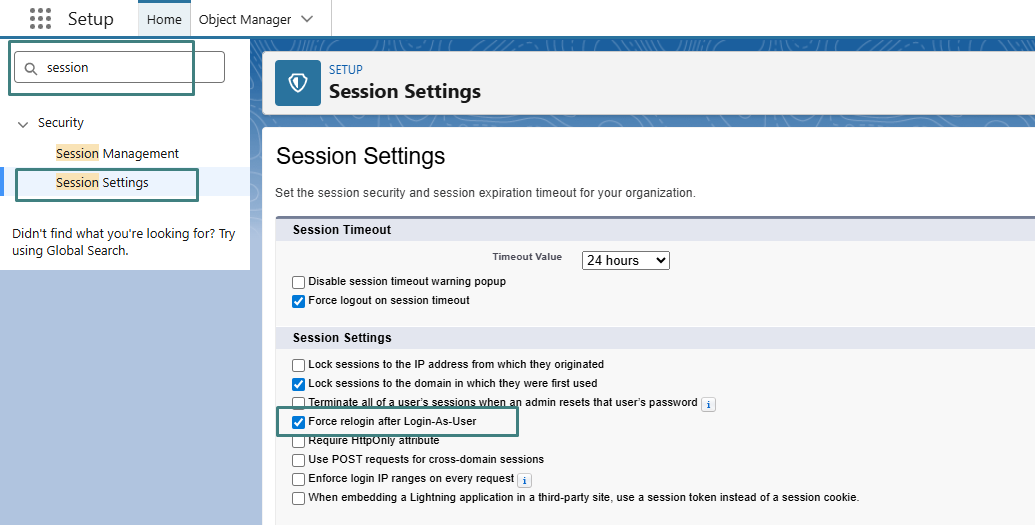
Setup → Session Settings
Look for the option:
Force relogin after Login-As-User
When this setting is enabled, Salesforce forces a full logout once you exit a Login As User session, instead of returning you to your original Admin login.
How to Fix It
- Go to Setup → Session Settings
- Uncheck the option “Force relogin after Login-As-User”
- Click Save
What Happens After This?
Once the setting is disabled:
- Logging out from a Login As User session returns you to your Admin session
- You remain logged in to Salesforce
- There’s no need to log in again
Why This Is Useful for Salesforce Admins
ThiThis small configuration tweak delivers a major productivity boost, especially for Admins who:
- Frequently troubleshoot user issues
- Test permissions and access levels
- Validate profiles and permission set behavior
- Perform repeated testing across multiple users
A simple setting that saves valuable time every single day.
Conclusion
Salesforce’s Force relogin after Login-As-User setting is designed for security, but it can disrupt daily admin workflows if left enabled. By adjusting this session setting, you can seamlessly switch back to your Admin session after testing without repeated logins. This quick optimization improves efficiency, streamlines troubleshooting, and makes everyday Salesforce administration smoother.
By following the above blog instructions, you will be able to learn “Why Salesforce Logs You Out After “Login As User” – And How to Fix It Instantly“. If you still have queries or any related problems, don’t hesitate to contact us at salesforce@greytrix.com. More details about our integration product are available on our website and Salesforce AppExchange.
We hope you may find this blog resourceful and helpful. However, if you still have concerns and need more help, please contact us at salesforce@greytrix.com.
About Us
Greytrix – a globally recognized and one of the oldest Sage Development Partner and a Salesforce Product development partner offers a wide variety of integration products and services to the end users as well as to the Partners and Sage PSG across the globe. We offer Consultation, Configuration, Training and support services in out-of-the-box functionality as well as customizations to incorporate custom business rules and functionalities that require apex code incorporation into the Salesforce platform.
Greytrix has some unique solutions for Cloud CRM such as Salesforce Sage integration for Sage X3, Sage 100 and Sage 300 (Sage Accpac). We also offer best-in-class Cloud CRM Salesforce customization and development services along with services such as Salesforce Data Migration, Integrated App development, Custom App development and Technical Support business partners and end users. Salesforce Cloud CRM integration offered by Greytrix works with Lightning web components and supports standard opportunity workflow. Greytrix GUMU™ integration for Sage ERP – Salesforce is a 5-star rated app listed on Salesforce AppExchange.
The GUMU™ Cloud framework by Greytrix forms the backbone of cloud integrations that are managed in real-time for processing and execution of application programs at the click of a button.
For more information on our Salesforce products and services, contact us at salesforce@greytrix.com. We will be glad to assist you.
Related Posts