
Salesforce provides several ways to execute processes asynchronously using Apex. Asynchronous processing allows operations to run in the background, which helps avoid blocking user transactions and prevents hitting governor limits during heavy processing.
Three of the most commonly used asynchronous Apex mechanisms are:
- Future Methods
- Queueable Apex
- Batch Apex
Although all three allow operations to run asynchronously, they differ significantly in terms of capabilities, limitations, and ideal use cases. Choosing the right approach is important for building scalable and efficient Salesforce solutions.
This blog explains the differences between Future methods, Queueable Apex, and Batch Apex, and provides guidance on when each should be used.
Why Asynchronous Apex Is Important
Salesforce enforces strict governor limits to ensure fair resource usage across the platform. Running Salesforce enforces strict governor limits to ensure fair resource usage across the platform. Running heavy operations in synchronous transactions can easily lead to:
- CPU time limit errors
- DML limits
- Long-running transactions
- Poor user experience
Asynchronous Apex allows these operations to be processed in the background, improving performance, scalability, and system stability.
Overview of Async Apex Options
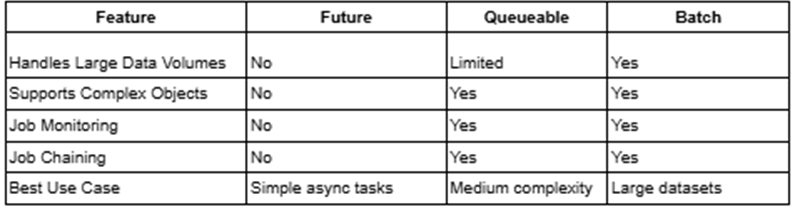
Below is a quick comparison of Future methods, Queueable Apex, and Batch Apex.
Comparison Table
Future Methods
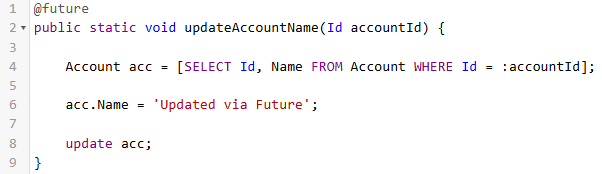
Future methods are the simplest way to run Apex asynchronously. They allow a method to execute in the background after the current transaction completes.
Future methods are declared using the @future annotation.
Key Characteristics
- Must be static methods
- Accept only primitive parameters
- No support for job monitoring
- No support for job chaining
Example
When to Use Future Method
Future methods are suitable for:
- Simple background processing
- Small record updates
- Trigger-based asynchronous callouts
- Lightweight operations
Limitations
- Cannot pass complex objects
- No tracking of job execution
- No support for chaining jobs
- Not suitable for processing large datasets
Queueable Apex
Queueable Apex was introduced to address many of the limitations of future methods. It allows developers to run more complex asynchronous jobs and provides better control over execution.
Queueable classes implement the Queueable interface.
Key Characteristics
- Supports complex objects and collections
- Allows job chaining
- Supports monitoring through AsyncApexJob
- More flexible than Future methods
Example
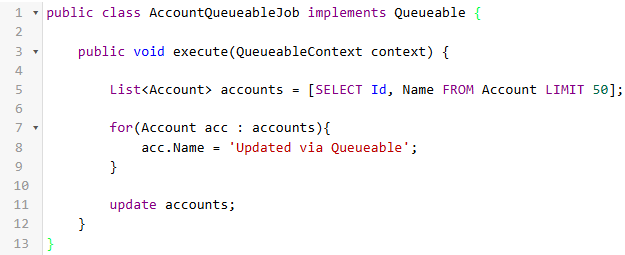
Enqueue Job
System.enqueueJob(new AccountQueueableJob());
When to Use Queueable Apex
Queueable Apex is ideal when:
- Logic is more complex than a Future method
- You need to pass objects or collections
- You want to chain asynchronous jobs
- You need to monitor job execution
Queueable Apex is often considered the modern replacement for Future methods.
Batch Apex
Batch Apex is designed to process large volumes of records efficiently. It breaks records into smaller chunks called batches, allowing each batch to run as a separate transaction.
This approach helps manage governor limits and enables processing of millions of records.
Key Characteristics
- Implements Database.Batchable
- Processes records in chunks (default size: 200)
- Supports millions of records
- Provides job monitoring
- Allows batch chaining
Example
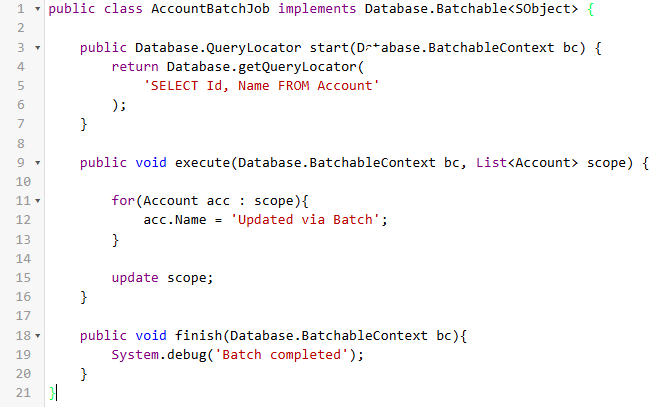
Execute batch
Database.executeBatch(new AccountBatchJob());
When to Use Batch Apex
Batch Apex is best used when:
- Processing large datasets
- Performing data cleanup operations
- Running scheduled background jobs
- Handling data migration or integration tasks
Real-World Decision Guide
Here are some practical scenarios to help choose the right asynchronous approach.
Scenario 1: Update 20 records asynchronously from a trigger
Recommended Approach: Queueable Apex
Reason: Supports complex objects and provides better flexibility.
Scenario 2: Make a simple callout after a record update
Recommended Approach: Future Method
Reason: Lightweight and easy to implement.
Scenario 3: Process 500,000 records overnight
Recommended Approach: Batch Apex
Reason: Designed for large-scale data processing.
Scenario 4: Chain multiple asynchronous jobs
Recommended Approach: Queueable Apex
Reason: Supports job chaining.
Common Mistakes Developers Make
Some common mistakes include:
- Using Future methods for complex logic
- Using Batch Apex for small data processing
- Ignoring Queueable Apex as a better alternative
- Not monitoring asynchronous jobs
Selecting the right async mechanism is essential for building scalable Salesforce applications.
Key Takeaways
- Future methods are suitable for simple asynchronous tasks.
- Queueable Apex offers greater flexibility and supports complex processing.
- Batch Apex is ideal for handling large datasets.
- When unsure, Queueable Apex is usually the best starting point.
Conclusion
Understanding the differences between Future methods, Queueable Apex, and Batch Apex helps developers design efficient, scalable, and maintainable Salesforce solutions.
Each asynchronous mechanism serves a specific purpose. By evaluating your data volume, complexity, and monitoring requirements, you can select the right asynchronous approach and build more robust Salesforce applications.
By following the above blog instructions, you will be able to learn “Apex Batch vs Queueable vs Future in Salesforce: When to Use Each Asynchronous Apex Method“. If you still have queries or any related problems, don’t hesitate to contact us at salesforce@greytrix.com. More details about our integration product are available on our website and Salesforce AppExchange.
We hope you may find this blog resourceful and helpful. However, if you still have concerns and need more help, please contact us at salesforce@greytrix.com.
About Us
Greytrix – a globally recognized and one of the oldest Sage Development Partner and a Salesforce Product development partner offers a wide variety of integration products and services to the end users as well as to the Partners and Sage PSG across the globe. We offer Consultation, Configuration, Training and support services in out-of-the-box functionality as well as customizations to incorporate custom business rules and functionalities that require apex code incorporation into the Salesforce platform.
Greytrix has some unique solutions for Cloud CRM such as Salesforce Sage integration for Sage X3, Sage 100 and Sage 300 (Sage Accpac). We also offer best-in-class Cloud CRM Salesforce customization and development services along with services such as Salesforce Data Migration, Integrated App development, Custom App development and Technical Support business partners and end users. Salesforce Cloud CRM integration offered by Greytrix works with Lightning web components and supports standard opportunity workflow. Greytrix GUMU™ integration for Sage ERP – Salesforce is a 5-star rated app listed on Salesforce AppExchange.
The GUMU™ Cloud framework by Greytrix forms the backbone of cloud integrations that are managed in real-time for processing and execution of application programs at the click of a button.
For more information on our Salesforce products and services, contact us at salesforce@greytrix.com. We will be glad to assist you.
Related Posts