
Batch Apex is one of the most powerful tools in Salesforce for handling large volumes of data asynchronously. It allows developers to process millions of records efficiently without hitting governor limits. However, with great power comes great responsibility and one of the most common pitfalls when working with batch jobs is recursive batch execution.
In this blog, we’ll explore what recursive batch execution is, why it happens, and how you can structure your batch jobs to avoid this costly mistake.
What is Recursive Batch Execution?
Recursive batch execution occurs when a batch class unintentionally schedules or executes another instance of itself while it is already running. This creates a loop where one batch spawns another, which spawns another, and so on. Before long, you’ll run into governor limits or see errors like:
System.AsyncException: Maximum number of Apex scheduled jobs or batch executions has been reached.
Cause:
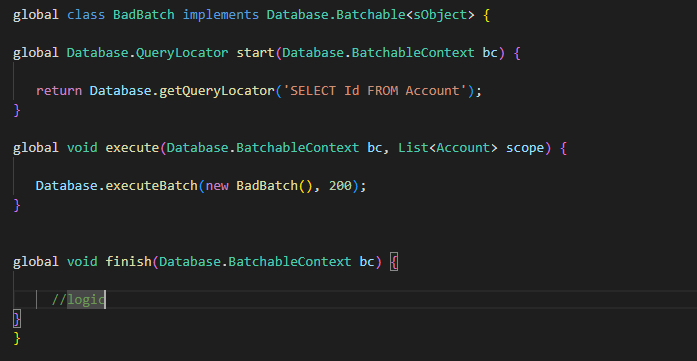
This typically occurs when developers place a call to Database.executeBatch() inside one of the batch class methods (start, execute, or finish) without any safeguard.
Here is an example:
How to Avoid Recursive Batch Execution
Fortunately, there are several safe strategies to avoid recursive execution:
- Use a Static Boolean Flag
A static variable is shared across the transaction and can be used as a simple guard.
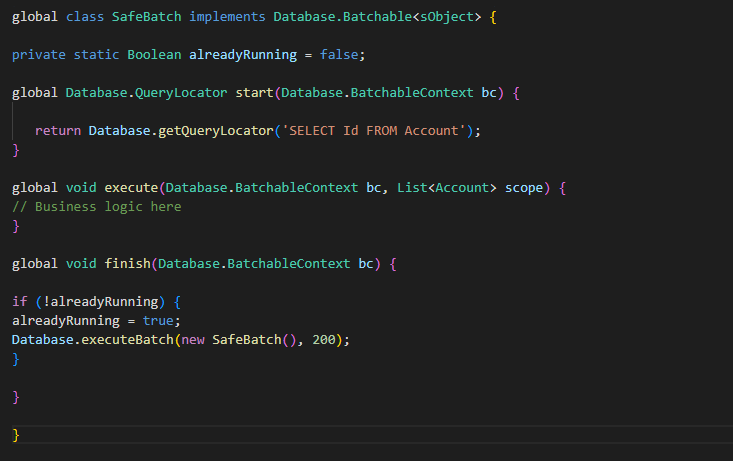
This ensures the batch is only executed once in a given transaction.
- Use a Custom Setting or Custom Metadata
Static variables reset after the transaction ends. If you need longer-term control, create a Custom Setting (e.g., Batch_Control__c) with a checkbox Is_Running__c.
- Before executing: Check if Is_Running__c = true. If yes, skip execution.
- At the start: Set Is_Running__c = true.
- At the end: Reset Is_Running__c = false.
This gives you persistent control across transactions.
- Use Schedulers Instead of Chaining
If your use case requires running the batch periodically, don’t chain it inside itself. Instead, schedule it:

This way, Salesforce runs your batch at defined intervals without recursion.
By following these detailed steps, you can effectively learn how Batch Apex can efficiently process large data volumes while avoiding pitfalls like recursive execution, ensuring smooth and efficient operations in Salesforce.
If you still have queries or any related problems, don’t hesitate to contact us at salesforce@greytrix.com. More details about our integration product are available on our website and Salesforce AppExchange.
We hope you may find this blog resourceful and helpful. However, if you still have concerns and need more help, please contact us at salesforce@greytrix.com.
About Us
Greytrix – a globally recognized and one of the oldest Sage Development Partner and a Salesforce Product development partner offers a wide variety of integration products and services to the end users as well as to the Partners and Sage PSG across the globe. We offer Consultation, Configuration, Training and support services in out-of-the-box functionality as well as customizations to incorporate custom business rules and functionalities that require apex code incorporation into the Salesforce platform.
Greytrix has some unique solutions for Cloud CRM such as Salesforce Sage integration for Sage X3, Sage 100 and Sage 300 (Sage Accpac). We also offer best-in-class Cloud CRM Salesforce customization and development services along with services such as Salesforce Data Migration, Integrated App development, Custom App development and Technical Support business partners and end users. Salesforce Cloud CRM integration offered by Greytrix works with Lightning web components and supports standard opportunity workflow. Greytrix GUMU™ integration for Sage ERP – Salesforce is a 5-star rated app listed on Salesforce AppExchange.
The GUMU™ Cloud framework by Greytrix forms the backbone of cloud integrations that are managed in real-time for processing and execution of application programs at the click of a button.
For more information on our Salesforce products and services, contact us at salesforce@greytrix.com. We will be glad to assist you.
Related Posts