
Salesforce CRM is where customer relationships begins. An ERP is where those relationships are fulfilled. Both play a key role in an organization’s operations. If connected they can be a game changing duo.
The integration brings about a wealth of benefits, including real-time data visibility, a 360-degree view, two-way data sharing, and automation. Integration Solutions like GUMU™ make this a reality through a no-code, single-click SaaS platform.
According to Gartner, enterprises spend 30–40% of their IT budget simply managing the chaos of disconnected systems — money that could be better spent on growth. Integrating Salesforce with your ERP is one of the most direct ways to cut that complexity and maximize business potential.
In this blog, we’ll explore how Salesforce and ERP integration can transform isolated business functions into a synchronized growth machine.
To start with let’s look at the top 5 benefits of ERP Integration with Salesforce:
- Real-time / Live Data Visibility
With its 2-way synchronization capability, GUMU™ syncs records between your ERP system and Salesforce. It gives users access to latest customer data and details about inventory, order and finances.
- 360-Degree Customer View
By exposing ERP records alongside CRM data, GUMU™ creates a comprehensive customer profile in Salesforce. This cuts down the need to navigate multiple systems just to access operational, financial and other information.
- Elimination of Duplicate Data Entry
Without integration, the data has to be entered manually multiple times. This not only wastes time but invites errors. GUMU™ automates the flow and keeps the records consistent, so that teams can focus on productive work rather than data entry.
- Faster Order-to-Cash Cycle
When a deal closes in SF, the order can automatically trigger fulfilment along with invoicing and inventory updates in the ERP. Hence the entire revenue cycle speeds up with fewer delays and minimal handoffs.
- Better Forecasting & Reporting
The integration combines CRM pipeline data with ERP inventory and financial details. The result – leadership team has a unified picture. This enables more accurate demand forecasting, better resource planning, and strong business decisions.
When connecting core platforms one crucial question inevitably rises to the top of one’s mind: How much is this going to cost, and how does it actually work? Worry not—we are going to break down the numbers, timelines, and returns you can expect in the next section.
ERP Integration with Salesforce: Cost, Timeline, and ROI Explained
While the upfront investment for Salesforce integration with ERP systems may vary, the long-term ROI can be substantial. According to Forrester organizations achieved $798,000 in technology savings through the consolidation and decommissioning of legacy systems.
To help you plan effectively, let’s dive deeper into these three key aspects of Salesforce ERP integration.
Cost
Complexity of the project can heavily influence the cost of the integration. Number of modules, records to be synced, custom workflows and the level of customization needs to be looked into. While simple integrations can be completed with minimal effort, enterprise -wide implementations/ larger ones demand more planning, development and testing.
Timeline
The implementation timeline typically ranges from 6 to 8 weeks, though it ultimately depends on the size and complexity of the integration. Projects involving multiple business functions, extensive data migration, and custom business logic may require additional time. A well-planned implementation roadmap, thorough testing, and phased rollouts help ensure a smooth and successful go-live.
ROI
The ROI from the integration is built on the results that compound over time.
Businesses report a 29% increase in sales revenue, 34% improvement in sales productivity, and 42% uplift in forecast accuracy — gains that deepen further when ERP data on inventory, financials, and order status enters the picture.
Automated workflows, unified data, and real time 360-degree visibility reduces inefficiencies significantly. This shifts the integration from an implementation cost to a smart business asset.
Choosing the Right Integration: A Side-by-Side Comparison
| Category | Tool | Best For | Technical Difference |
|---|---|---|---|
| Enterprise iPaaS | MuleSoft Anypoint | Large enterprises, complex API-led architecture | API-led connectivity with reusable, layered APIs (system/process/experience layers) |
| Dell Boomi | Large enterprises wanting vendor independence | Single-instance, multi-tenant cloud architecture — no per-client infrastructure | |
| Workato | Mid-to-large orgs needing automation + integration | Recipe-based (trigger-action) logic instead of API orchestration | |
| Jitterbit | Mid-market Salesforce-heavy orgs | Harmony engine runs integrations on distributed agents close to source data | |
| Informatica | Data-centric, governance-heavy use cases | CDGC (Cloud Data Governance & Catalog) layer for metadata-driven governance | |
| Mid-Market / SMB-Friendly | Zapier | Small teams, marketing-led automation | Polling/webhook-based triggers, no persistent middleware layer |
| Celigo | Growing companies, NetSuite–Salesforce pairs | Pre-built “integration apps” (packaged flows) vs. building from scratch | |
| Tray.io | Business technologists, GTM stack integrations | Visual workflow builder with conditional logic, no coding required | |
| Native Salesforce-Built | Salesforce Flow | Simple, in-platform automation | Runs on Salesforce’s own execution engine — no external middleware or hop |
| External Services | Calling external REST APIs declaratively | Auto-generates schema from OpenAPI spec, exposed as invocable Flow actions | |
| Platform Events | Event-driven, real-time triggers | Pub/sub model built on Salesforce’s Event Bus, not polling | |
| Heroku Connect | Salesforce–Heroku Postgres sync | Sync is polling-based (not real-time push), mapped via Postgres schema | |
| Developer-First | Apache Camel | Code-driven integration projects | Enterprise Integration Patterns (EIP) via DSL — routes/transforms in code |
| Nango | Technical teams wanting full control | Config lives in YAML in your repo — integration-as-code, version-controlled | |
| Merge | Broad unified API coverage | Normalizes multiple vendor APIs into one common data model/schema | |
| ERP-Specific Connectors | GUMU™ (Greytrix) | Sage (Intacct, X3, 100, 300) & Acumatica ↔ Salesforce | Bi-directional, near-real-time sync via dynamic field mapping, no middleware hop |
| Dell Boomi | NetSuite–Salesforce | Uses Boomi’s cloud-native runtime rather than an ERP-native connector | |
| Celigo | NetSuite–Salesforce | Pre-built NetSuite connector with native SuiteScript-level hooks |
Essentials to Look for Before You Integrate
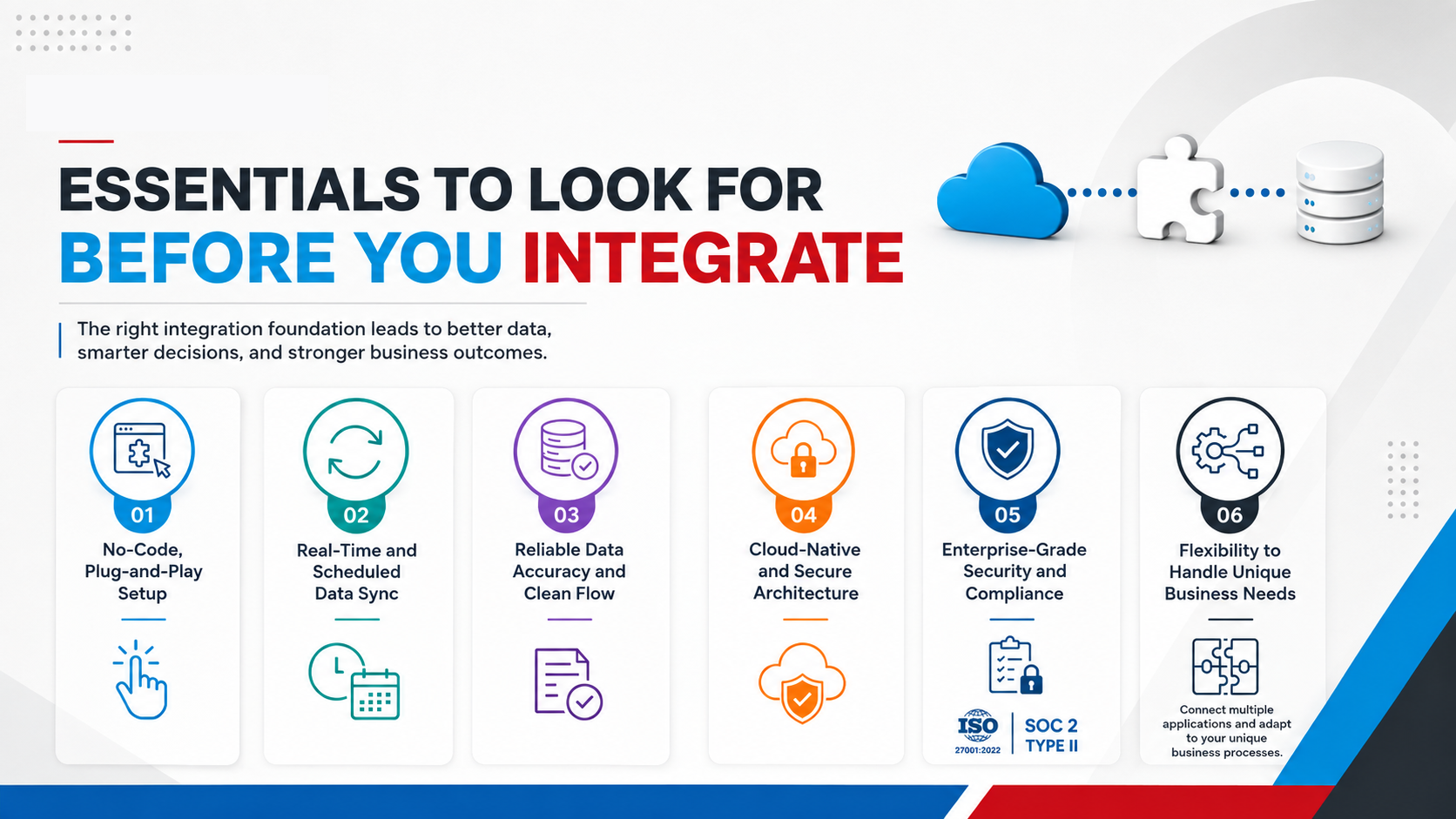
1. No-Code, Plug-and-Play Setup
A good integration should not require months of custom development. Look for a solution that offers simple configuration with minimal technical overhead — one that your team can deploy without writing code, reducing both implementation time and dependency on IT.
2. Real-Time and Scheduled Data Sync
The integration should support data synchronizations, both – on demand and scheduled, helping teams to always work with current information. Because, stale data between your CRM and ERP can lead to order errors, forecast mismatches and customer service failures.
3. Reliable Data Accuracy and Clean Flow
Before you integrate, confirm that the platform can import clean data while preserving your existing business logic. GUMU™ is built around this principle, enabling flawless data flow between systems with a uniform organisational view, so nothing gets corrupted or duplicated in transit.
4. Cloud-Native and Secure Architecture
Your integration layer should be serverless, securely hosted, and independently deployable. This helps with scalability, parallel execution, and resilience without adding infrastructure overhead to your IT team.
5. Enterprise-Grade Security and Compliance
An integration platform should meet globally recognized security standards such as ISO 27001:2022 and SOC 2 Type II. These certifications indicate that the platform follows established best practices for information security, data protection, risk management, and operational controls—helping ensure sensitive CRM and ERP data remains secure throughout the integration lifecycle.
6. Flexibility to Handle Unique Business Needs
No two businesses operate the same way, which is why your integration platform should support customization and connect multiple applications beyond a single CRM–ERP pair. If you’re evaluating ERP systems that integrate with Salesforce, GUMU™ by Greytrix connects Salesforce with leading ERPs—including Sage Intacct, Sage X3, Sage 100, Sage 300, and Acumatica—through dynamic field mapping and tailored integration services that adapt to your unique business processes, not the other way around.
GUMU™: Connecting Salesforce and Sage, the Right Way
Choosing the right integration platform is just as important as choosing the right CRM or ERP. GUMU™ is designed to provide a dependable connection between Salesforce CRM and Sage ERP systems, including Sage Intacct, Sage X3, Sage 100, and Sage 300. It brings together the capabilities businesses expect from an enterprise-grade integration solution, including secure data exchange, bi-directional synchronization, flexible field mapping, configurable business logic, and scalable deployment. Whether you’re synchronizing customer records, sales orders, inventory, pricing, or financial data, GUMU™ helps ensure that Salesforce and Sage remain connected, allowing teams across sales, finance, and operations to work with consistent and up-to-date information from a single source of truth.
Wrapping up
An ERP integrated with Salesforce isn’t merely connecting two systems, it is a about creating a business that is agile, smart and confident in its decisions. As we move ahead in the 21st century, customer expectation, operations complexity and siloed data can quickly become a hurdle.
A well-planned integration like GUMU™ builds a strong foundation, enabling informed decision making, collaboration, and scalability which is long term.
No matter if you are looking to strengthen your daily operations or preparing for future growth, a robust integration is one of the best investments that can create a lasting value for your business.
Frequently answered questions (FAQs)
1. Why should businesses integrate Salesforce with an ERP system?
Integrating Salesforce with an ERP eliminates data silos as it connects customer, financial, inventory, and operational data. The result – improved visibility, reduced manual work, and agile business decisions.
2. How long does Salesforce and ERP integration typically take?
The timeline depends on factors such as the ERP system, business complexity, custom workflows, and data migration requirements. Simple projects may take weeks, while enterprise implementations can take longer.
3. What ERP systems does GUMU™ integrate with Salesforce?
GUMU™ supports Salesforce integration with leading ERP systems, including Sage Intacct, Sage X3, Sage 100, Sage 300, and Acumatica. It also offers flexible customization to meet unique business requirements.
4. Does GUMU™ require custom coding to integrate Salesforce with an ERP?
No. GUMU™ is a no-code, single-click SaaS integration platform that minimizes development effort. It enables faster deployment while supporting custom field mapping and business logic where required.
5. What are the biggest benefits of Salesforce ERP integration?
Real-time data visibility, a 360-degree customer view, automated workflows, reduced duplicate data entry, and more accurate reporting and forecasting are some of the major benefits of Salesforce ERP integration.
6. Is GUMU Secure?
Yes. GUMU™ is built with enterprise-grade security practices and adheres to globally recognized standards, including ISO 27001:2022 for information security management and SOC 2 Type II for security and operational controls, helping ensure secure and reliable data exchange between Salesforce and ERP systems.
6. Is Salesforce ERP integration GDPR compliant?
Yes. GUMU™ is designed with data privacy and security in mind, ensuring that all third-party tools used within the integration ecosystem comply with GDPR and ePrivacy Directive requirements, helping organizations meet their regulatory and data protection obligations.
About Us
Greytrix – a globally recognized and one of the oldest Sage Development Partner and a Salesforce Product development partner offers a wide variety of integration products and services to the end users as well as to the Partners and Sage PSG across the globe. We offer Consultation, Configuration, Training and support services in out-of-the-box functionality as well as customizations to incorporate custom business rules and functionalities that require apex code incorporation into the Salesforce platform.
Greytrix has some unique solutions for Cloud CRM such as Salesforce Sage integration for Sage X3, Sage 100 and Sage 300 (Sage Accpac). We also offer best-in-class Cloud CRM Salesforce customization and development services along with services such as Salesforce Data Migration, Integrated App development, Custom App development and Technical Support business partners and end users. Salesforce Cloud CRM integration offered by Greytrix works with Lightning web components and supports standard opportunity workflow. Greytrix GUMU™ integration for Sage ERP – Salesforce is a 5-star rated app listed on Salesforce AppExchange.
The GUMU™ Cloud framework by Greytrix forms the backbone of cloud integrations that are managed in real-time for processing and execution of application programs at the click of a button.
For more information on our Salesforce products and services, contact us at salesforce@greytrix.com. We will be glad to assist you.