
The normal SageCRM user interface that we have got used to over the years is that the user clicks on a tab and if the tab lists multiple records then the user are presented with a grid. The user then has to click on one of the records to view the summary or detail information of that record. Makes perfect sense.
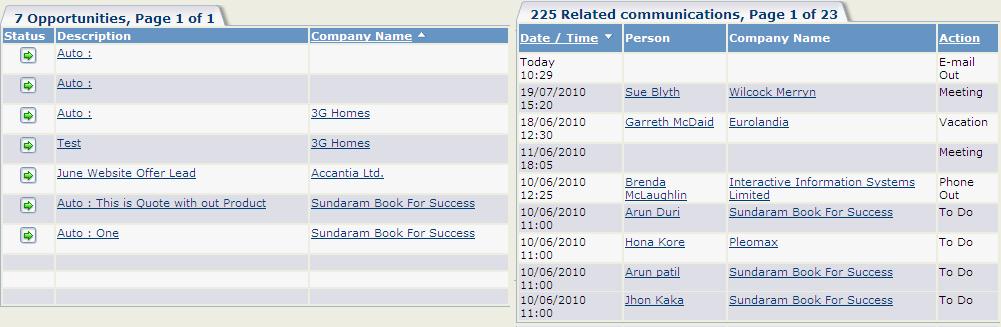
However there are some users who have such multiple tabs and each of the tabs have grid listed. Now instead of viewing one grid at a time and then clicking on another grid to view the other details, the users need to see the information of both the grids in one single page. It is more like a live in relationship; not related but still together. Till recent past though the SQL relationship between the tables were all that I needed to know while understanding or explaining SageCRM but I could not find a better example than this one J.
So now that you have understood what we need to achieve and why we have to do that lets check how to do it and what are the challenges that we encounter during the development.
To achieve the above result we used IFRAME. Each of the grids was initiated by its own IFRAME from a parent page. The IFRAME was assigned appropriate properties so it does not look like an IFRAME and bingo!!! We got what we wanted. But the work did not stop here. The challenge here was that we had to handle the navigation as well. Once the users click on the record in the grid and go to the summary or details of the record, the back or cancel button should get him back to the parent page that houses the 2 grids. That was a little tricky but we managed to get past it and were happy that we were able to present the client with the solution that he wanted. Here is how the grid looked like.
If you find this content useful, please feel free to drop us an email at crm@greytrix.com.
