
our continuous efforts to enhance GUMU™ functionality, we remain committed to helping our clients improve usability, streamline their sales operations, and bring greater clarity to their pricing processes. In today’s blog, we are excited to introduce a new QLE enhancement — Cost and Markup % Fields — designed to give sales teams direct control over pricing logic right within the Quick Line Entry (QLE) screen.
Recently, one of our clients identified a need for a more structured and transparent approach to quoting. There was a requirement to capture the base cost and the desired margin for each line item, and to have the system automatically compute the final price — reducing manual effort, preventing errors, and ensuring pricing accuracy across the board.
To address this, we introduced two new editable fields — Cost and Markup % — in both the New Line screen and the upper and lower grids of the QLE screen, backed by an automatic Quoted Price calculation logic. This ensures users can leverage the same pricing methodology whether they are creating a new line item or modifying existing line items within QLE.
Cost
A new editable field where users enter the base cost of the product or service for a given line item. This value is a direct input into the Quoted Price calculation and is available on both the New Line screen and the upper and lower QLE grids.
Markup %
A new editable percentage field representing the desired margin to be applied above cost. When entered alongside Cost, it drives the Quoted Price. When the Quoted Price is entered directly by the user instead, this field is back-calculated automatically by the system. The field is available on both the New Line screen and the upper and lower QLE grids.
Quoted Price
The final price presented to the customer. It is auto-calculated based on Cost and Markup %, or can be entered directly by the user — in which case the Markup % is back-calculated by the system. Tax calculations and existing line item-level tax class customizations continue to apply on top of this value.
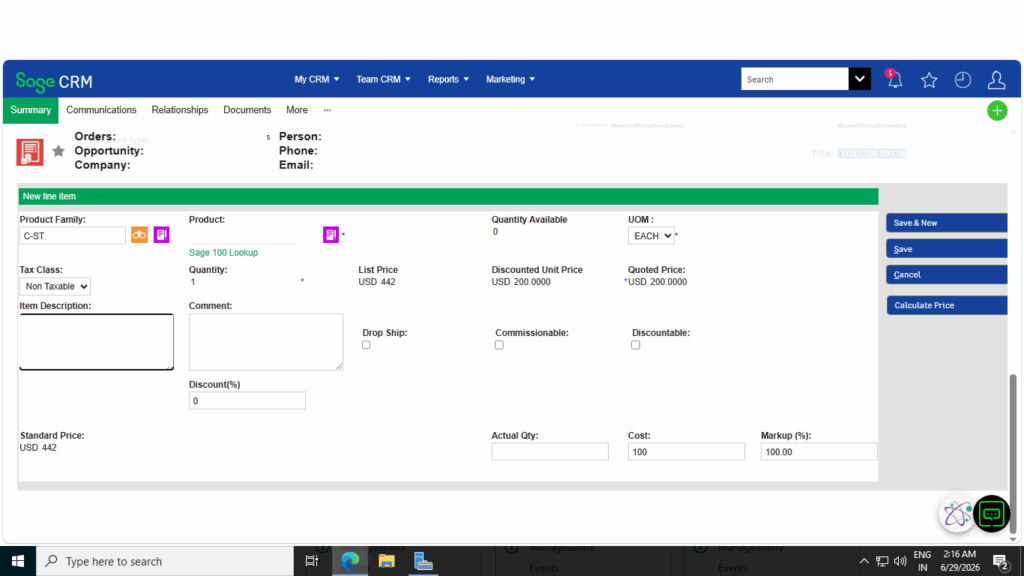
New Line screen — Cost, Markup (%), and the auto-calculated Quoted Price field
How the Pricing Logic Works
This enhancement supports two flexible workflows, giving sales teams the freedom to arrive at the Quoted Price from whichever direction makes sense for each situation. The same calculation logic is available in both the New Line screen and the QLE screen, ensuring a consistent pricing experience throughout the quote lifecycle.
Workflow 1 — Enter Cost and Markup % to Calculate Quoted Price
When the sales representative knows the base cost and the target margin, they can enter both values directly. The system immediately calculates and populates the Quoted Price using the formula below.
Quoted Price = Cost × (1 + Markup % / 100)
This approach is particularly useful when organizations follow margin-based pricing strategies and want to ensure consistent profitability across products and opportunities.
Workflow 2 — Enter Cost and Quoted Price to Back-Calculate Markup %
When the representative already has a target selling price in mind, they can enter the Cost and Quoted Price directly. The system automatically calculates the implied Markup % using the formula below — giving full visibility into the margin on every line item.
Markup % = 100 × (Quoted Price − Cost) / Cost
This workflow is ideal when sales teams are working with customer-driven pricing requirements and need immediate insight into the resulting markup.
The Quoted Price recalculates automatically whenever the Cost or Markup % values are updated, and the calculated Quoted Price populates and updates the item pricing accordingly — without any additional manual steps.
Likewise, when users modify the Quoted Price directly, the Markup % is recalculated automatically. This ensures that Cost, Markup %, and Quoted Price remain synchronized at all times, regardless of whether the user is working within the New Line screen or the QLE grids.
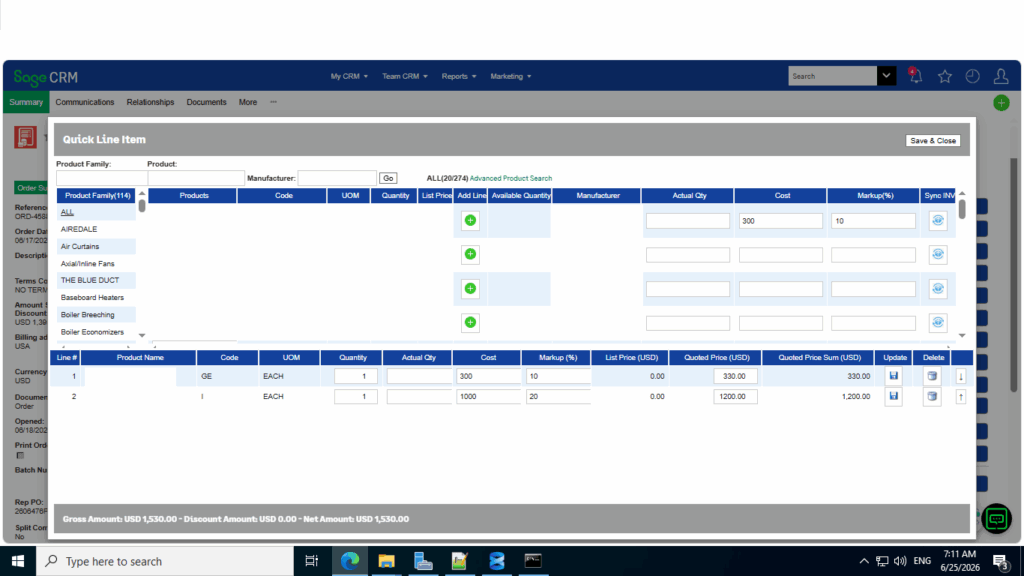
QLE grid view — Cost and Markup (%) driving the calculated Quoted Price for each line item
Tax and Existing Customizations
This enhancement has been designed to integrate seamlessly with existing configurations. Tax calculations continue to apply based on the calculated Quoted Price, and all existing line item-level tax class customizations remain fully intact — including the default tax class behavior based on the Order Tax Schedule customization previously implemented. No changes are required to existing tax setups.
Key Benefits
- Eliminates off-system calculations, reducing the risk of pricing errors across Quotes and Orders.
- Gives sales teams full visibility into cost basis and margin at the line item level — not just the final price.
- Supports flexible workflows: price forward from cost, or backward from a target Quoted Price.
- Automatically recalculates Quoted Price whenever Cost or Markup % is updated, saving time and ensuring consistency.
- Provides the same pricing calculation capabilities across both the New Line and QLE screens, ensuring a consistent user experience regardless of where line items are created or updated.
- Preserves all existing tax configurations and line item-level customizations without any additional setup.
Conclusion
This enhancement brings greater structure, speed, and confidence to the pricing process by allowing users to manage Cost, Markup %, and Quoted Price directly within both the New Line and QLE experiences. By automating calculations and maintaining synchronization between pricing fields, sales teams can create accurate quotes faster while gaining complete visibility into profitability at the line-item level.
Whether users prefer to work from a target margin or a target selling price, the system supports both approaches seamlessly, ensuring consistent and transparent pricing decisions across every Quote and Order.