
In Sage CRM, one of our clients came with a requirement to automate their invoice processing workflow. Previously, invoices were entered manually through a portal and validated against predefined acceptance and denial rules, making the process time-consuming and prone to errors.
To address this challenge, we developed an Automated Invoice Import Functionality that imports invoices directly from an Excel file, validates them based on business rules, prevents duplicate records, and significantly reduces manual effort.
Solution Overview
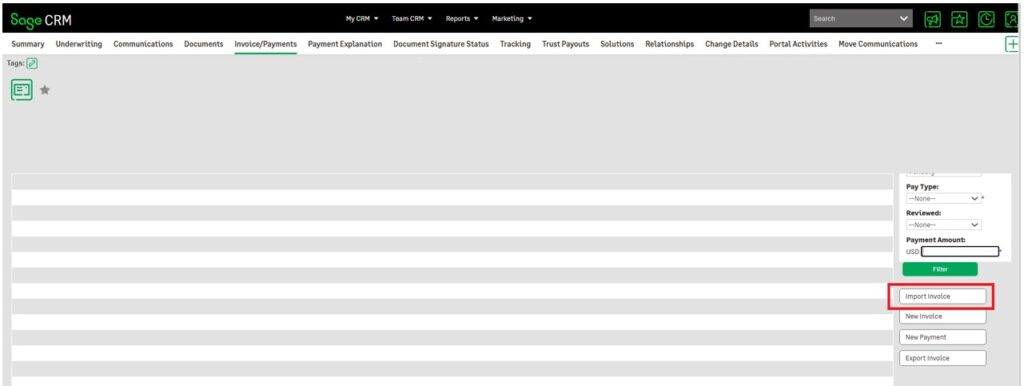
To automate the process, we developed a new feature within Sage CRM called Import Invoice.
A dedicated “Import Invoice” button was added to the relevant CRM tab, providing users with a simple and intuitive way to upload invoice data in bulk.
User Experience
When the user clicks the Import Invoice button, a popup window is displayed containing:
- Browse button
- Upload button
- Cancel button
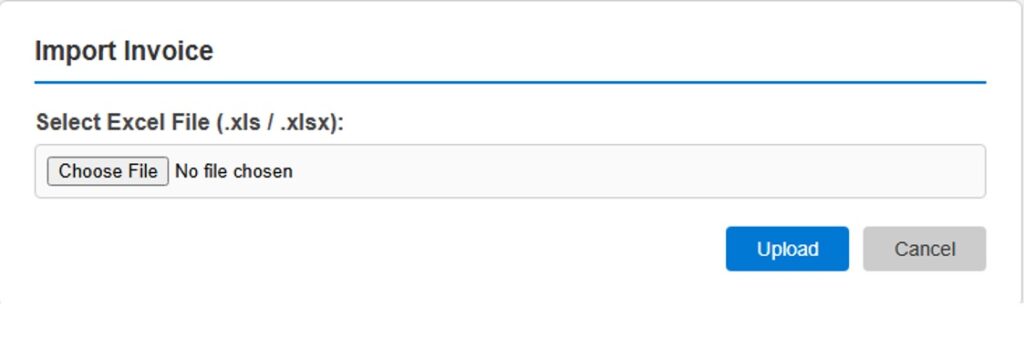
The Browse option allows users to select an invoice file from their local machine.
File Validation
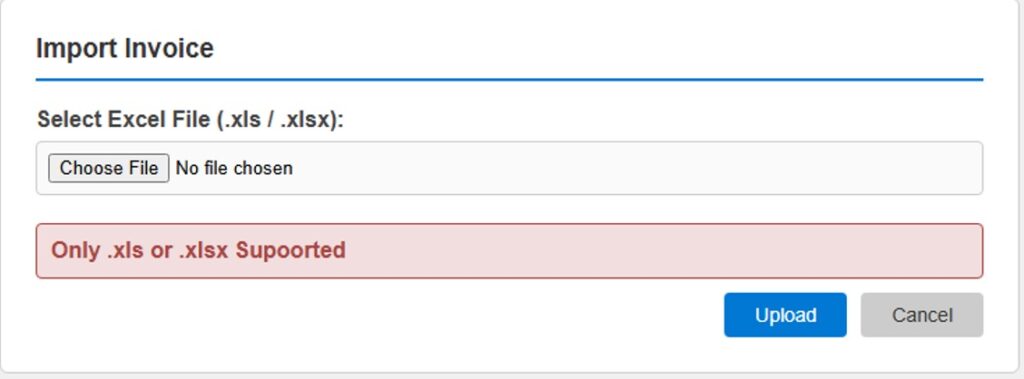
To maintain data integrity and ensure compatibility, the system only accepts Microsoft Excel files in the following formats:
.xls.xlsx
If a user attempts to upload any other file type, the system prevents the upload and prompts the user to select a valid Excel file.
Automated Invoice Processing
Once the user selects a valid Excel file and clicks the Upload button, the system automatically:
- Reads the invoice data from the Excel file.
- Validates each invoice against the client’s predefined Accept/Deny Logic.
- Processes only the invoices that satisfy the required business conditions.
- Inserts eligible invoices directly into the database.
- Rejects or skips invoices that do not meet the validation criteria.
This automation eliminates the need for manual invoice entry and significantly accelerates the overall processing workflow.
Duplicate Invoice Prevention
A key feature of this solution is its duplicate detection mechanism.
Before inserting any invoice, the system verifies whether the invoice already exists:
- In the database for the specific claim.
- Multiple times within the uploaded Excel file itself.
If a duplicate invoice is detected, the record is skipped automatically and the user receives a clear notification message:
“Skipped: Invoice ‘Invoice Number’ already exists.”
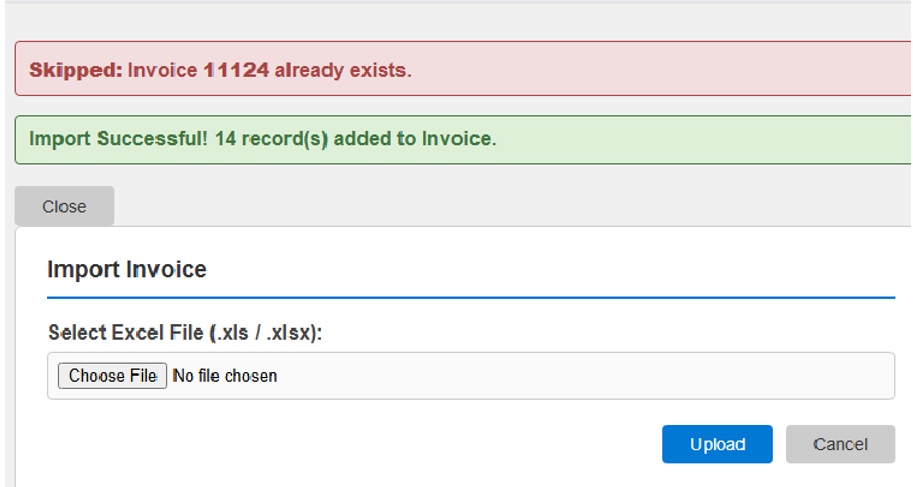
This ensures that duplicate invoices are never processed or inserted into the system, preserving data accuracy and preventing unnecessary administrative effort.
Key Benefits
The automated invoice import solution provides several business advantages:
Reduced Manual Effort
Bulk invoice uploads eliminate repetitive data entry tasks.
Faster Processing
Hundreds of invoices can be processed within minutes instead of hours.
Improved Accuracy
Automated validation reduces the risk of human error.
Duplicate Prevention
Built-in checks ensure invoice uniqueness across both uploaded files and existing records.
Consistent Business Rule Enforcement
Every invoice is evaluated using the same acceptance and denial criteria, ensuring compliance and consistency.
Enhanced User Experience
A simple upload interface allows users to process invoices quickly with minimal training.
Conclusion
The Invoice Import Functionality has transformed the client’s invoice management process within Sage CRM. By automating data import, validation, and duplicate checking, the solution has significantly reduced processing time while improving accuracy and operational efficiency.
This implementation demonstrates how business-specific automation within Sage CRM can streamline complex workflows, eliminate manual effort, and deliver measurable productivity gains for organizations handling high volumes of transactional data.