
In our previous Dynamic Query Grid Blog, we explored how the Enhanced Dynamic Grid Query Manager simplifies displaying Sage 100 ERP data within Sage CRM using Query-wise and Table-wise configurations.
Before creating your first Dynamic Grid, it’s important to understand the metadata that controls how the grid behaves. Metadata defines what data is displayed, how it is presented, where it appears, and how Sage CRM communicates with Sage 100.
What is Dynamic Grid Metadata?
Metadata is the collection of configuration settings that tells the Dynamic Grid Query Manager how your grid should behave. It defines which query is executed, the columns displayed, user-friendly column titles, formatting, and navigation behavior.
Where is Metadata Configured?
Navigate to Administration → Sage 100 Administration → Dynamic Grid Query Manager and create or edit a configuration. The GTInvoice configuration is used throughout this article as a practical example.
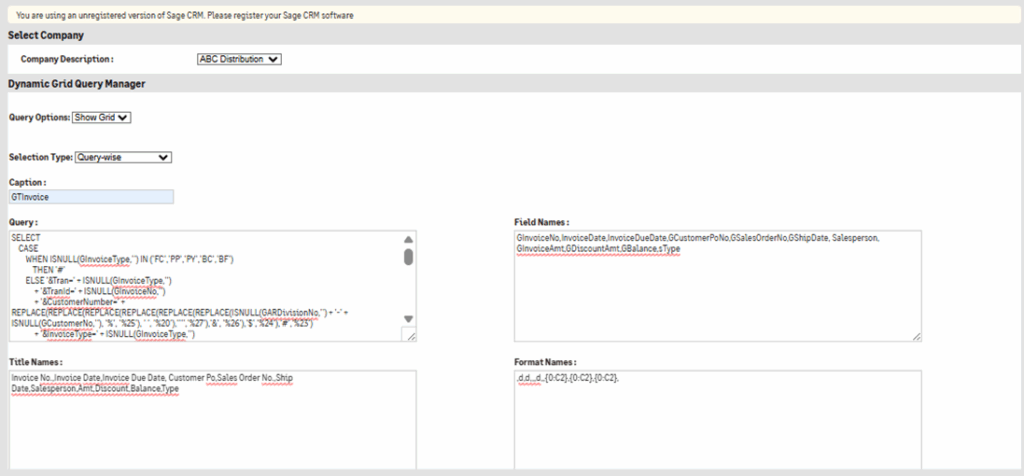
Understanding Each Metadata Field
- Company Description – The Company Description specifies the Sage 100 company against which the Dynamic Grid configuration will execute.
- Query Option – Determines whether the configuration displays data using Show Grid or synchronizes data using Sync Data.
- Caption – Defines the title displayed above the grid in Sage CRM.
- Query – The Query field contains the SQL statement that is executed when the Dynamic Grid is loaded. This query retrieves the required data from the SQL table or view and determines which columns will be displayed in the grid.
- Field Names – Internal column names returned by the SQL query, such as GInvoiceNo, InvoiceDate
- Title Names – User-friendly column headings displayed in the grid, such as Invoice No., Invoice Date
- Format Names – Formats values before display. GTInvoice uses ‘d’ for dates and ‘{0:C2}’ for currency fields.
Why Metadata Matters
Although the SQL query retrieves the data, metadata determines how users interact with that data. Proper metadata ensures meaningful column headings, correct formatting, consistent behavior, and easier maintenance.
Best Practices
- Use meaningful configuration names.
- Keep Title Names simple and business-friendly.
- Ensure every Field Name exists in the SQL query.
- Apply formatting for dates and currency values.
- Test metadata after modifying queries.
- Validate the grid before deploying to production.
Conclusion
Metadata is the foundation of every Dynamic Grid configuration. Understanding these settings makes it easier to build reliable, maintainable, and user-friendly Dynamic Grids within Sage CRM.
About Us
Greytrix – a globally recognized and one of the oldest Sage Development Partners is a one-stop solution provider for Sage ERP and Sage CRM organizational needs. Being acknowledged and rewarded for multi-man years of experience and expertise, we bring complete end-to-end assistance for your technical consultations, product customizations, data migration, system integrations, third-party add-on development, and implementation competence.
Greytrix has some unique integration solutions developed for Sage CRM with Sage ERPs namely Sage X3, Sage Intacct, Sage 100, Sage 500, and Sage 300. We also offer best-in-class Sage ERP and Sage CRM customization and development services to Business Partners, End Users, and Sage PSG worldwide. Greytrix helps in the migration of Sage CRM from Salesforce | ACT! | SalesLogix | Goldmine | Sugar CRM | Maximizer. Our Sage CRM Product Suite includes add-ons like Greytrix Business Manager, Sage CRM Project Manager, Sage CRM Resource Planner, Sage CRM Contract Manager, Sage CRM Event Manager, Sage CRM Budget Planner, Gmail Integration, Sage CRM Mobile Service Signature, Sage CRM CTI Framework.
Greytrix is a recognized Sage Champion Partner for GUMU™ Sage X3 – Sage CRM integration listed on Sage Marketplace and Sage CRM – Sage Intacct integration listed on Sage Intacct Marketplace. The GUMU™ Cloud framework by Greytrix forms the backbone of cloud integrations that are managed in real-time for the processing and execution of application programs at the click of a button.
For more information on our integration solutions, please contact us at sage@greytrix.com. We will be glad to assist you.