
If you work with the Item History screen, you’ve probably wondered how current the numbers in front of you are. Two small features answer that question: the Data sync message at the top of the screen and the Sync button on the right. Together they show you how fresh your data is and let you refresh it yourself.
The Data Sync Message
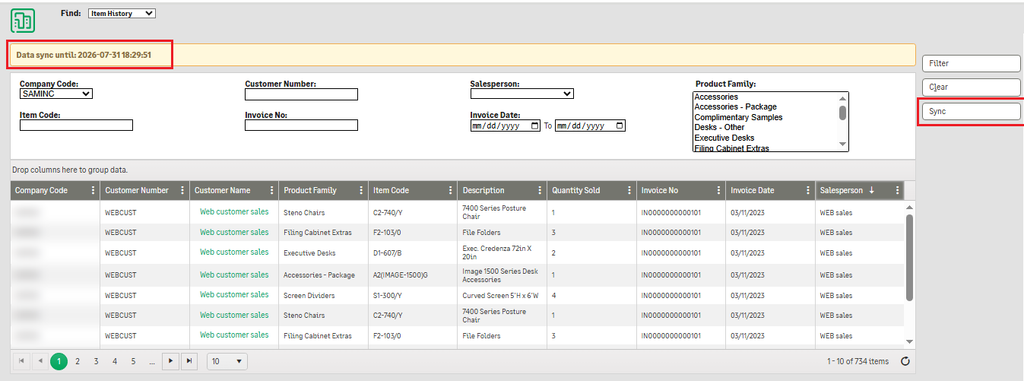
At the top of the Item History screen, in a highlighted banner, you’ll see a message like this:
Data sync until: 2026-07-31 18:29:51
This is the timestamp up to which the data on the screen is synchronized. Anything invoiced or changed after that moment may not appear yet.
Why it matters:
- Trust your numbers. Before you pull a quantity sold figure or confirm an invoice, check the timestamp so you know whether you’re looking at current or slightly older data.
- Explain gaps. If a recent invoice is missing from the grid, the banner often tells you why: it was created after the last sync.
- Reconcile reports. When you compare Item History against another report, a matching sync time avoids false discrepancies.
The banner sits at the top of the page, so you see it before you start filtering.
The Sync Button
On the right, below Filter and Clear, is the Sync button. Clicking it refreshes the Item History data so the screen catches up with the latest records.
When to use it:
- You expect new invoices that don’t appear yet.
- The “Data sync until” time is older than you need.
- You’ve been told that source data was corrected or updated.
How to use it:
- Check the Data sync until timestamp.
- Click Sync.
- Wait for the refresh to finish and confirm the banner shows a newer timestamp.
- Apply your filters (Company Code, Customer Number, Item Code, Invoice No, Salesperson, Invoice Date range, Product Family) and click Filter to see the updated results.
Filtering changes what you see from the data you already have. Syncing changes how recent that data is. If you filter for an invoice and it isn’t there, sync first, then filter again.
About Us
Greytrix – a globally recognized and one of the oldest Sage Development Partners is a one-stop solution provider for Sage ERP and Sage CRM organizational needs. Being acknowledged and rewarded for multi-man years of experience and expertise, we bring complete end-to-end assistance for your technical consultations, product customizations, data migration, system integrations, third-party add-on development, and implementation competence.
Greytrix has some unique integration solutions developed for Sage CRM with Sage ERPs namely Sage X3, Sage Intacct, Sage 100, Sage 500, and Sage 300. We also offer best-in-class Sage ERP and Sage CRM customization and development services to Business Partners, End Users, and Sage PSG worldwide. Greytrix helps in the migration of Sage CRM from Salesforce | ACT! | SalesLogix | Goldmine | Sugar CRM | Maximizer. Our Sage CRM Product Suite includes add-ons like Greytrix Business Manager, Sage CRM Project Manager, Sage CRM Resource Planner, Sage CRM Contract Manager, Sage CRM Event Manager, Sage CRM Budget Planner, Gmail Integration, Sage CRM Mobile Service Signature, Sage CRM CTI Framework.
Greytrix is a recognized Sage Champion Partner for GUMU™ Sage X3 – Sage CRM integration listed on Sage Marketplace and Sage CRM – Sage Intacct integration listed on Sage Intacct Marketplace. The GUMU™ Cloud framework by Greytrix forms the backbone of cloud integrations that are managed in real-time for the processing and execution of application programs at the click of a button.
For more information on our integration solutions, please contact us at sage@greytrix.com. We will be glad to assist you.