
GUMU™ for Sage CRM – Sage 300 provides real-time, bi-directional integration between Sage CRM and Sage 300. To further enhance the user experience, Greytrix has introduced the Save Search Filter functionality in the Item History tab under the Find context in Sage CRM.
This enhancement automatically retains the search filters applied by individual users. When users navigate to another screen and return to Item History, their previously selected filter values are restored, allowing them to continue their searches without repeatedly entering the same criteria.
Save Search Filter Functionality in Item History
The Item History tab allows Sage CRM users to search and view item-related transaction details using multiple filter criteria.
With the Save Search Filter enhancement, the system automatically saves the last applied filter values for each individual user.
Users can apply filters such as:
- Company Code
- Item Code
- Customer Number
- Invoice Number
- Salesperson
- Product Family
- Invoice Date
Once users click the Filter option, Sage CRM displays the matching item history records and retains the selected search criteria.
If users navigate to another screen and subsequently return to the Item History tab, the previously applied filters are automatically populated, and the corresponding records are displayed.
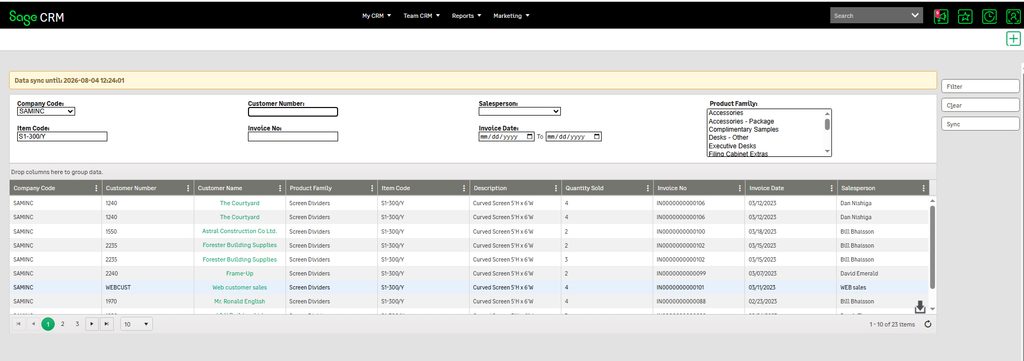
How Does It Work?
The Save Search Filter functionality follows a simple workflow:
- Navigate to Item History: Log in to Sage CRM, navigate to the Find context, and open the Item History tab.
- Apply Search Filters: Select the required criteria, such as Company Code, Customer Number, Item Code, Invoice Number, Invoice Date, Salesperson, or Product Family.
- Retrieve Item History Records: Click the Filter option to display records matching the selected criteria.
- Navigate to Another Screen: Move to any other screen or section within Sage CRM.
- Return to Item History: Navigate back to the Find context and reopen the Item History tab.
- Automatic Filter Restoration: The system automatically restores the previously applied filter values for that particular user and displays the corresponding item history records.
Users can therefore continue their previous search activities without manually configuring the filters again.
Benefits of Save Search Filter Functionality
This enhancement offers several advantages:
- User-Specific Preferences: Each user has their own saved search filter preferences.
- Automatic Filter Restoration: Previously applied filter values are automatically populated when users revisit Item History.
- Reduced Manual Effort: Users do not need to repeatedly enter the same search criteria.
- Improved Productivity: Users can quickly access relevant item history records and continue their previous searches.
- Consistent User Experience: Search preferences are retained while navigating between different Sage CRM screens.
With the Save Search Filter functionality, Greytrix continues to enhance the usability of GUMU™ for Sage CRM – Sage 300, simplifying access to item history information and reducing repetitive user activities.
About Us
Greytrix – a globally recognized and one of the oldest Sage Development Partners is a one-stop solution provider for Sage ERP and Sage CRM organizational needs. Being acknowledged and rewarded for multi-man years of experience and expertise, we bring complete end-to-end assistance for your technical consultations, product customizations, data migration, system integrations, third-party add-on development, and implementation competence.
Greytrix has some unique integration solutions developed for Sage CRM with Sage ERPs namely Sage X3, Sage Intacct, Sage 100, Sage 500, and Sage 300. We also offer best-in-class Sage ERP and Sage CRM customization and development services to Business Partners, End Users, and Sage PSG worldwide. Greytrix helps in the migration of Sage CRM from Salesforce | ACT! | SalesLogix | Goldmine | Sugar CRM | Maximizer. Our Sage CRM Product Suite includes add-ons like Greytrix Business Manager, Sage CRM Project Manager, Sage CRM Resource Planner, Sage CRM Contract Manager, Sage CRM Event Manager, Sage CRM Budget Planner, Gmail Integration, Sage CRM Mobile Service Signature, Sage CRM CTI Framework.
Greytrix is a recognized Sage Champion Partner for GUMU™ Sage X3 – Sage CRM integration listed on Sage Marketplace and Sage CRM – Sage Intacct integration listed on Sage Intacct Marketplace. The GUMU™ Cloud framework by Greytrix forms the backbone of cloud integrations that are managed in real-time for the processing and execution of application programs at the click of a button.
For more information on our integration solutions, please contact us at sage@greytrix.com. We will be glad to assist you.