
When developing and deploying Salesforce Second-Generation Managed Packages (2GP), you might encounter an installation error related to LightningTypeBundle. This issue often arises when Apex wrapper classes are referenced incorrectly inside Schema.js or renderer.json files.
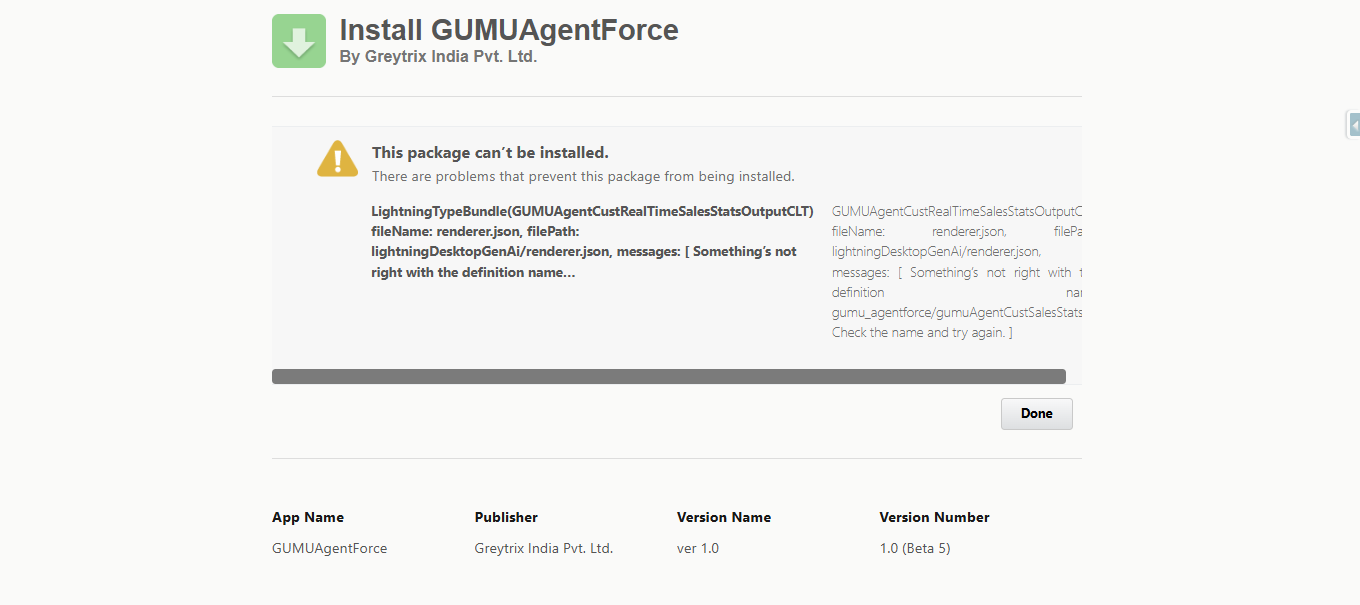
Common Error Message
This package can’t be installed.
LightningTypeBundle(SomeCustomOutputCLT)
fileName: renderer.json
filePath: lightningDesktopGenAi/renderer.json
messages: [ Something’s not right with the definition name… ]
Upon investigation, the root cause is usually related to how the wrapper class is defined and referenced in Schema.js.
The Problem
In many implementations, developers place the wrapper class inside the main Apex class and then reference it directly in Schema.js.
However, this approach causes Salesforce installation errors because $WrapperClass naming is not supported in 2GP packages.
Example – Problematic Structure
global class CustomerStatsMain {
@JsonAccess(serializable=’always’ deserializable=’always’)
global class CustomerStatisticsResponse {
@InvocableVariable global String status;
@InvocableVariable global String message;
@InvocableVariable global String createdDate;
}
}
Schema.js Reference:
{
“title”: “Customer Statistics Data Response”,
“description”: “Customer Statistics Data Response”,
“lightning:type”: “@apexClassType/c__CustomerStatsMain$CustomerStatisticsResponse”
}
This reference works in some cases but fails during 2GP package installation, resulting in the LightningTypeBundle error.
The Solution: Use a Separate Wrapper Class
To fix this, simply create the wrapper class separately instead of nesting it inside the main class.
Then, reference it directly in Schema.js.
Step 1: Create a Wrapper Class
@JsonAccess(serializable=’always’ deserializable=’always’)
global without sharing class CustomerStatisticsResponse {
@InvocableVariable global String status;
@InvocableVariable global String message;
@InvocableVariable global String totalRecords;
@InvocableVariable global String processedDate;
}
Step 2: Create the Main Class That Uses the Wrapper
global class CustomerStatisticsResponseWrapper {
@InvocableVariable
global CustomerStatisticsResponse response;
}
Step 3: Update Schema.js Reference
Instead of referencing $WrapperClass, point directly to the wrapper class name:
{
“title”: “Customer Statistics Data Response”,
“description”: “Customer Statistics Data Response”,
“lightning:type”: “@apexClassType/c__CustomerStatisticsResponse”
}
This ensures that your 2GP package installs smoothly without LightningTypeBundle errors.
Step 4: Fix renderer.json Definition
Make sure the renderer.json file references the correct Lightning component:
{
“renderer”: {
“componentOverrides”: {
“$”: {
“definition”: “c/customerStatsComponent”
}
}
}
}
Key Takeaways
- Always create wrapper classes separately; do not nest them inside main classes.
- Schema.js should reference the class name directly (avoid $WrapperClass).
- Ensure renderer.json definitions match your Lightning component name.
- If installation fails, check for naming mismatches in both Schema.js and renderer.json.
Conclusion
By restructuring wrapper classes and updating Schema.js references, you can resolve LightningTypeBundle installation errors in Salesforce 2GP packages. This method ensures your package remains modular, maintainable, and compliant with Salesforce’s packaging standards.
If you’re working with Lightning Web Components and Apex wrappers in 2GP packages, follow this approach to avoid installation failures and streamline deployment.
By following the above blog instructions, you will be able to learn “How to Fix LightningTypeBundle Installation Errors in Salesforce 2GP Packages“. If you still have queries or any related problems, don’t hesitate to contact us at salesforce@greytrix.com. More details about our integration product are available on our website and Salesforce AppExchange.
We hope you may find this blog resourceful and helpful. However, if you still have concerns and need more help, please contact us at salesforce@greytrix.com.
About Us
Greytrix – a globally recognized and one of the oldest Sage Development Partner and a Salesforce Product development partner offers a wide variety of integration products and services to the end users as well as to the Partners and Sage PSG across the globe. We offer Consultation, Configuration, Training and support services in out-of-the-box functionality as well as customizations to incorporate custom business rules and functionalities that require apex code incorporation into the Salesforce platform.
Greytrix has some unique solutions for Cloud CRM such as Salesforce Sage integration for Sage X3, Sage 100 and Sage 300 (Sage Accpac). We also offer best-in-class Cloud CRM Salesforce customization and development services along with services such as Salesforce Data Migration, Integrated App development, Custom App development and Technical Support business partners and end users. Salesforce Cloud CRM integration offered by Greytrix works with Lightning web components and supports standard opportunity workflow. Greytrix GUMU™ integration for Sage ERP – Salesforce is a 5-star rated app listed on Salesforce AppExchange.
The GUMU™ Cloud framework by Greytrix forms the backbone of cloud integrations that are managed in real-time for processing and execution of application programs at the click of a button.
For more information on our Salesforce products and services, contact us at salesforce@greytrix.com. We will be glad to assist you.