
Technology often promises transformation. Yet, those who have spent time in the enterprise technology space know that transformation rarely comes from technology alone. It comes from how thoughtfully it is adopted, implemented, and woven into the everyday workflows of an organization. This is particularly true with Salesforce.
Over the years, Salesforce has grown from being a customer relationship management platform into something much broader, a foundation for managing customer engagement, sales processes, service operations, and increasingly, intelligent decision-making powered by data and AI. To unlock the full potential of this platform, many organizations rely on expert Salesforce implementation services to configure, customize, and align Salesforce with their unique business processes.
Implementing Salesforce successfully is not simply a matter of turning on a new system. It is a journey that requires clarity, patience, and a deep understanding of how people within the organization work. When approached thoughtfully, Salesforce implementation can become one of the most valuable investments a business makes.
This guide explores the key steps, considerations, and best practices for Salesforce CRM implementation in 2026, offering a practical path for organizations preparing to begin or refine their journey.
Why Getting Salesforce Implementation Right Makes All the Difference
Organizations today face evolving customer expectations, such as faster responses, personalized interactions, and seamless multi-channel experiences. Meeting these expectations requires more than hard work; it requires systems that work together effectively. Salesforce plays a central role in enabling this.
When implemented well, Salesforce helps organizations:
- Build a complete view of customer relationships
- Align sales, service, and marketing teams
- Improve collaboration across departments
- Make decisions based on real-time data
However, many organizations still face challenges when adopting CRM platforms, often due to implementation rather than the technology itself. This is why businesses rely on salesforce implementation consulting and a salesforce implementation consultant to ensure the platform is properly configured, integrated, and scalable for long-term value.
Preparing for Salesforce Implementation
Before any configuration begins, preparation is essential. Organizations that invest time in planning their Salesforce CRM implementation often find the journey far smoother. Preparation allows teams to understand what they truly need from the platform and how it will support their business goals.
Several key questions often guide this stage:
What business challenges are we trying to solve?
Is the focus on improving sales visibility, enhancing customer service, or connecting multiple departments?
How do teams currently manage customer relationships?
Understanding existing workflows helps ensure the new system supports the people using it.
What systems already exist within the organization?
Salesforce rarely operates in isolation. ERP systems, marketing platforms, and finance systems often play important roles in the broader ecosystem.
By answering these questions early, organizations can build a foundation that supports long-term success rather than short-term fixes.
Step 1: Defining Clear Objectives
One of the most important aspects of Salesforce implementation is clarity of purpose. Without clear objectives, even the most powerful platform can struggle to deliver meaningful results.
Organizations often begin by defining goals such as:
- Improving lead management
- Increasing sales pipeline visibility
- Enhancing customer service response times
- Strengthening collaboration between teams
These objectives serve as a compass throughout the implementation process. They help ensure that configuration decisions, integrations, and workflows are aligned with real business needs rather than technical possibilities.
Step 2: Choosing the Right Salesforce Products
Salesforce offers a wide ecosystem of products designed to support different aspects of a business.
Some of the most commonly implemented solutions include:
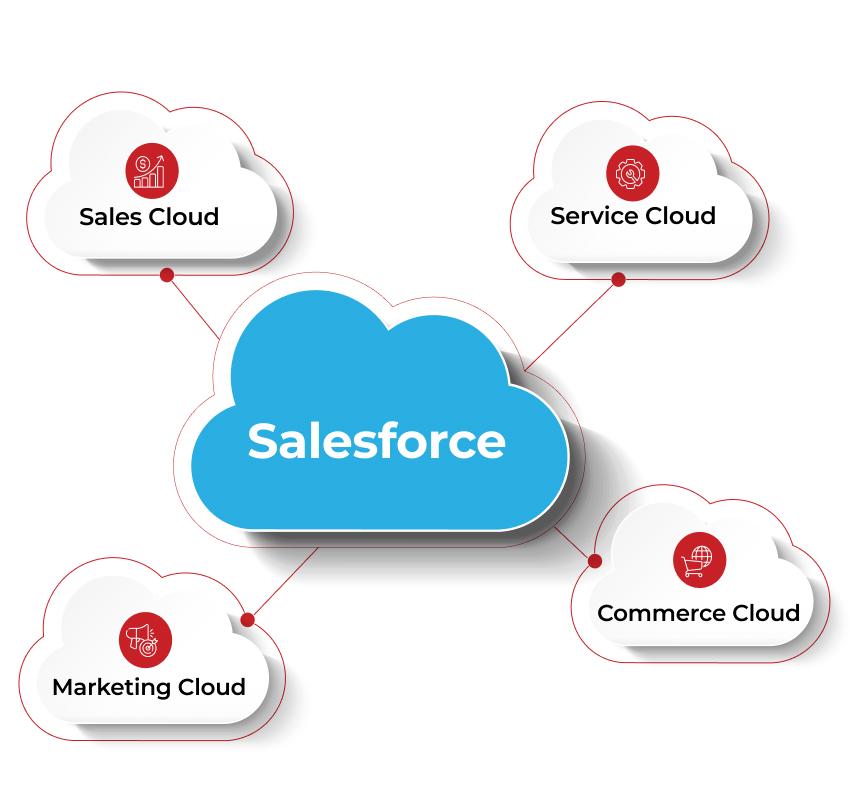
Sales Cloud: Supports sales with leads, pipeline, and forecasting
Service Cloud: Enables case management and service automation
Marketing Cloud: Supports campaigns, journeys, and personalized marketing
Commerce Cloud: Powers digital commerce across online sales channels
In recent years, Salesforce has also introduced powerful capabilities around AI, automation, and data integration, enabling organizations to gain deeper insights into customer behaviour.
Selecting the right combination of these tools ensures the platform aligns closely with business needs.
Step 3: Designing the Right Data Structure
At the heart of Salesforce lies its data model. Contacts, accounts, opportunities, activities, and many other objects work together to represent customer relationships. Designing this structure carefully ensures that information flows logically and remains easy to manage.
A well-designed data structure allows teams to:
- Access accurate customer information quickly
- Generate meaningful reports
- Track sales activities effectively
- Understand customer history in a single place
Organizations often discover that thoughtful data design early in the implementation process prevents complexity later on.
Step 4: Customization and Configuration
One of Salesforce’s greatest strengths is its flexibility. The platform can be customized to match a wide variety of business processes. Fields, workflows, dashboards, and automation can all be configured to support how teams actually work.
However, there is an important balance to maintain. While customization is valuable, excessive complexity can make systems harder to maintain over time. Many experienced Salesforce teams follow a simple philosophy:
Configure where possible. Customize only where necessary.
This approach helps ensure that the system remains scalable and adaptable as the organization evolves.
Step 5: Integration with Other Systems
In most organizations, Salesforce is not the only critical system in use. ERP platforms, finance systems, marketing tools, and operational systems all contribute to the overall business environment. When these systems remain disconnected, teams often spend valuable time searching for information across multiple platforms.
Integration helps bridge this gap. By connecting Salesforce with other business systems, organizations can create a more unified flow of information.
For example:
- Sales teams can view order histories directly within Salesforce
- Customer service teams can access billing or shipping details
- Leadership can gain a complete view of business performance
At Greytrix, with over 25 years of experience in enterprise solutions, we help organizations achieve this through GUMU™, our integration solution that connects Salesforce with ERP systems and other business applications. As a Salesforce implementation partner, Greytrix enables businesses to synchronize critical data between systems in real time, ensuring teams always have the information they need directly within Salesforce.
Over time, these integrations play a crucial role in ensuring that Salesforce becomes a central hub for customer-related information.
Step 6: Data Migration
Migrating existing customer data into Salesforce is another important stage of the implementation process. Many organizations have customer information spread across spreadsheets, legacy CRM systems, and other databases. Bringing this information into Salesforce requires careful preparation.
This often includes:
- Cleaning and validating existing data
- Removing duplicate records
- Standardizing formats and structures
A thoughtful migration process ensures that the new system begins with accurate and reliable data. After all, the quality of insights generated by any system depends heavily on the quality of the data it contains.
Step 7: Testing the System
Before Salesforce is fully deployed, thorough testing is essential. Testing allows organizations to verify that workflows function as expected, integrations operate smoothly, and data appears correctly within the system.
Several types of testing typically take place:
1. Functional Testing
Ensures that individual features work correctly.
2. Integration Testing
Confirms that connected systems exchange information properly.
3. User Acceptance Testing (UAT)
Allows real users to interact with the system and validate that it supports their daily tasks.
This stage often reveals small adjustments that can significantly improve the user experience.
Step 8: Training and User Adoption
Even the most thoughtfully implemented system can struggle if users are not comfortable with it. Training plays a vital role in helping teams understand how Salesforce supports their work. More importantly, it helps users see the value the system brings to their daily responsibilities.
Effective training programs often include:
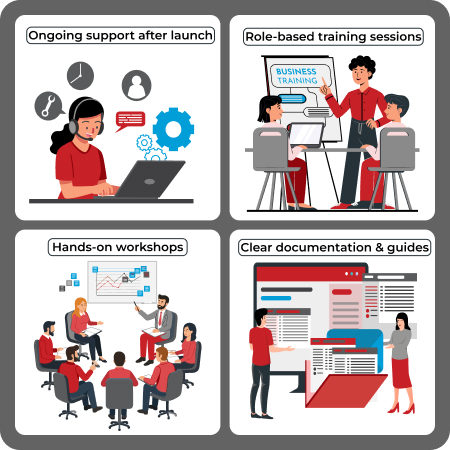
Organizations that invest in user adoption often discover that Salesforce becomes a trusted tool rather than a mandated system.
Step 9: Deployment and Continuous Improvement
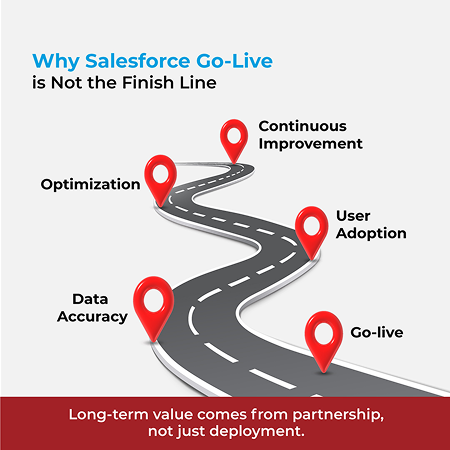
Once testing and training are complete, Salesforce can be deployed across the organization. Yet implementation rarely ends at deployment.
In many ways, the most interesting phase begins afterward. As teams begin using the system in real-world scenarios, new insights emerge. Workflows may evolve, new reports may be needed, and additional integrations may be explored. Organizations that treat Salesforce as an evolving platform rather than a finished project often unlock the greatest value over time.
Salesforce Implementation Trends in 2026
The salesforce ecosystem continues to evolve, and several trends are shaping implementations in 2026.
AI is becoming increasingly central to how organizations use customer data. Salesforce’s growing AI capabilities allow teams to identify patterns, predict customer needs, and automate certain decisions.
Deeper system integrations are also becoming more common. Businesses are recognizing that connecting CRM, ERP, and operational systems creates a far richer understanding of customers.
Finally, user experience and simplicity remain a strong focus. Organizations are placing greater emphasis on designing systems that feel intuitive for the people who rely on them daily.
These trends highlight an encouraging direction for the industry, one where technology continues to give a helping hand to better relationships between businesses and their customers.
Final Thoughts
Salesforce implementation is often described as a technical project. In reality, it is much more than that. It is an opportunity for organizations to rethink how they manage customer relationships, how teams collaborate, and how information flows across the business.
When approached with patience, clarity, and thoughtful planning, Salesforce can become far more than a CRM platform. It becomes a system that facilitates better decisions, stronger customer connections, and more efficient operations.
As a Salesforce implementation partner, Greytrix has helped thousands of organizations across the world to successfully implement and optimize Salesforce. Over the years, we’ve seen how the right implementation doesn’t just improve systems, it transforms how teams work, how insights are used, and how businesses build lasting customer relationships.
If you’re exploring how Salesforce can actualize your organization’s next phase of growth, sometimes the best place to start is simply with a conversation.
Book a demo with us, we are just a few clicks and a few keystrokes away!
About Us
Greytrix – a globally recognized and one of the oldest Sage Development Partner and a Salesforce Product development partner offers a wide variety of integration products and services to the end users as well as to the Partners and Sage PSG across the globe. We offer Consultation, Configuration, Training and support services in out-of-the-box functionality as well as customizations to incorporate custom business rules and functionalities that require apex code incorporation into the Salesforce platform.
Greytrix has some unique solutions for Cloud CRM such as Salesforce Sage integration for Sage X3, Sage 100 and Sage 300 (Sage Accpac). We also offer best-in-class Cloud CRM Salesforce customization and development services along with services such as Salesforce Data Migration, Integrated App development, Custom App development and Technical Support business partners and end users. Salesforce Cloud CRM integration offered by Greytrix works with Lightning web components and supports standard opportunity workflow. Greytrix GUMU™ integration for Sage ERP – Salesforce is a 5-star rated app listed on Salesforce AppExchange.
The GUMU™ Cloud framework by Greytrix forms the backbone of cloud integrations that are managed in real-time for processing and execution of application programs at the click of a button.
For more information on our Salesforce products and services, contact us at salesforce@greytrix.com. We will be glad to assist you.