
Salesforce Spring ’26 introduces an exciting new capability for Lightning Web Components (LWC): GraphQL Mutations.
If you’ve been using LWC to display data, you’re likely familiar with @wire(graphql), which allows you to read data reactively. However, until now, creating, updating, or deleting records required Apex methods or REST API calls.
With GraphQL mutations, developers can now perform create, update, and delete operations directly from JavaScript in LWC, making data operations simpler and more efficient.
What Is a GraphQL Mutation?
In simple terms:
- Query → Reads data
- Mutation → Creates, updates, or deletes data
Think of it like this:
- Queries = “Give me this data”
- Mutations = “Change this data”
Salesforce Spring ’26 introduces a new function called executeMutation, which allows developers to perform these operations directly within Lightning Web Components.
How GraphQL Mutations Work in LWC
To use GraphQL mutations in LWC:
- Define your mutation using the gql template.
- Send it using executeMutation, along with the required values.
- Retrieve only the fields you request – avoiding unnecessary data.
This approach improves performance, efficiency, and developer productivity.
Step 1 – Import the Required Functions
First, import the required functions:
import { gql, executeMutation } from ‘lightning/graphql’;
- gql allows you to write GraphQL queries or mutations.
- executeMutation executes the mutation directly from your component.
Step 2 – Write a Simple Mutation
Here is an example of a GraphQL mutation to create a new Contact record.
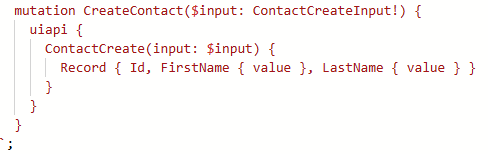
Explanation
- $input represents the data we send to create the Contact.
- Record { Id, FirstName { value }, LastName { value } } specifies which fields we want Salesforce to return after the record is created.
This ensures the response includes only the necessary fields.
Step 3 – Execute the Mutation
const result = await executeMutation({
query: CREATE_CONTACT,
variables: {
input: {
Contact: {
FirstName: ‘Sam’,
LastName: ‘Smith’
}
}
}
});const newId = result.data.uiapi.ContactCreate.Record.Id;
console.log(‘Created Contact ID:’, newId);
What Happens Here
- We call executeMutation with the mutation query and variables.
- Salesforce creates the Contact record.
- The response returns the Contact ID, which can then be used inside the component.
Beginner-Friendly Example
Imagine you have a form in your Lightning Web Component that allows users to create a new Contact.


Using GraphQL mutations, users can submit the form and instantly create a Contact record, all handled directly within LWC using GraphQL.
Conclusion
GraphQL Mutations in Lightning Web Components introduce a modern and efficient way to perform create, update, and delete operations directly from LWC. With the Spring ’26 release, developers can now manage data operations using GraphQL without relying heavily on Apex or REST APIs. By using executeMutation, LWC components become more streamlined, flexible, and easier to maintain. This enhancement helps developers build faster, cleaner, and more scalable Salesforce applications while simplifying client-side data management.
By following the above blog instructions, you will be able to learn “Salesforce Spring ’26: How to Use GraphQL Mutations in Lightning Web Components (LWC)“. If you still have queries or any related problems, don’t hesitate to contact us at salesforce@greytrix.com. More details about our integration product are available on our website and Salesforce AppExchange.
We hope you may find this blog resourceful and helpful. However, if you still have concerns and need more help, please contact us at salesforce@greytrix.com.
About Us
Greytrix – a globally recognized and one of the oldest Sage Development Partner and a Salesforce Product development partner offers a wide variety of integration products and services to the end users as well as to the Partners and Sage PSG across the globe. We offer Consultation, Configuration, Training and support services in out-of-the-box functionality as well as customizations to incorporate custom business rules and functionalities that require apex code incorporation into the Salesforce platform.
Greytrix has some unique solutions for Cloud CRM such as Salesforce Sage integration for Sage X3, Sage 100 and Sage 300 (Sage Accpac). We also offer best-in-class Cloud CRM Salesforce customization and development services along with services such as Salesforce Data Migration, Integrated App development, Custom App development and Technical Support business partners and end users. Salesforce Cloud CRM integration offered by Greytrix works with Lightning web components and supports standard opportunity workflow. Greytrix GUMU™ integration for Sage ERP – Salesforce is a 5-star rated app listed on Salesforce AppExchange.
The GUMU™ Cloud framework by Greytrix forms the backbone of cloud integrations that are managed in real-time for processing and execution of application programs at the click of a button.
For more information on our Salesforce products and services, contact us at salesforce@greytrix.com. We will be glad to assist you.
Related Posts