
Sage Business Vision is retiring on December 31, 2026. After the End of Life (EOL) date, every edition will stop receiving software updates, fixes, security patches, compliance changes, and technical support. Sage will not be responsible for it.
If you’re reading this in late 2026, note that a Sage BusinessVision migration typically takes four to nine months. Starting your Sage BusinessVision ERP migration now means crossing the retirement date—but that’s no reason to delay. Instead, plan deliberately. A migration completed in Q2 2027 is safer than a rushed December go-live with untested data.
This Sage BusinessVision migration guide follows your decision process: what end of life means for your business, which Sage product suits its size and complexity, how long migration takes, and how to protect your business while using BusinessVision.
What happens when Sage BusinessVision reaches end of life
When Sage Business Vision reaches End of Life on 31st December, after that Sage will no longer issue updates, fixes or technical support for any Business Vision edition. You may continue using the software at your own discretion or migrate your ERP to another suitable option. No screen will shut down on New Year’s Day. What will change is who is responsible when something breaks down.
You can consult Business management software providers like Greytrix to understand which ERP best suits your data and business requirements.
| What ends on January 1, 2027 | What does not end |
| Product updates and bug fixes | Your license — the software still launches and runs |
| Security patches | Access to your own data and company files |
| Payroll and compliance updates | Your ability to print, post and close a period |
| Sage technical support | The Sage BusinessVision Community Hub discussion forum |
| Sage’s responsibility for failures, losses or compliance issues | Your responsibility for all of the above |
Two milestones have already passed and are worth noting if you are planning around them. July 2026 was the final payroll update BusinessVision will ever receive, with only a year-end update for T4 and T5018 reporting to follow. Since October 1, 2026, Sage has provided technical support only through chat —case submission through the Customer and Partner Portals has ended.
For the full dated sequence, our Final 100 Days calendar lists every published milestone from January 2026 to the retirement date.
What are your Sage BusinessVision Migration options?
There is no single Sage BusinessVision replacement that suits every business. Sage directs users toward different ERPs based on their company, industry, and requirements. For example, smaller businesses can migrate to Sage 50 Accounting, while larger, more complex businesses can migrate to Sage 300, with migration tooling available. Sage 100, Sage Intacct and Sage X3 each solve for a different kind of complexity. The best replacement for Sage BusinessVision depends on your transaction volume, user count, number of entities, inventory depth, and cloud strategy.
- Sage 50 Accounting — small businesses with straightforward accounting. Lower cost and a familiar Sage environment, but limited transaction and history migration, and not suited to complex distribution, manufacturing or multi-entity needs.
- Sage 100 — growing distribution, wholesale, light manufacturing and service businesses, often 5–50 users. Strong order management, inventory and warehousing, and modular so you buy what you use. Custom fields, pricing rules and workflows need careful mapping.
- Sage 300 — multi-company, multi-currency, project and job-cost environments. The most mature BusinessVision migration path, with strong financial controls and scalability. Expect more implementation effort than Sage 50, and a partner-led migration.
- Sage Intacct — cloud-first finance teams, multi-entity groups, non-profits and reporting-driven organizations. Dimension-based reporting, automation and a strong API ecosystem. Less of a direct replacement where deep warehouse or manufacturing function is the priority.
- Sage X3 — complex manufacturing, multi-site distribution and global operations. Deep supply chain, multi-site and multi-legislation capability, at the highest cost and complexity. Only justified when that complexity is genuinely there.
How do you determine which ERP best fits your business?Most Business Vision users recognize themselves in one of these four profiles.
- Wholesale distribution, around 10 users — You use AR, AP, inventory and sales orders, and order management matters as much as the general ledger. Sage 100 is usually the strongest fit. Migrate masters, open transactions, item costs and recent history, and archive the rest.
- Several legal entities, intercompany entries and project billing — Sage 300 and Sage Intacct are both credible. Choose Sage 300 if operational ERP is the priority and you want the lowest-friction conversion path. Choose Intacct if cloud financial management and dimensional reporting matter more.
- Manufacturing with BOMs, production orders and lot control — Evaluate Sage 100 or Sage X3, with particular attention to how BOMs, routings, costing and lot or serial data will be handled — these are rarely in a standard conversion scope.
- Small services business, simple accounting, no inventory — Sage 50 is likely sufficient and the fastest route, provided you accept that limited transaction history will come across and plan an archive for the rest.
One rule that applies to the above profiles is that the cheapest license can become the most expensive implementation if workflows, inventory, integrations and reporting are poorly fitted.
The six phases of a BusinessVision Migration
A Sage BusinessVision migration is a business project with a data-conversion component. Treat the six phases below as your Sage BusinessVision migration checklist — each runs in sequence, and each produces something the next phase depends on.
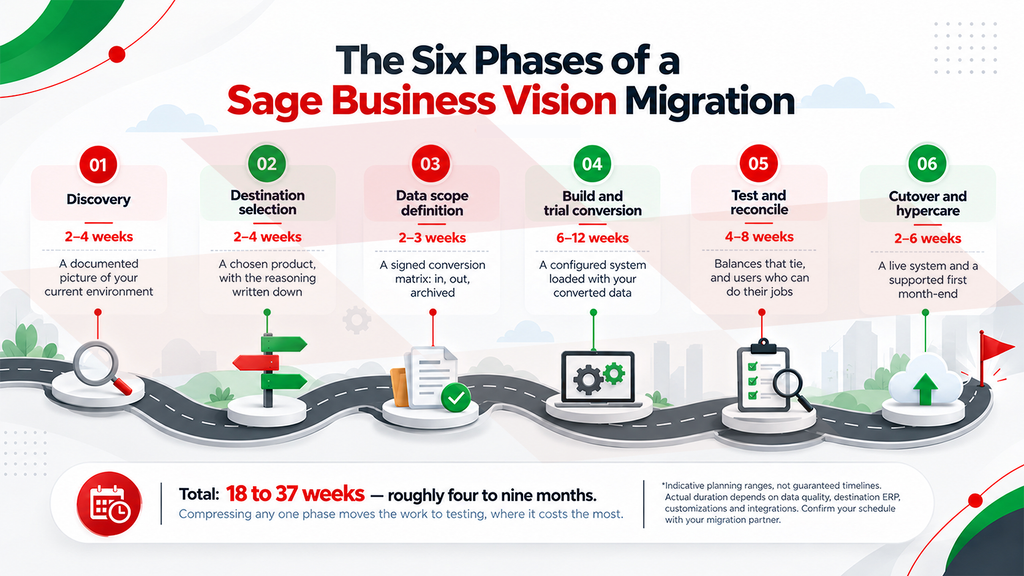
1. Discovery
Before choosing software, document what you have: active modules, critical workflows (quoting, order entry, credit holds, picking, receiving, returns, month-end close), customizations, custom fields, reports, forms and third-party integrations. Add your user roles, warehouses, companies, currencies and tax structures, and the number of years of history each department genuinely needs. Include future requirements in the documents.
2. Destination selection
Match requirements to the comparison above. Evaluate total cost, not license cost: licenses, implementation, data migration, integrations, hosting, support, upgrades, and the internal time your own team will spend.
3. Data scope definition
Agree in writing which master records convert, which open transactions convert, how many years of history are included, and what is explicitly excluded or archived. Also agree on who performs data cleansing, how many test conversions are included, and what happens if the source data is incomplete. This document prevents the most common dispute in ERP projects.
4. Build and trial conversion
The new system is configured — chart of accounts, tax setup, pricing, warehouses, workflows, security roles — and your data is converted into it for the first time. Expect the first trial conversion to surface problems in your source data. That is what it is for.
5. Test and reconcile
This phase determines whether the migration succeeds, and it’s the one most often cut short.
- Reconciliation: compare trial balances, AR and AP aging, inventory valuation, open-order value, and bank balances between the old system and the new one. They must tie, line by line.
- User acceptance testing: accounting, sales, warehouse, and purchasing staff run real scenarios, not demo data.
- Integration testing: e-commerce, shipping, EDI, banking, CRM and any custom interfaces.
- Parallel run: operate critical processes in both systems for at least one period where feasible.
6. Cutover and hypercare
Define the freeze date, the final data extraction, opening balances, user access, backups and a rollback plan. Then support the business intensively through the first close and first month-end. The most common cause of a failed ERP project is not bad data — it is poor adoption. Train by role rather than by screen, write new procedures for changed workflows, and keep a post-go-live issue log with someone empowered to resolve it.
What if you can’t finish before December 31, 2026?
A realistic Sage BusinessVision migration timeline run months from discovery to a stable go-live. A simple Sage 50 move with master data only can finish faster. A multi-entity Sage 300 or Sage X3 project with integrations and manufacturing data will take longer.
Most businesses starting a migration in late 2026 will not complete it before the retirement date, and that is manageable. The legacy ERP will keep running. What you need is a deliberate bridge plan that reduces risk during the unsupported period, rather than an unplanned drift into 2027 with nothing decided.
If your project will cross the date, consider doing these five things.
- Freeze the scope now and start anyway. Discovery and selection do not depend on the deadline. Starting in November beats starting in February, and a project underway has a target date rather than an open question.
- Harden the BusinessVision environment before January 1 2027 . No further security patches are coming. Isolate the server, restrict remote access, tighten permissions, verify your backups restore, and freeze the operating-system and database it runs on.
- Take and verify a clean archive snapshot. Create a full, restorable copy of your current ERP data at year-end and confirm it opens. This protects your audit position and becomes the source for your historical archive.
- Handle payroll and year-end as a separate decision. July 2026 was the final payroll update; Sage will not revise the calculations again. Decide before January whether to move payroll first.
- Target a clean fiscal boundary for go-live. Cutting over at the start of a fiscal year or quarter simplifies opening balances and comparative reporting. For most businesses crossing the deadline, that means aiming at Q2 or Q3 2027.
The risk during a bridge period is real but bounded, and it compounds the longer it runs. Our article on the seven risks of staying on BusinessVision covers what that exposure looks like in practice.
How Greytrix supports a BusinessVision migration
Sage does not perform migrations. In their official statement, they have mentioned that migration services are delivered by Sage business partners, which means the outcome of your project depends heavily on who you engage and whether they have done a BusinessVision conversion before.
Selecting the right implementation partner is an important part of reducing migration risk. Look for demonstrated BusinessVision conversion experience, a documented migration scope, transparent exclusions and a repeatable reconciliation process Greytrix brings a dedicated Sage Migration Center with documented BusinessVision conversions behind it, so the manual parts of this process are met rather than discovered on your timeline, plus in-house development to rebuild the custom fields, reports and workflows your team genuinely depends on — and the consulting experience to tell you which of them were only workarounds for BusinessVision’s limits.
What happens before any data moves matters just as much. An assessment maps your modules, integrations and history requirements to the right destination. That includes cases where the smaller, less expensive product is the right answer for your business.
Greytrix is a Sage Gold Development Partner with a certified GUMU™ migration solution for Sage BusinessVision to Sage 300. GUMU™ also supports it as a source for Sage 100, with additional paths to Sage Intacct and Sage X3.
- Sage BusinessVision conversion knowledge — documented conversion experience across customers, items, units of measure, costs, on-hand quantities, AR transactions and GL history.
- A repeatable method — GUMU™ handles extraction, cleansing, duplicate removal, mapping, test migration, validation and final load.
- Financial integrity — conversion scoped around reconciliation of GL, AR, AP, bank, tax, inventory, open orders and defined history.
- Clear scope boundaries — published inclusions and exclusions, so payroll, job cost, BOM, closed orders and custom fields are scoped early, not discovered late.
- Data security — ISO 27001:2022 and SOC 2 certified.
- Work after the data lands — implementation, configuration, integrations, custom reports, training and post-go-live support.
Most BusinessVision migrations run into trouble over scope rather than technology, which is why you should insist on two things before you sign anything: a written conversion matrix and a trial conversion run on a copy of your live database.
Conclusion
December 31, 2026 is a planning deadline, not a shutdown. BusinessVision will still function on January 1 2027, but security, compliance, and compatibility become entirely your responsibility. Success depends on choosing a destination suited to your complexity, documenting what data will move or be archived, and allowing time to reconcile before launch. If migration extends into 2027, plan deliberately, protect the environment, and target a clean fiscal boundary. The costliest decision is no decision.
Book a free Sage BusinessVision Migration Assessment. We will review your current environment, recommend a destination based on your actual complexity, define your conversion scope in writing, and give you a realistic timeline.
Frequently Asked Questions:
1. Is Sage BusinessVision still usable after December 31, 2026?
Yes. BusinessVision will continue to run on supported operating systems after the retirement date. What ends is Sage’s support: no updates, fixes, security patches, compliance changes or technical assistance. You may keep using it at your own discretion, but you will carry the security, compatibility, and compliance risk yourself.
2. What replaces Sage BusinessVision?
There is no single replacement. Sage points users to different products by size and complexity: Sage 50 Accounting for simpler businesses, and Sage 300 for larger ones where migration tooling is available. Sage 100 suits distribution and light manufacturing, Sage Intacct suits cloud-first multi-entity finance teams, and Sage X3 suits complex manufacturing and multi-site operations.
3. Can I export my BusinessVision data myself?
Only partially. BusinessVision’s export to Excel handles master lists such as customers, vendors, employees, inventory and accounts. That export doesn’t include transactions or history. Moving open balances and financial history requires a partner-led conversion using purpose-built migration tooling, such as the GUMU™ solution Greytrix uses to extract, cleanse, map and validate its data.
4. Does Sage perform the migration for me?
No. Sage technical support does not perform migrations. Sage business partners deliver migration services for a fee. Greytrix is one such partner, with a certified GUMU™ migration solution for BusinessVision to Sage 300, Sage 100 or any other suitable ERP.
5. What happens to payroll after BusinessVision end of life?
Before EOL, July 2026 was the final payroll update, followed by a year-end update for T4 and T5018 reporting. After December 31, 2026, no further payroll calculations or compliance updates will occur. If you run payroll in BusinessVision, treat it as a separate, earlier migration decision.
6. What if I miss the December 31, 2026 deadline?
You can still migrate afterward. To reduce risk in the meantime, harden and isolate the BusinessVision environment, verify your backups, take a restorable year-end archive snapshot, resolve payroll separately, and target a clean fiscal boundary in 2027 for go-live rather than rushing a mid-period cutover. A Greytrix migration assessment can set that target date and the sequence needed to reach it.
About Us
Stay ahead of the curve with our latest insights, trends, and expert perspectives that decode technology’s role in shaping modern enterprises. From emerging market shifts to hands-on implementation strategies, Tech Talk brings you practical knowledge designed to help you make smarter, faster, and future-ready business decisions.
From consultation to implementation, migration, and custom development, we help organizations transform complex business processes into connected, data-driven workflows enabling smarter decisions, better collaboration, and sustainable growth.
At Greytrix, we blend human expertise with intelligent technology so your business can move faster, adapt quicker, and stay future-ready.
Ready to modernize your business stack? Talk to our experts today.