
Over this series, we have covered what Sage’s End-Of-Life announcement actually means, the seven risks of staying on Sage BusinessVision past the deadline, and how to build a realistic transition calendar. Each of those articles ended in the same place: you need to start now. This post answers the question that follows — who should help you, and how do you tell a genuine BusinessVision migration specialist from a firm that simply sells ERP licenses?
One line in Sage’s official Customer FAQ that most Sage BusinessVision users read past decides how the next few months go for them. “Technical support does not perform migrations.” Sage confirms the same point again, later in the FAQ—migration services for Sage 300 are delivered by Sage Business Partners, for a fee.
So the vendor has set the date. The partner determines the outcome.
Below are ten questions to ask any prospective partner before you sign. Greytrix is a Sage Business Partner and development partner that has been converting BusinessVision data into Sage 300 for years. They meet all these requirements, and when choosing a migration partner, you should check whether yours does.
Why this decision carries the deadline
The calendar no longer leaves room for a second attempt. Sage BusinessVision retires on December 31, 2026. As of late September 2026, that is less than 100 days away, and a typical ERP migration takes four to nine months.
Two further dates tighten the window:
- October 1, 2026 — Sage BusinessVision technical support moves to chat only. You can no longer submit cases through the Customer Portal or Partner Portal.
- December 31, 2026 — Product updates, compliance changes, and technical support end for all editions. Final payroll update: July 2026. T4/T5018 year-end update: November or December.
We’ve discussed it in detail in our article on the Sage BusinessVision EOL deadline Calendar.
In a normal year, choosing the wrong partner costs you time and goodwill. In this one, it can cost you a compliant year-end. That is why the questions below are worth asking before you sign a proposal.
What happens to Sage BusinessVision after December 31, 2026?
After December 31, 2026, the BusinessVision software will continue to run, but everything around it will stop. Sage’s support for the system, such as security patches, payroll, or compliance updates, ends after this date. Sage now directs technical issues to certified partners and third-party providers.
To summarize, your data stays with you, but Sage has said it will not be responsible for losses or compliance failures caused by continued use. There won’t be a major visible impact right away, but the risk will grow each month, and so will the cost of fixing it late.
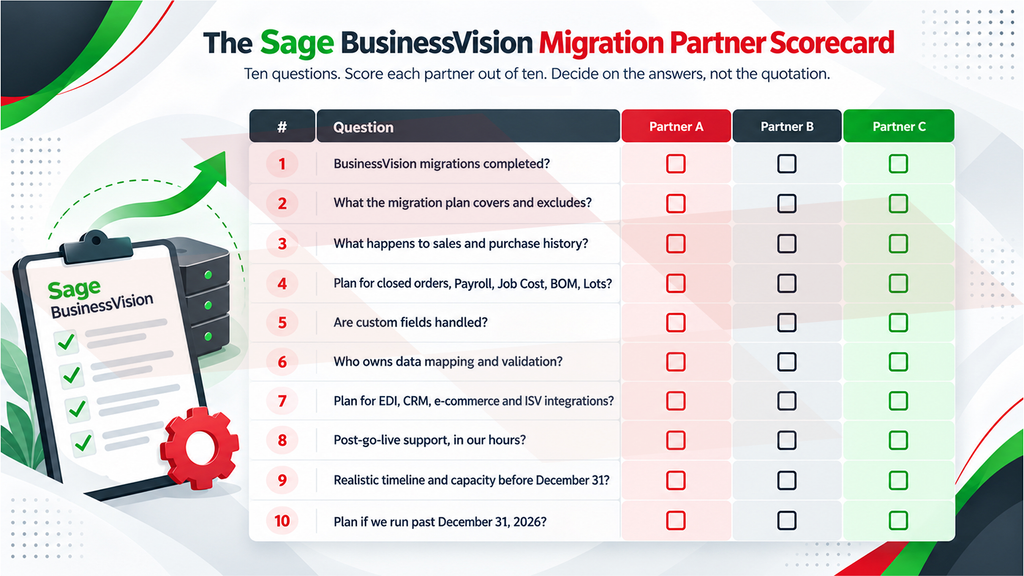
10 questions to ask a Sage BusinessVision Migration Partner
1. How many Sage BusinessVision migrations have you completed, not just Sage 300 implementations?
These are different skills. Implementing Sage 300 is configuration work. Converting BusinessVision is data work. It means understanding how the legacy database stores masters and transactions and mapping them into a modern structure. A specialist will answer with BusinessVision project numbers without being pushed twice.
2. What exactly does your migration plan cover, and what falls outside it?
A credible partner explains what moves and what does not, in plain language, before quoting. Greytrix shares a structured plan specifically designed for your business requirements and challenges.
A standard migration plan should cover:
- General Ledger masters plus two years of history
- Bank masters and open bank balances
- A/P vendors and open payables
- A/R customers and open receivables
- Open purchase orders with backorder quantities
- Open sales orders with backorder quantities
- Inventory Control masters and on-hand quantities
Everything else—sales and purchase history, closed orders, bank reconciliation, custom fields, and modules such as Payroll, Job Cost, BOM, and Lots—falls outside the standard plan. These items can be handled as additional work, priced upfront.
Greytrix confirms both sides of that boundary before you sign, so the scope you approve is the scope you receive.
3. What happens to my sales and purchase history?
Standard conversions carry forward open balances and a limited window of transaction history, not decades of detail. Sage has also said BusinessVision transaction and history data isn’t available for export to Excel. A partner who promises complete history without qualification has either not scoped the project or is planning to bill it later as extra work.
Ask how many years are in scope, what additional years would cost, and how you will reach older records once BusinessVision is retired. Most businesses keep a read-only archive for that lookback.
4. What is your plan for closed orders, Payroll, Job Cost, BOM and lot tracking?
These sit outside most standard conversion scopes. That is acceptable. What is not acceptable is silence. The right answer describes options like archive, read-only legacy access, targeted extract, or a scoped add-on, and attaches a cost to each. Payroll matters most here. It gets no compliance updates after December 31, 2026, so you need a new system before your first 2027 pay run.
5. Do you handle custom fields?
After fifteen or twenty years, almost no BusinessVision installation is standard. Custom fields at master or transaction level are excluded from standard migrations across the market.
Greytrix has an in-house development team, so the same partner handling the conversion manages custom fields, bespoke reports, and tailored screens rather than passing them to a third vendor.
6. Who owns data mapping and validation — you or my team?
Every conversion requires someone to verify the result. Opening balances must agree with the closing figures in Sage BusinessVision, the chart of accounts must be mapped correctly, and customer, vendor and inventory records must be checked for completeness. This work is substantial, and it is frequently assumed rather than assigned. Where it falls to your controller during a month-end, the project carries a cost the quotation never disclosed.
Ask each partner to set out the division of responsibilities: who prepares the mapping, who reviews and signs off on it, and how many days of your team’s time the plan assumes.
7. What happens to my integrations — EDI, CRM, e-commerce, ISV add-ons?
Sage states directly that Sage 300 does not support every existing integration, and advises customers using ISV solutions to review compatibility with Sage or their partner. This is usually what derails timelines because it is discovered late. A capable partner inventories your integrations during assessment, not during testing.
Greytrix builds and supports integrations itself, including the GUMU integration suite connecting Sage 300 with leading CRM platforms, so connected systems are part of the migration plan rather than a separate project.
8. Will you support us after go-live, and in our working hours?
Cutover is not the finish line. The first month-end and the first year-end on a new system are where questions surface. Sage’s own guidance directs customers with technical issues after the retirement date to a certified partner or third-party provider, which makes your partner your only line of support. Confirm what post-go-live support includes, how long it lasts, and which time zone it operates in.
9. What is your realistic timeline, and do you have capacity before December 31?
Migrations typically run four to nine months. With roughly 100 days remaining, an honest partner will tell you what can genuinely be completed, what may need to be phased, and how many implementation slots are actually left.
10. What is your plan if we run past December 31, 2026?
Sage confirms that BusinessVision continues to run after the retirement date, without updates or support. A partner who has done this work before will have a bridge plan: stabilize the environment, secure clean backups, understand the year-end position, and continue the conversion into 2027 in a controlled way.
Why Businesses Choose Greytrix for BusinessVision Migration
Greytrix is an ERP and CRM technology services provider with more than 25 years of experience and over 1,000 migrations delivered. These are the questions clients ask most often, and Greytrix answers each one in detail before work begins.
- A conversion scope confirmed before the quote – Greytrix sets out what converts and what does not before a client commits, so the scope is settled before work begins rather than renegotiated during it.
- Migration, integration and development under one roof – Custom fields, bespoke reports and connected systems, including GUMU integrations between Sage 300 and leading CRM platforms, are handled by the same team running the conversion.
- Disciplined scoping behind every quotation – Before pricing, Greytrix asks for the Sage BusinessVision version and edition, the target Sage 300 version and edition, the number of companies to be converted, the years of history required, and a tentative schedule. Specific inputs produce accurate numbers.
- Delivery capacity when the deadline is near – With more than 25 years in the Sage ecosystem and delivery teams across several regions, Greytrix can run parallel workstreams. On this timeline, that difference is between finishing before December 31, 2026, and finishing eventually.
For a business still running on Sage BusinessVision, these strengths have a practical effect. Balances, customers, vendors and inventory transfer intact, integrations and custom requirements are handled by the same team rather than a second vendor, and the transition is planned to complete well ahead of December 31, 2026. Finance continues to report without interruption through the changeover, and the business moves onto a supported platform with current compliance, modern reporting and room to grow.
In summary
The retirement date is fixed, and the product choice is reasonably well understood. The partner decision is the one variable still fully in your control, and the one with the widest range of outcomes.
A partner who answers all ten of these questions clearly and in writing is worth taking further. One who cannot is asking a business to accept considerable risk with roughly 100 days remaining.
Book a free BusinessVision Migration Assessment and Greytrix will answer all ten for your environment, with a documented scope and a realistic timeline.
About Us
Stay ahead of the curve with our latest insights, trends, and expert perspectives that decode technology’s role in shaping modern enterprises. From emerging market shifts to hands-on implementation strategies, Tech Talk brings you practical knowledge designed to help you make smarter, faster, and future-ready business decisions.
From consultation to implementation, migration, and custom development, we help organizations transform complex business processes into connected, data-driven workflows enabling smarter decisions, better collaboration, and sustainable growth.
At Greytrix, we blend human expertise with intelligent technology so your business can move faster, adapt quicker, and stay future-ready.
Ready to modernize your business stack? Talk to our experts today.