
The holiday season is about to start, and retailers are already lining up their promotions. According to Adobe, consumers are expected to spend $275.1 billion online during the 2026 holiday season.
The busiest stretch comes with Thanksgiving, Black Friday, and Cyber Monday, when order volumes surge and every part of your business is tested at once. That pressure doesn’t stop at your storefront. It lands on the systems behind it.
Many retailers run Microsoft Dynamics 365 CRM for sales and service, and Sage ERP for orders, products, and invoices. When the two are not connected, the handoff between them is one of the first things to strain at holiday volumes.
Now picture that same rush with the two systems working as one: orders reaching Sage without re-entry, customer and product records aligned, and sales, service, and finance looking at the same data. That is what a Microsoft Dynamics 365 Sage integration makes possible. This blog covers where the gaps show up, what changes once the systems are connected, and how Greytrix approaches the integration.
A missing Dynamics 365 Sage integration can quietly cut into your holiday revenue. Here’s where it shows up:
1. Orders get entered twice
An order confirmed in Dynamics 365 CRM has to be typed into Sage again. It’s a few extra minutes and another chance for an error. In the holiday rush, those minutes add up to a backlog, and a delayed order means a delayed shipment.
2. Product and warehouse details drift apart
Products and warehouses are maintained in Sage, while your sales team works from what they see in Microsoft Dynamics 365. When the two don’t match, quotes and orders get built on outdated details, and someone has to fix them afterwards.
3. The same customer exists twice
With two systems, one customer can end up with two records: a different spelling, an old address, a missing contact. New customers arrive faster during the season, so the duplicates grow just as quickly.
4. Nobody can see order or invoice status in one place
Without a CRM integration, invoices raised in Sage don’t appear on the customer’s record in D365. So when a customer asks “Where’s my order?”, the answer means asking someone in finance. At holiday volumes, your team spends its day passing information along.
5. Finance and sales numbers don’t match
When orders reach Sage ERP late or with small differences, the two sets of numbers drift apart. After the rush, someone has to reconcile them, and that time could have gone to the next campaign.
6. Peak weeks go to fixing data
Each issue above is small. Together, they pull people away from selling and serving customers to checking, correcting, and following up, in the weeks when their time matters most.
How to Close the Gap Between Microsoft Dynamics 365 and Sage ERP
The fix is a CRM integration that lets the two systems share data automatically, so nobody has to re-type it. Let’s look at what changes for each gap when Microsoft Dynamics 365 and Sage ERP are connected:
| The gap | What changes when D365 and Sage are connected |
| 1. Double entry | Orders and quotes move from D365 to Sage without re-entry |
| 2. Outdated details | Products and warehouses are shared from Sage to D365, so quotes use current details |
| 3. Duplicate customers | Customers and contacts stay in sync both ways, so there’s one record per customer |
| 4. No status visibility | Invoices from Sage show up in D365 against the original order |
| 5. Mismatched numbers | Orders and invoices flow between the systems, so both sides work from the same data |
| 6. Time lost to fixes | With data moving between the systems automatically, your team spends less time re-checking and correcting it |
Connecting the two isn’t just a technical task. It protects the revenue your team works for all year.
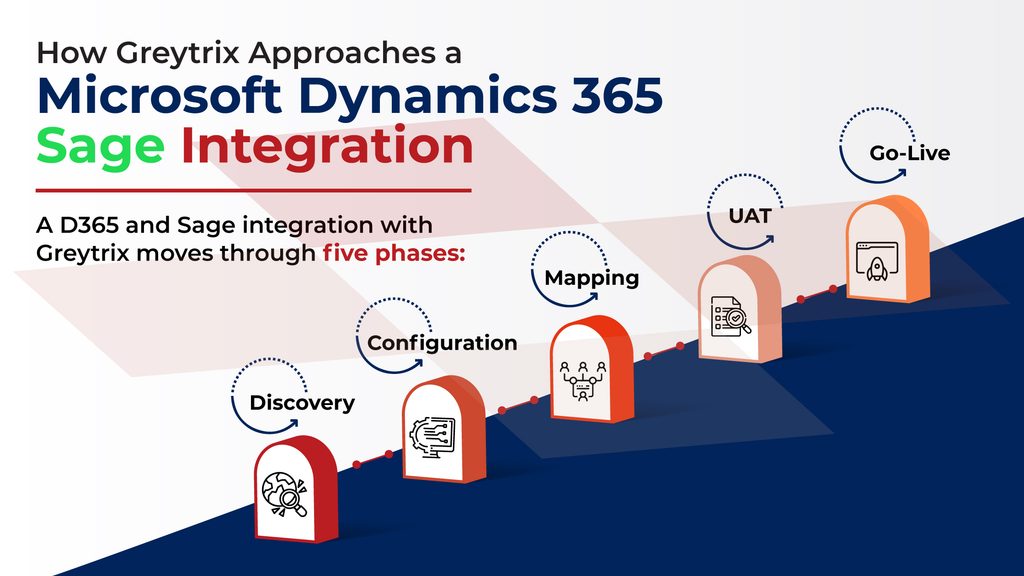
Our Dynamics 365 Sage integration moves through five phases:
- Discovery: We start by understanding your setup and what needs to sync between Dynamics 365 CRM and your Sage ERP. GUMU™ supports Sage 100, Sage X3, Sage 300, and Sage Intacct. For Sage 100, Sage X3, and Sage 300, more than one Sage company can connect to a single Dynamics 365 environment, so your Sage version and company structure are part of this picture.
- Configuration: The connection between Microsoft Dynamics 365 and Sage is set up. The two systems connect through their web services, not through direct database access.
- Mapping: Data fields are defined so they line up between the two systems. The records covered include customers, orders, invoices, products, and warehouses.
- UAT: The integration goes through user acceptance testing before it goes live.
- Go-live: The CRM integration moves into live use, and data syncs between the two systems on a schedule.
Each phase builds on the one before it, so the integration is tested before it handles live orders.
Final Thoughts
The holiday rush does not create the gap between Dynamics 365 and Sage. It shows where the gap already is. A Dynamics 365 Sage integration allows sales, service, and finance to work from the same data, and the value of that connection grows with every increase in order volume. Whichever Sage ERP you run, whether Sage 100, Sage X3, Sage 300, or Sage Intacct, the benefit holds as your business scales.
Our GUMU™ integration connects Microsoft Dynamics 365 CRM with all four. It is designed to operate within the supported boundaries of both platforms, so updates to either system call for validation rather than rebuilding the integration, unless there are major API-level changes.
To discuss a Microsoft Dynamics 365 Sage integration ahead of your next peak season, get in touch with our team.
FAQs
1. What is GUMU™ and how does it connect Dynamics 365 and Sage?
GUMU™ is Greytrix’s own cloud connector, delivered as a plug-and-play SaaS platform. It connects Microsoft Dynamics 365 CRM with your Sage ERP, whether that is Sage 100, Sage X3, Sage 300, or Sage Intacct. It uses pre-defined mappings, so the two systems can start exchanging data without the connection being built from scratch.
2. What do we need to get started?
GUMU™ is a native cloud SaaS connector platform, so a Microsoft Dynamics 365 Sage integration doesn’t need an on-premise server. It only needs the web-based API connection details of the two systems, which is the web services connection described in the Configuration step above.
3. How does GUMU™ keep our data secure?
It synchronizes data between Dynamics 365 CRM and Sage ERP without storing it. Transfers can be scheduled for a time you choose, and the connector is designed to avoid duplicate entries.
4. Can we choose when data syncs between the two systems?
Yes. Data synchronization can be triggered on demand or scheduled to run at a set time, so your team decides when data moves between Microsoft Dynamics 365 and Sage.
5. How is GUMU™ priced?
GUMU™ is sold under a licensing model, with a base price that differs on a per-user basis. Our team can walk you through the pricing for your Dynamics 365 Sage integration.
About Us
Stay ahead of the curve with our latest insights, trends, and expert perspectives that decode technology’s role in shaping modern enterprises. From emerging market shifts to hands-on implementation strategies, Tech Talk brings you practical knowledge designed to help you make smarter, faster, and future-ready business decisions.
From consultation to implementation, migration, and custom development, we help organizations transform complex business processes into connected, data-driven workflows enabling smarter decisions, better collaboration, and sustainable growth.
At Greytrix, we blend human expertise with intelligent technology so your business can move faster, adapt quicker, and stay future-ready.
Ready to modernize your business stack? Talk to our experts today.