
What if every team in your business — sales, finance, operations, support — was always working from the same up-to-date information?
That’s exactly what Dynamics 365 CRM integration with your ERP makes possible using GUMU™. Your customer data, orders, invoices, and inventory all stay in sync across every department, in real time.
Here’s what changes when Dynamics 365 CRM and your ERP are connected.
10 Key Benefits of Dynamics 365 CRM Integration with ERP
1. One Source of Truth Across Your Business
When CRM and ERP are integrated, customer data, pricing, order history, and invoices stay consistent across both systems. Every team works from the same information — no duplicate records, no conflicting data.
2. Real-Time Data Visibility for Every Team
Integration with CRM means every department can see what they need, when they need it. Sales can check order status, support can view billing history, and marketing can track customer activity — all without switching systems or waiting on updates.
3. Faster Order-to-Cash Cycle
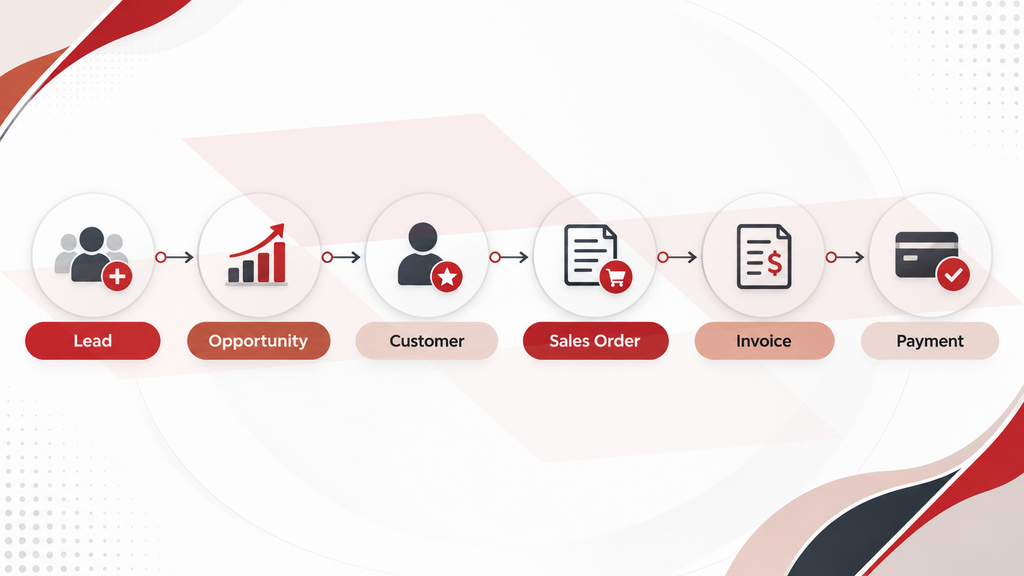
Once a deal is closed in CRM, the order is automatically created in ERP — no manual re-entry, no back and forth. Invoices and payments sync back into CRM, keeping the entire order-to-cash process moving without delays.
4. Elimination of Manual Work and Human Error
Without integration, teams spend time re-entering data, cross-checking records, and fixing avoidable mistakes. When Dynamics CRM integration connects your systems, that information flows automatically — reducing errors and freeing your teams to focus on work that actually moves the business forward.
5. Smarter Forecasting and Data-Driven Decision-Making
With CRM pipeline data and ERP financials in one connected view, forecasts are based on what’s actually happening in the business — not assumptions. Leaders can plan with more confidence and act on insights faster.
6. Better Customer Experience
When every team has access to the same customer information — order history, billing status, past interactions — they can respond faster and more accurately. Customers get consistent service regardless of which team they’re speaking to.
7. Unlocking Upsell and Cross-Sell Opportunities
With ERP transaction history visible inside CRM, sales teams can spot patterns in what customers buy, identify gaps, and reach out at the right time with the right offer. Expansion opportunities that would otherwise go unnoticed become much easier to act on.
8. Stronger Cross-Department Collaboration
When sales, finance, operations, and support are all working from the same data, collaboration happens naturally. There’s less time spent chasing information across departments and more time spent on decisions that matter.
9. Cost Efficiency and Higher Productivity
Integrated systems mean fewer manual processes, fewer errors, and less time spent on reconciliation. Teams operate more efficiently, resources are better allocated, and the overall cost of running day-to-day operations comes down.
10. Scalability That Grows with Your Business
As your business grows, the volume of data and the complexity of operations grow with it. An integrated CRM and ERP setup scales with you — new teams, new processes, and new demands are handled without adding unnecessary complexity or manual effort.
The Real Challenges of Microsoft Dynamics CRM Integration
- Data Mapping Complexity
CRM and ERP systems store data differently — different fields, different formats, different naming conventions. Without proper mapping in place, data moving between the two systems can land in the wrong place, create duplicate records, or simply fail to sync altogether.
- ERP Connector Compatibility
Not every integration tool is built to work with every ERP. Businesses often find that the connector they’ve chosen doesn’t fully support their ERP version, leading to data gaps and ongoing maintenance issues that quietly slow operations down.
- Real-Time Data Sync
A delay in data sync, even by a few hours, can mean sales is quoting from outdated inventory, finance is working from yesterday’s numbers, and support is answering customers without the full picture. Real-time sync isn’t just a nice-to-have; it’s what makes the integration actually useful.
- Data Security and Access Control
When two systems share data, controlling who can see and edit what becomes more complex. Without the right governance in place, sensitive customer and financial information can be accessed by the wrong people — creating compliance and security risks.
- Choosing the Right Integration Partner
Microsoft Dynamics CRM integration services aren’t a plug-and-play process. It requires deep knowledge of both systems, a clear implementation plan, and ongoing support. A right partner, like Greytrix, ensures your integration is done correctly, on time, and built to scale with your business.
How Does Dynamics 365 CRM Integration with ERP Work?
Dynamics 365 CRM and ERP each play a distinct role in your business. CRM manages the customer-facing side — leads, opportunities, accounts, and sales activities. ERP handles the operational side — orders, invoices, inventory, payments, and financials.
When the two are integrated, information moves between them automatically. A deal that progresses in CRM triggers the right actions in ERP — and updates from ERP flow back into CRM — without anyone having to step in between.
What Data Can Be Synced Between Dynamics 365 CRM and ERP?
The data that moves between Dynamics 365 CRM and your ERP depends on your business requirements, the ERP system in use, and how the integration is configured. Here is a look at the key data objects that typically sync between the two systems and the direction they flow:
- Customers and Accounts — bi-directional
- Contacts — bi-directional
- Products and Pricing — ERP to CRM
- Inventory Availability — ERP to CRM
- Warehouses and Sites — ERP to CRM
- Sales Persons — ERP to CRM
- Sales Quotes — CRM to ERP
- Sales Orders — bi-directional
- Sales Invoices — ERP to CRM
- Payment and Accounts Receivable Information — ERP to CRM
The direction of synchronization — whether data flows one way or both ways — depends on where that data is owned and how your business processes are structured.
How Greytrix Solves It with GUMU™
Integrating Dynamics 365 CRM with an ERP system comes with its own set of complexities — and that’s exactly where Greytrix steps in.
GUMU™ is a native cloud integration framework built specifically to connect Dynamics 365 CRM with your ERP. It keeps your customer data, orders, invoices, and inventory in sync across both systems in real time — so every team always has the full picture, decisions are faster, and operations run without interruption.
If you are ready to explore what GUMU™ can do for your business, get in touch with our experts.
How GUMU™ Dynamics CRM Integration Works
GUMU™ follows an API and web service-led integration architecture to connect Dynamics 365 CRM with your ERP system. Rather than connecting directly to the database, GUMU™ operates through secure, governed API layers — ensuring data exchange is structured, maintainable, and reliable.
When an update is made in one system, GUMU™ picks it up through the API, applies the configured mapping rules, and pushes it to the other system — keeping both in sync without manual intervention.
GUMU™ also supports multi-company setups — meaning multiple ERP companies can be connected to a single Dynamics 365 CRM instance. And when your ERP or Dynamics 365 releases a version update, the integration does not need to be rebuilt — only validated against the updated platform.
ERP Systems Supported by GUMU™
GUMU™ supports integration with multiple ERP systems, giving businesses the flexibility to connect Dynamics 365 CRM with the ERP they already use.
| Data Object | Sage 300 | Sage X3 | Sage Intacct | Sage 100 | Acumatica |
| Customers | Bi-directional | Bi-directional | Bi-directional | Bi-directional | Bi-directional |
| Contacts | Bi-directional | Bi-directional | Bi-directional | Bi-directional | Bi-directional |
| Products | ERP → CRM | ERP → CRM | ERP → CRM | ERP → CRM | ERP → CRM |
| Warehouses/Sites | ERP → CRM | ERP → CRM | ERP → CRM | ERP → CRM | ERP → CRM |
| Sales Persons | ERP → CRM | ERP → CRM | ERP → CRM | ERP → CRM | ERP → CRM |
| Sales Quotes | CRM → ERP | CRM → ERP | CRM → ERP | CRM → ERP | CRM → ERP |
| Sales Orders | Bi-directional | Bi-directional | Bi-directional | Bi-directional | Bi-directional |
| Sales Invoices | ERP → CRM | ERP → CRM | ERP → CRM | ERP → CRM | ERP → CRM |
Industry Use Cases — GUMU™ Dynamics 365 CRM and ERP Integration
Manufacturing
Sales teams get real-time inventory and production visibility directly inside Dynamics 365 CRM — so quotes are accurate and delivery timelines are realistic. This helps them prepare more accurate quotes, set realistic delivery expectations, and respond to customer questions without constantly checking with production or operations teams.
Distribution
When an order is confirmed in CRM, the information can flow directly into the ERP system for fulfillment. This reduces duplicate data entry and gives sales, warehouse, and operations teams access to the same order information — helping keep everything on track from order placement through delivery.
Healthcare & Life Sciences
Customer records, product data, and order history stay consistent and compliant across both systems — giving sales and support teams the right information at the right time. Whether they’re checking product availability, reviewing an order, or responding to a customer query, teams have the latest information without having to switch between CRM and ERP systems.
Retail & Consumer
Sales and support teams get a complete view of the customer — purchase history, pending orders, and payment status — all in one place. This makes it easier to answer questions, follow up on orders, and provide more consistent customer service.
Technology & Services
Once a deal is closed in CRM, key information can move into the ERP system for billing and invoicing. Finance teams get the details they need without repeatedly following up with sales, while the handoff from sales to finance becomes simpler and easier to track.
If you are ready to explore what GUMU™ can do for your business, get in touch with our experts.
FAQs
1. How long does it take to integrate Dynamics 365 CRM with an ERP?
The timeline for Microsoft Dynamics CRM integration services depends on the complexity of your business processes, the ERP system you are using, and the volume of data involved. Greytrix works with you to assess your setup and define a clear implementation plan from the start.
2. Do we need to replace our existing ERP to integrate it with Dynamics 365 CRM?
No. GUMU™ is designed to support Dynamics 365 CRM integration with your existing ERP system — whether it is Sage 100, Sage 300, Sage X3, Sage Intacct, Acumatica, or another ERP. There is no need to replace or overhaul your current setup.
3. Will the integration affect our existing data?
No. GUMU™ is built to protect your existing data during integration with CRM. It follows defined data mapping and ownership rules, ensuring data moves accurately between systems without disrupting what is already in place.
4. Can Dynamics CRM integration be customized to fit our specific business processes?
Yes. Every business operates differently. GUMU™ offers flexible CRM integration that can be configured to match your specific workflows, data fields, and business rules — rather than forcing your processes to fit a standard template.
5. What is the cost of Microsoft Dynamics CRM Integration with an ERP using GUMU™?
The cost depends on your specific business requirements, the ERP system you are using, and the scope of the integration. To get a tailored quote, connect with us and our team will get back to you
About Us
Stay ahead of the curve with our latest insights, trends, and expert perspectives that decode technology’s role in shaping modern enterprises. From emerging market shifts to hands-on implementation strategies, Tech Talk brings you practical knowledge designed to help you make smarter, faster, and future-ready business decisions.
From consultation to implementation, migration, and custom development, we help organizations transform complex business processes into connected, data-driven workflows enabling smarter decisions, better collaboration, and sustainable growth.
At Greytrix, we blend human expertise with intelligent technology so your business can move faster, adapt quicker, and stay future-ready.
Ready to modernize your business stack? Talk to our experts today.