
GUMU™ for Sage CRM – Sage 100 application is a real-time bi-directional link where we synchronize all the customers and vendors data from Sage 100 to Sage CRM and vice versa. Using this integration, users can access critical ERP data — such as sales invoices, orders, and item sales history directly within the Sage CRM.
With our custom GUMU enhancements, we continuously strive to help our clients streamline their sales processes, improve accuracy, and increase efficiency in their day-to-day operations. In today’s blog, we are pleased to introduce one of our latest QLE enhancements — the Line# Column, designed and implemented for a client to provide better control over line item sequencing in Quotes and Orders within Sage CRM integrated with Sage 100.
Recently, one of our clients required greater flexibility in managing the order of line items while creating or revising Quotes and Orders. Their sales team frequently needed to insert products between existing lines, maintain a structured layout for customer-facing documents, and ensure that primary products, accessories, and services appeared in a specific sequence.
To address this requirement, we introduced the Line# column in the Quick Line Entry (QLE) screen. This enhancement allows users to define the exact position of an item before adding it to the document. With this functionality, users can easily insert items at the required position without deleting or manually rearranging existing lines.
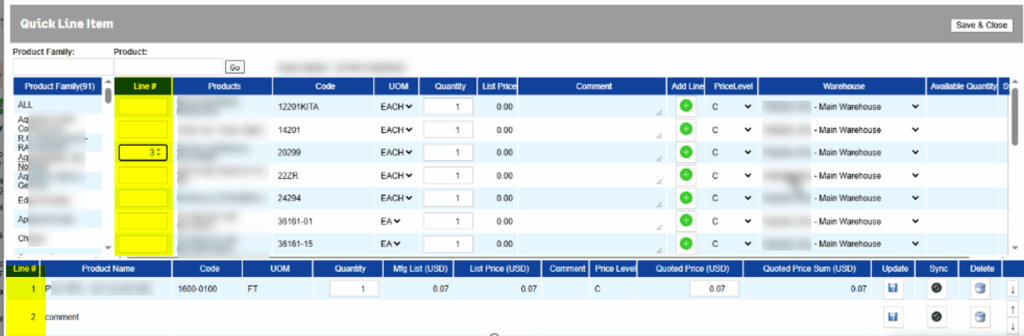
The Line# column in the QLE screen allows users to control exactly where a new item should appear while creating a Quote or Order in GUMU integrated with Sage CRM and Sage 100. If a user enters a specific line number and that position already exists, the new item is inserted at that line and the existing items automatically shift down. If the entered line number does not exist, the item is added at the end of the list. If no line number is entered, the system follows the standard GUMU™ behavior. This ensures flexibility while maintaining the existing workflow.
This enhancement gives users structured control over document sequencing without disrupting the existing workflow. It simplifies revisions, improves presentation consistency, and enhances overall efficiency during quote and order creation.
If your organization is exploring similar enhancements or looking to further tailor your Sage CRM – Sage 100 integration to align with specific business processes, feel free to contact us. Our team would be glad to understand your requirements and deliver a customized solution that supports your operational goals.
About Us
Greytrix – a globally recognized and one of the oldest Sage Development Partners is a one-stop solution provider for Sage ERP and Sage CRM organizational needs. Being acknowledged and rewarded for multi-man years of experience and expertise, we bring complete end-to-end assistance for your technical consultations, product customizations, data migration, system integrations, third-party add-on development, and implementation competence.
Greytrix has some unique integration solutions developed for Sage CRM with Sage ERPs namely Sage X3, Sage Intacct, Sage 100, Sage 500, and Sage 300. We also offer best-in-class Sage ERP and Sage CRM customization and development services to Business Partners, End Users, and Sage PSG worldwide. Greytrix helps in the migration of Sage CRM from Salesforce | ACT! | SalesLogix | Goldmine | Sugar CRM | Maximizer. Our Sage CRM Product Suite includes add-ons like Greytrix Business Manager, Sage CRM Project Manager, Sage CRM Resource Planner, Sage CRM Contract Manager, Sage CRM Event Manager, Sage CRM Budget Planner, Gmail Integration, Sage CRM Mobile Service Signature, Sage CRM CTI Framework.
Greytrix is a recognized Sage Champion Partner for GUMU™ Sage X3 – Sage CRM integration listed on Sage Marketplace and Sage CRM – Sage Intacct integration listed on Sage Intacct Marketplace. The GUMU™ Cloud framework by Greytrix forms the backbone of cloud integrations that are managed in real-time for the processing and execution of application programs at the click of a button.
For more information on our integration solutions, please contact us at sage@greytrix.com. We will be glad to assist you.