
With our continuous efforts to enhance GUMU™ functionality, we remain committed to helping our clients improve usability, streamline operations, and bring greater clarity to their sales processes. In today’s blog, we are excited to introduce a new QLE enhancement — the Comment Field Column, designed to allow users to add item-specific notes directly within the Quick Line Entry (QLE) screen.
Recently, one of our clients identified the need to capture additional information for individual line items while creating Quotes and Orders. There was a frequent requirement to include contextual details such as special instructions, product-specific notes, or internal references for each item, ensuring all relevant information is captured and easily available within the system.
To support this requirement, we introduced a Comment Field Column in the header section of the QLE screen. This enhancement allows users to seamlessly enter comments for individual items directly within the header section of the QLE. By simply clicking on the Add button, the entered comments associated with their respective line item are displayed in the bottom section of the QLE, ensuring all relevant information is captured and clearly presented.
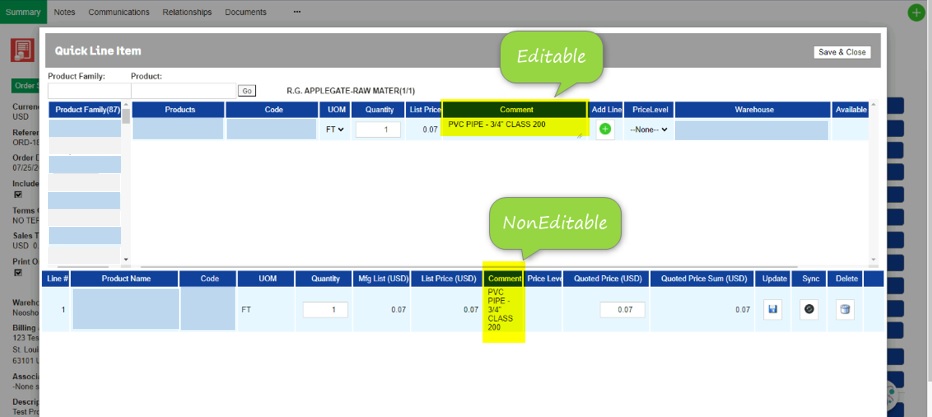
The added comments displayed in the bottom section of the QLE screen are set as read-only, providing clear visibility while preventing any accidental modifications. This ensures that the integrity of the information is maintained, while still allowing users to easily review item-specific notes.
This enhancement enhances data clarity, and ensures that important item-level details are not missed during the sales process. By providing a structured way to capture and display comments, it helps teams maintain consistency, reduce errors, and improve overall efficiency while working with Quotes and Orders.