
Access Sage 300 Item History Directly from Sage CRM
Businesses using Sage CRM and Sage 300 often manage important customer and transaction information across both systems. Sage CRM provides a central platform for managing customer relationships, opportunities, cases, and sales activities, while Sage 300 manages essential ERP information such as invoices, items, quantities, and sales transactions.
To address this challenge, we developed a customized Sage CRM Item History Kendo Grid that brings relevant transaction information from Sage 300 directly into Sage CRM.
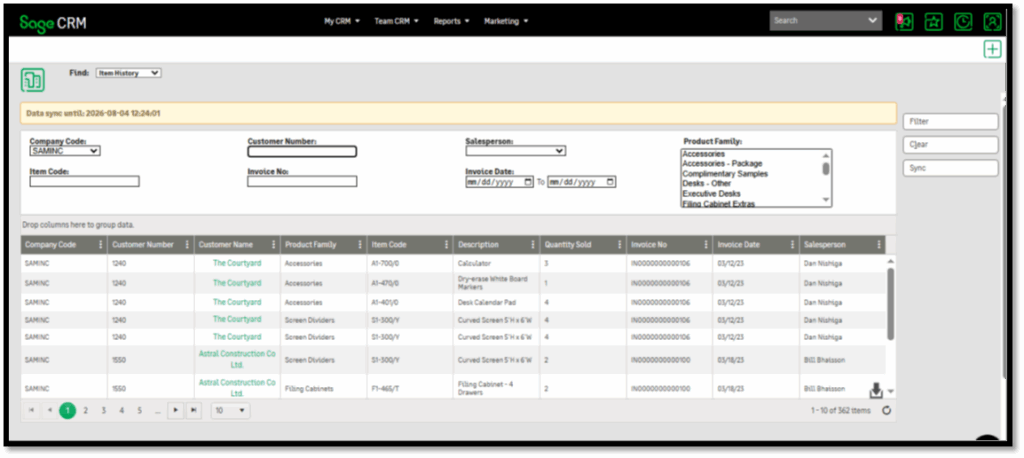
The solution allows users to view and analyze item history at both the Find level and Company level, providing a more connected and efficient way to access customer transaction information.
The Business Challenge
Customer purchasing history is valuable information for sales and customer service teams. However, when this information resides in a separate ERP system, users may need to leave Sage CRM and search through Sage 300 to find the required details.
This can become particularly challenging when users need to:
- Find a specific invoice.
- Search for a particular item or product.
- Review historical transactions.
- Check quantities associated with an item.
- Analyze a customer’s purchasing history.
- Search transactions across a specific period.
Manually switching between Sage CRM and Sage 300 can add unnecessary steps to everyday workflows. The goal was to make this information available within Sage CRM, without requiring users to navigate away from the CRM.
Our Solution: Sage CRM Item History Kendo Grid
We customized Sage CRM with an interactive Kendo Grid that displays relevant Item History information from Sage 300. The grid provides users with a structured and easy-to-use interface for searching and analyzing transaction data. Instead of accessing Sage 300 separately, users can review relevant item and transaction information directly within their Sage CRM workflow.
The Item History functionality is available in two key areas:
- Find Level
- Company Level
Item History at the Find Level
At the Find level, users can search Item History across customers and transactions, including:
- Invoice details
- Item codes
- Product descriptions
- Customer transactions
- Date-range history
The Kendo Grid supports filtering, sorting, and pagination, making large datasets easier to search and analyze.
Item History at the Company Level
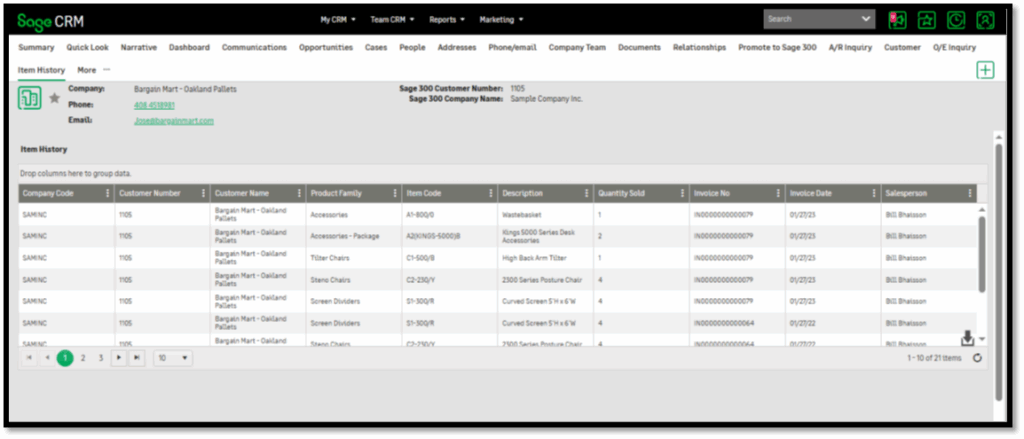
The Item History Grid is also available within the Company level in Sage CRM. Users can view a customer’s purchasing and transaction history directly from the company record without opening Sage 300.
This is useful for:
- Reviewing previous purchases
- Preparing for customer meetings
- Responding to transaction questions
- Identifying purchasing patterns.
The customization helps bridge the gap between CRM and ERP data by making relevant Sage 300 transaction information available within Sage CRM. Rather than treating customer relationship information and transaction history as separate datasets, users can access both as part of a more unified workflow. This can help sales, customer service, and management teams work with a more complete view of customer activity.
The Sage CRM Item History Kendo Grid integrated with Sage 300 provides users with convenient access to item and transaction history directly within Sage CRM. With functionality available at both the Find and Company levels, users can quickly search, filter, sort, and review relevant transaction information.
By reducing application switching and bringing valuable Sage 300 data into Sage CRM, this customization helps improve productivity, enhance customer service, and provide sales teams with a more complete view of customer purchasing activity.
The result is a more connected Sage CRM experience where customer relationships and transaction history come together in one place.
About Us
Greytrix – a globally recognized and one of the oldest Sage Development Partners is a one-stop solution provider for Sage ERP and Sage CRM organizational needs. Being acknowledged and rewarded for multi-man years of experience and expertise, we bring complete end-to-end assistance for your technical consultations, product customizations, data migration, system integrations, third-party add-on development, and implementation competence.
Greytrix has some unique integration solutions developed for Sage CRM with Sage ERPs namely Sage X3, Sage Intacct, Sage 100, Sage 500, and Sage 300. We also offer best-in-class Sage ERP and Sage CRM customization and development services to Business Partners, End Users, and Sage PSG worldwide. Greytrix helps in the migration of Sage CRM from Salesforce | ACT! | SalesLogix | Goldmine | Sugar CRM | Maximizer. Our Sage CRM Product Suite includes add-ons like Greytrix Business Manager, Sage CRM Project Manager, Sage CRM Resource Planner, Sage CRM Contract Manager, Sage CRM Event Manager, Sage CRM Budget Planner, Gmail Integration, Sage CRM Mobile Service Signature, Sage CRM CTI Framework.
Greytrix is a recognized Sage Champion Partner for GUMU™ Sage X3 – Sage CRM integration listed on Sage Marketplace and Sage CRM – Sage Intacct integration listed on Sage Intacct Marketplace. The GUMU™ Cloud framework by Greytrix forms the backbone of cloud integrations that are managed in real-time for the processing and execution of application programs at the click of a button.
For more information on our integration solutions, please contact us at sage@greytrix.com. We will be glad to assist you.