
Acumatica is making changes to its user experience. More screens are being updated to the Modern UI. This new interface is cleaner and easier to use. However, some things you could do in the Classic UI are not available in the Modern UI yet.
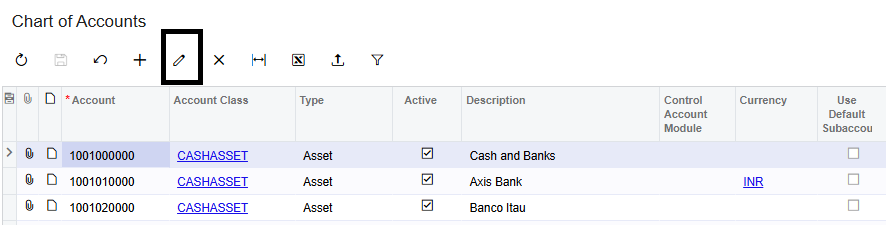
One example is the Chart of Accounts screen. If you are using Acumatica 2025 R2 or later, you will notice that the Edit button is not there when you are in the Modern UI. It is part of the changes that Acumatica is making.
In the past you could edit account details directly in the Classic UI. You would select a record. Click the Edit button. In the Modern UI you can only view, filter and navigate account records. You cannot edit them yet.
Here are some things you can do in the Modern UI:
1. Look at the Chart of Accounts
2. Search and filter records
3. Check account information
4. Navigate through account records
If you need to change an account you have to switch to the Classic UI.
This is because Acumatica is slowly moving screens to the Modern UI. Some screens are converted before all the features are available. The Modern UI documentation says that you can switch between the Modern UI and Classic UI during this time.
Modern UI
The interface is clean and modern
There is no Edit button
It is designed for looking at and navigating records

Classic UI
If you switch to the Classic UI:
- The Edit button is there
- You can change account records like before
- You can do all the maintenance tasks
About the Chart of Accounts ScreenThe Chart of Accounts is an important screen in Acumatica. It sets up the accounting structure used in the system.
How to Edit an Account
If you need to update an account in Acumatica 2025 R2 or later follow these steps:
- Step 1
Open Finance → Configuration → Chart of Accounts.
- Step 2
Find the account you want to change.
- Step 3
Click the Switch Between Grid and Form (or Switch to Classic UI) option.
- Step 4
The screen will reload in the Classic UI.
- Step 5
Select the account. The Edit button will be there.
- Step 6
Click Edit make the changes. Save the record.
- Step 7
After you are done you can switch back to the Modern UI.
When you need to edit an account just switch to the Classic UI make the changes and switch back to the Modern UI if you want. As Acumatica keeps improving the Modern UI more maintenance tasks will be available, in the interface. Until then switching to the Classic UI is the way to edit Chart of Accounts records.