
Every business with equipment, vehicles, laptops, or machinery eventually runs into the same problem: someone has to track what was bought, what it’s worth now, and where it actually is. From my experience working on Acumatica implementations, I’ve noticed that Fixed Assets is one of those modules clients often underestimate until auditors start asking questions.
In simple terms, fixed asset is anything a company buys and expects to use for several years instead of consuming it within a month like computers, vehicles, machinery, furniture, buildings. The accounting for these is different from a regular expense because the cost gets spread out over the asset’s useful life instead of hitting the books all at once. That spreading out is depreciation, and which is essentially what the Fixed Assets module helps manage.
Once a business owns more than a handful of these assets, managing them through spreadsheets can quickly become difficult. I’ve seen finance teams maintain separate sheets for different asset classes, manually compare them with the GL, and then spend days before an audit trying to reconcile numbers that don’t match. Acumatica’s Fixed Assets module exists to fix exactly that – it ties the physical asset record to the financial accounting so the two never drift apart.
Picture a company with a few hundred laptops, vehicles, and pieces of shop equipment. Without a system, the finance team is stuck answering audit questions off memory and Excel: What did we originally pay for this? How much have we depreciated so far? What’s it worth on the books today? Where is it physically sitting? Which GL accounts touch it? Acumatica, all of this information is maintained in a single asset record instead of being scattered across different files and spreadsheets.
How an Asset Moves Through Its Life
An asset in Acumatica generally passes through six stages – acquisition, asset creation, capitalization, depreciation, transfer or adjustment, and eventually disposal.
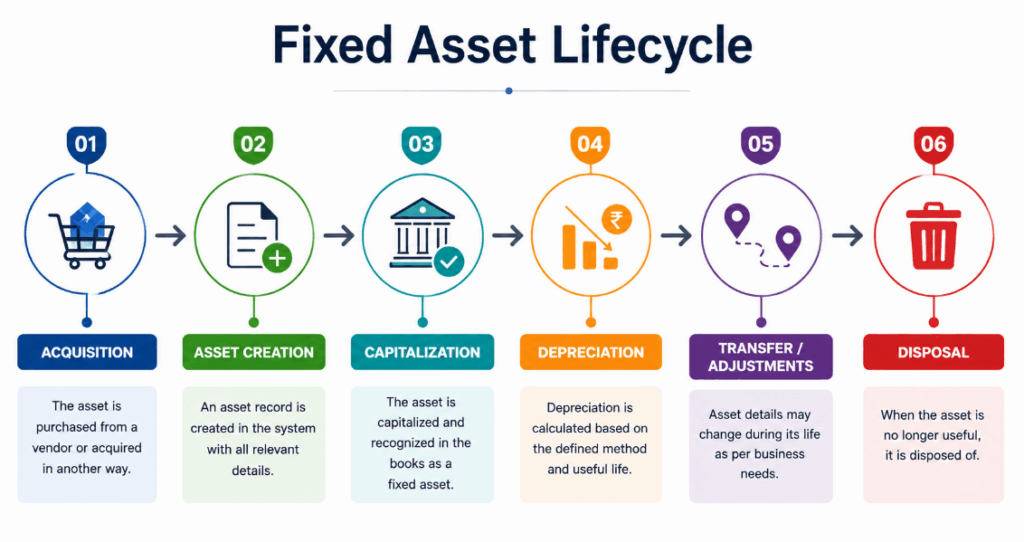
It starts simple – the asset is first acquired and entered into the system. Once it’s capitalized, Acumatica can start calculating depreciation based on however the asset’s useful life and depreciation method are configured. This configuration is more important than it may seem, and I’ll come back to that later.
Assets rarely sit still for their entire life. They get moved between locations, split into multiple assets, or adjusted when circumstances change – and Acumatica needs each of those events recorded so the asset’s history stays accurate. Eventually, when the organization no longer needs it, the asset is disposed of, which closes out the lifecycle.
What You’re Actually Looking at in the Fixed Assets Screen
The Fixed Assets screen is basically the central place for all the information related to an asset. There are a few key tabs worth knowing:
● General – the basic identifying details of the asset.
● GL Accounts – which General Ledger accounts the asset is tied to.
● Balance – the asset’s financial position at a glance.
● Depreciation – depreciation details, including what’s already been processed.
● Transactions – the full transaction history for that asset.
● Reconciliation – what you’d use to reconcile the asset record against the financial records.
Having all of this on one record is the actual value add here. A finance user doesn’t have to jump between multiple spreadsheets or files just to understand the current status of an asset. All the information is available on a single screen.

It Doesn’t Work Alone
Fixed Assets rarely operates in isolation – in most implementations I’ve worked on, it’s connected to Purchasing and Accounts Payable and the General Ledger on one hand. A typical flow looks like
Purchasing → Accounts Payable → Fixed Assets → General Ledger.
Say a company buys equipment from a vendor. That purchase moves through Purchasing and AP as normal. Once it’s identified as a capital asset rather than a straight expense, it gets picked up by Fixed Assets. From there, depreciation and other asset-related postings flow through to the General Ledger automatically.The real benefit of this integration is not just convenience; it’s about keeping the numbers aligned. When purchasing, asset tracking, and accounting are handled as separate manual processes, discrepancies can easily creep in over time. Connecting these processes helps keep the records consistent without the finance team having to manually reconcile everything every month.
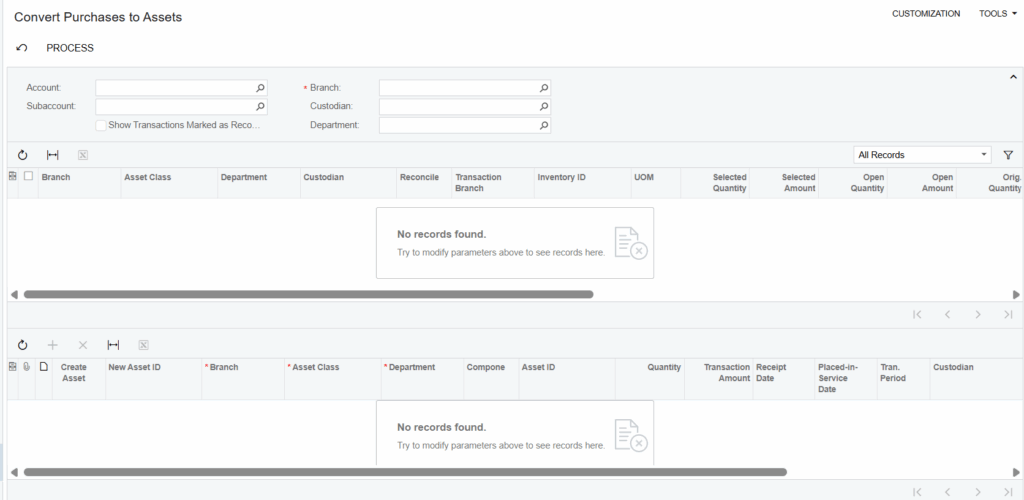
On paper Fixed Assets looks like a simple module, but small configuration choices carry a lot of weight. Get the useful life wrong and the whole depreciation schedule is off. Point an asset class at the wrong GL account and you’ve got postings landing somewhere nobody’s looking for them. I’ve had to unwind both of these on live client data, and it’s never a quick fix once dozens of assets have already been processed against a bad configuration.
Because of that, I always push for testing the configuration before touching the full asset list: configure the asset class, create one test asset, run depreciation on it, check the results, check the accounting, and only then process the rest. It’s a slower start, but it catches configuration issues while there’s still one asset to fix instead of two hundred.
A Quick Example
Say a company buys a piece of computer equipment for ₹120,000, expects a ₹12,000 salvage value at the end, and sets a 36-month useful life.
Depreciable value: ₹120,000 − ₹12,000 = ₹108,000
Depreciation: ₹108,000 ÷ 36 months = ₹3,000 per month
That’s the simplified version, obviously. In an actual Acumatica environment, the schedule depends on the depreciation method configured, the exact acquisition date, how financial periods are set up, and whatever other depreciation settings apply – which is exactly why that configuration deserves a careful review rather than a default click-through.
Where This Leaves You
Fixed Asset Management in Acumatica isn’t just a list of things a company owns, it’s a structured way to follow an asset from the day it’s acquired through capitalization, depreciation, whatever transfers or adjustments happen along the way, and finally disposal.
Keeping asset details, depreciation, transaction history, location, and financial data in one place gives finance teams real visibility instead of a patchwork of spreadsheets they hope agree with each other.
If you’re heading into a Fixed Assets implementation, spend time on asset classes, useful lives, depreciation method, financial periods, and GL account mapping before you process anything in production. Get that foundation right, and Acumatica Fixed Assets becomes a genuinely reliable way to manage an organization’s long-term assets.