
Field teams use their devices a lot, to take and upload site photos directly into Acumatica. We had observed a problem with one of our setups where field users with iPhones could not upload photos on the Daily Field Report screen.
The upload did not work because iPhones usually save images in.HEIC or.HEIF format and this was not allowed in Acumatica’s file upload settings by default.
The Problem
When users tried to upload photos from their iPhones into the Daily Field Report screen Acumatica showed an error. Would not let them upload.
This happened mainly because:
* iPhones save photos in HEIC/HEIF format
* Acumatica only allow image types like JPG or PNG
* The.heic and.heif extensions were not in the allowed upload file types
The Fix
We fixed the issue by changing Acumatica’s file upload settings to allow these file extensions:
*.heic
*.heif
Once we added these formats to the allowed upload types, users could upload photos, from their iPhones without any errors.
Steps to Allow HEIC/HEIF Uploads in Acumatica
To fix this, do the following:
Go to System Management, then Preferences and then File Upload Preferences.
Add.heic to the list.
Add.heif to the list.
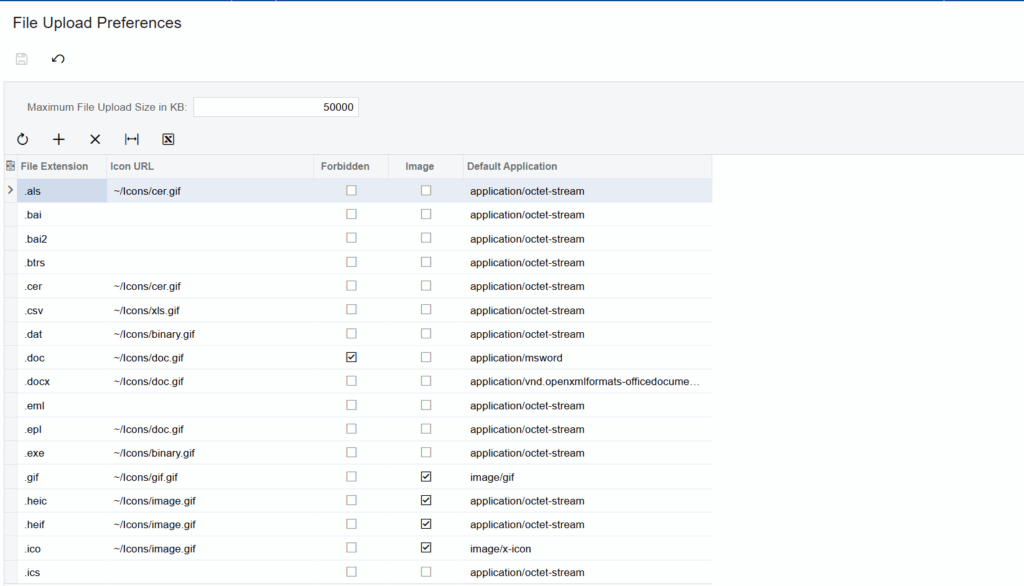
Save the changes.After you update the preferences try uploading from your device.
Another Option for iPhone Users
If you do not want to allow HEIC/HEIF formats in Acumatica, iPhone users can change their camera settings to capture photos in a compatible format like JPEG.
On the iPhone go to:
* Settings → Camera → Formats → Most Compatible
This setting makes sure new photos are stored in JPEG format of HEIC.
Why This Matters
Many field employees use iPhones for site reporting, inspections and documentation. Supporting image formats makes:
* User experience better
* Mobile upload reliable
* Daily report creation more efficiently
* Reduced support tickets from field teams
Final Thoughts
As mobile devices become more popular in construction and project management it’s essential to ensure Acumatica supports the file formats that modern smartphones generate.
A simple update to the file upload settings can save a lot of troubleshooting time and provide an experience for field users.