
The GUMU™ for Sage CRM – Sage 100 Integration is a real-time, bi-directional link that seamlessly connects Sage CRM and Sage 100 where users can view customers, vendors and sales information from either of the systems Sage CRM to Sage 100 and vice versa.
In this blog, we will highlight a recent customization implemented for one of our clients who wanted better visibility into their customers’ ordering behavior. The objective was to track recent sales order history for each company in Sage CRM and provide actionable insights into customer engagement patterns.
The client aimed to:
- Understand how frequently customers place orders
- Analyze current date ordering trends
- Identify customers who may have reduced or stopped ordering
- Proactively take action to re-engage such customers
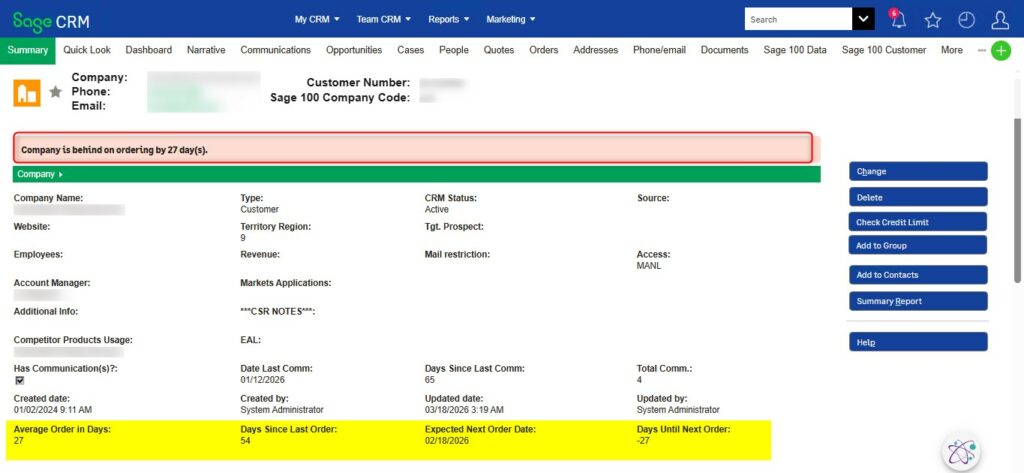
To address this requirement, we introduced four new fields on the Company Summary Screen in Sage CRM:
- Average Order in Days
- Days Since Last Order
- Days Until Next Order
- Expected Next Order Date
These fields are populated using real-time data from Sage 100 and are calculated as follows:
| Field Name | Description / Calculation |
| Last Ordered Date | Captures the most recent sales order date from Sage 100 |
| Average Order in Days | Calculates the average interval (in days) between the last five sales orders. If fewer than five orders exist, available data is used |
| Days Since Last Order | Number of days elapsed since the last order |
| Days Until Next Order | Difference between the current date and the Expected Next Order Date |
| Expected Next Order Date | Calculated as: Last Ordered Date + Average Order in Days |
The above Order data is fetched and calculated for all Sage 100 order types such as Active, Complete, Backorder, and Partially Shipped, while excluding Deleted and Quote-type orders(as requested by client).
To further enhance usability, a warning message has been introduced on the Company Summary screen. This message is triggered when the Days Until Next Order value is less than -1, indicating that the customer is overdue in placing their next order.
The warning message displays as:
“Company is behind on ordering by X days“, where X represents the number of overdue days.
Business Benefits
This customization empowers CRM users with valuable insights into customer sales behavior. It enables them to:
– Quickly identify high-value and inactive customers
– Monitor ordering patterns more effectively
– Take proactive steps to re-engage customers
– Plan targeted sales strategies and follow-ups
By leveraging this enhancement, businesses can strengthen customer relationships and improve overall sales performance through data-driven decision-making.