GUMU™ for Sage CRM – Sage 100 application is a real time bi-directional integration link. One of its exclusive features is that it is a customizable link and we can customize GUMU to suite your company business process.
Managing order line items efficiently is essential for sales teams working with Sage CRM and integrated ERP systems. To simplify navigation and provide greater flexibility, we have enhanced the Line Item functionality for promoted orders.
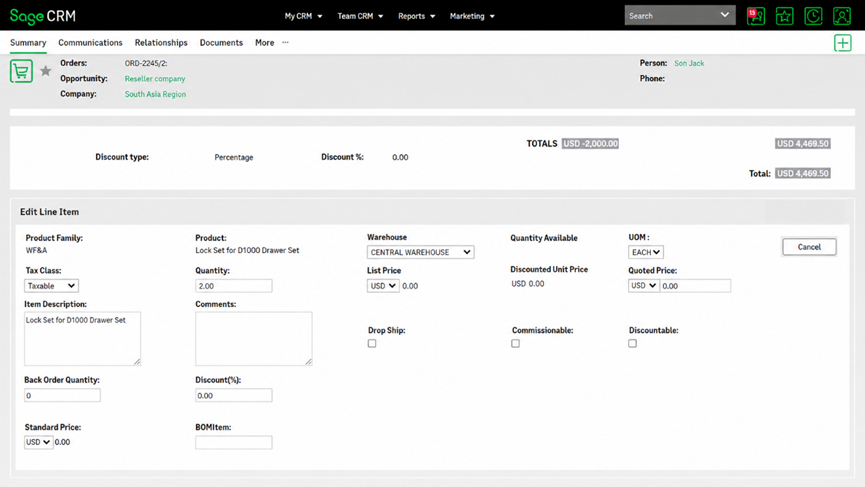
With this enhancement, users can now access the Item Summary screen directly from the Line Item through a hyperlink, with the screen mode determined by whether the Edit Order functionality is enabled or disabled.
Seamless Access to Item Details
A hyperlink has been added to the Line Item, allowing users to quickly open the corresponding Item Summary screen without having to navigate through multiple screens.
When the Edit Order functionality is disabled, clicking the Line Item hyperlink opens the Item Summary screen in view-only mode. This allows users to review item information while preventing unintended changes to the order.
Flexible Editing After Order Promotion
When the Edit Order functionality is enabled, users can click the Line Item hyperlink to open the Item Summary screen in editable mode.
Importantly, this functionality continues to work even after the order has been promoted. Users can therefore access and modify the relevant item details directly from the promoted order, based on their available editing permissions.
Key Benefits
- Quick navigation: Open the Item Summary screen directly from the Line Item.
- Controlled access: View-only mode is enforced when order editing is disabled.
- Enhanced flexibility: Users with Edit Order access can modify item details directly.
- Post-promotion editing: Item details can still be accessed in editable mode after order promotion when editing is enabled.
- Improved user experience: Reduces unnecessary navigation and makes order management more efficient.
Conclusion
This enhancement provides a more intuitive and permission-aware way to manage order line items in Sage CRM. By dynamically opening the Item Summary screen in view-only or editable mode based on the Edit Order functionality, users gain both better control and greater flexibility throughout the order lifecycle.